How to add and use Hindustan Times app from Flickerwall store?
Step by step guide to learn how to add the Hindustan Times app from the Flickerwall store
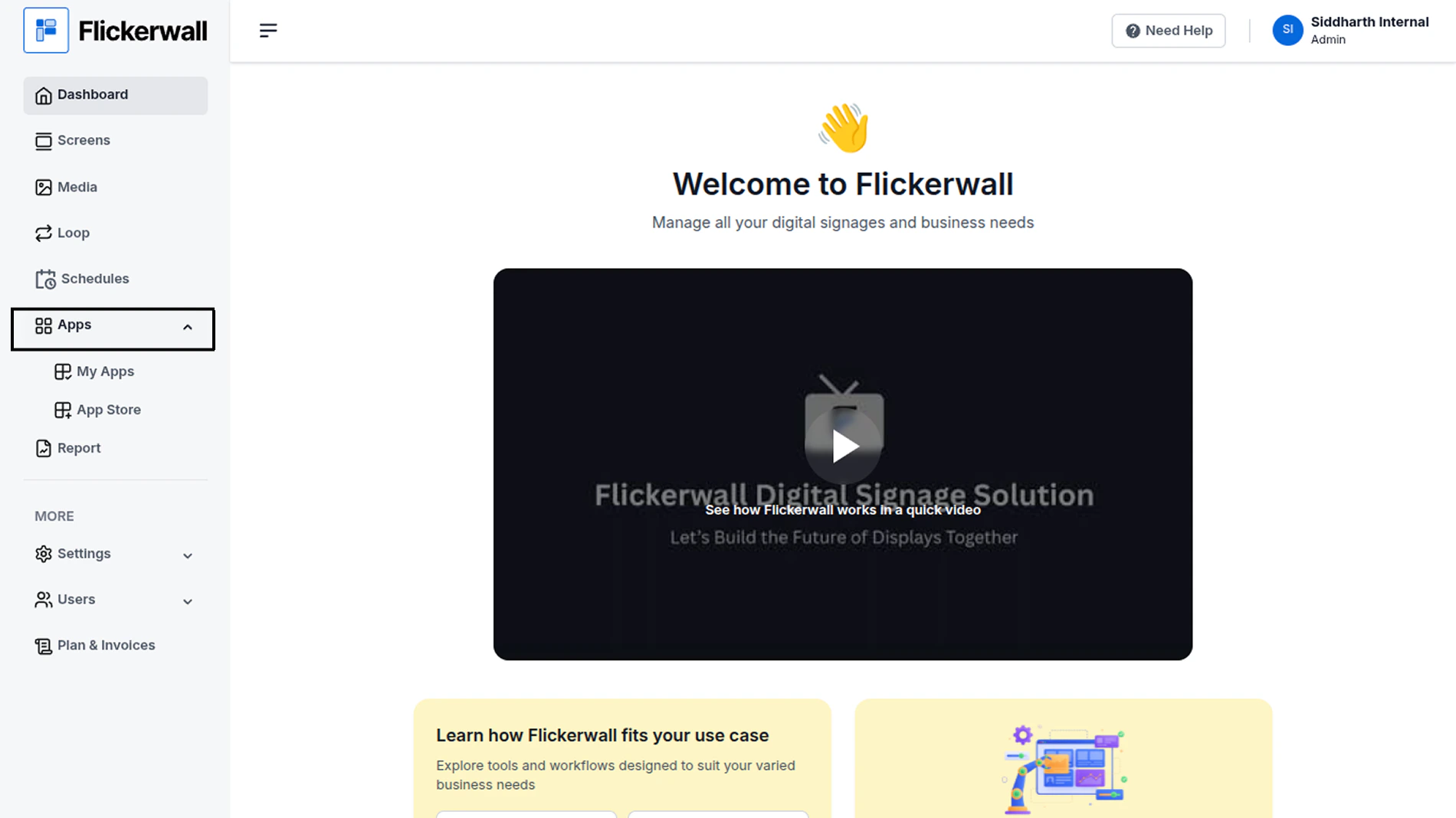
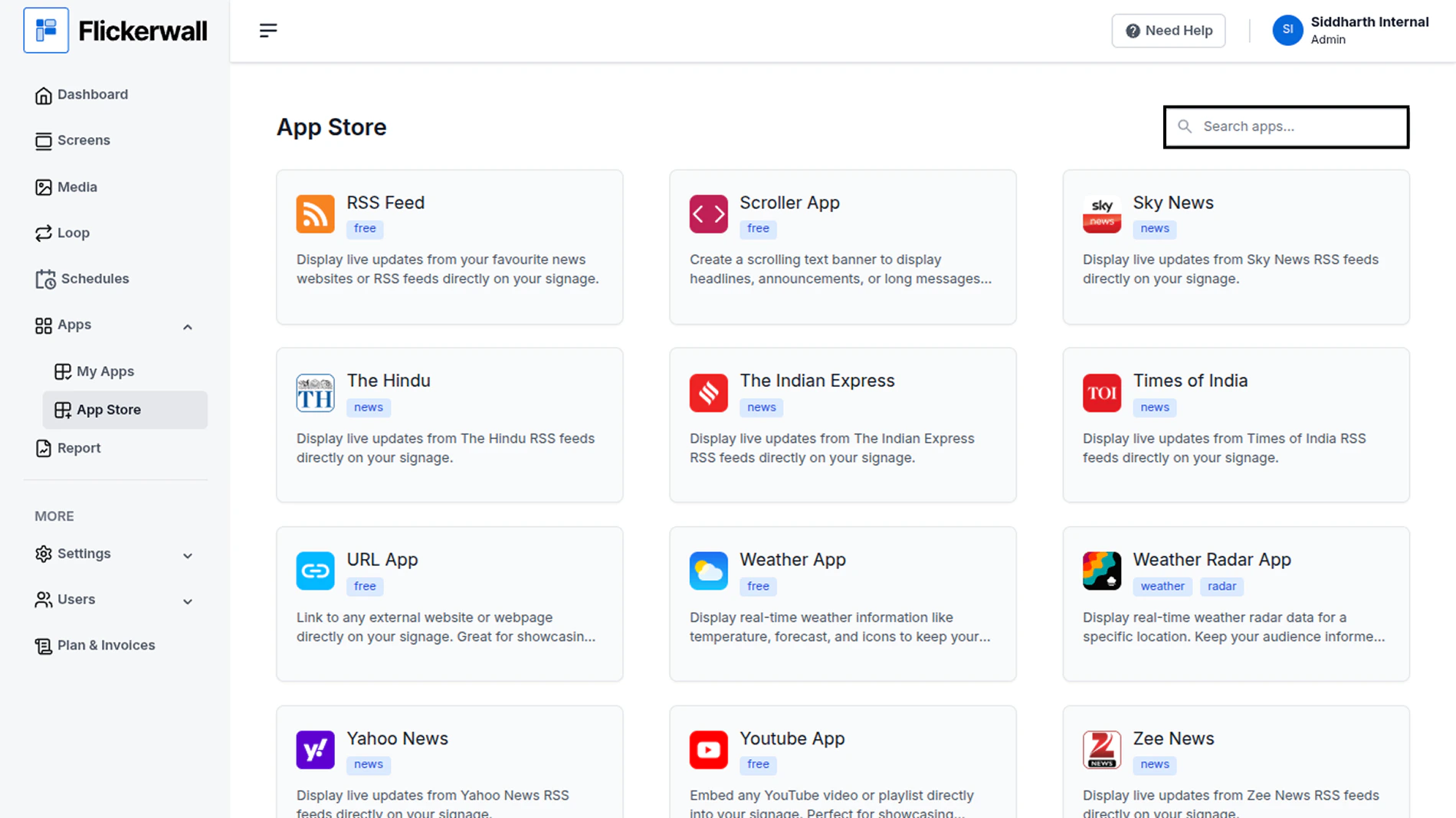
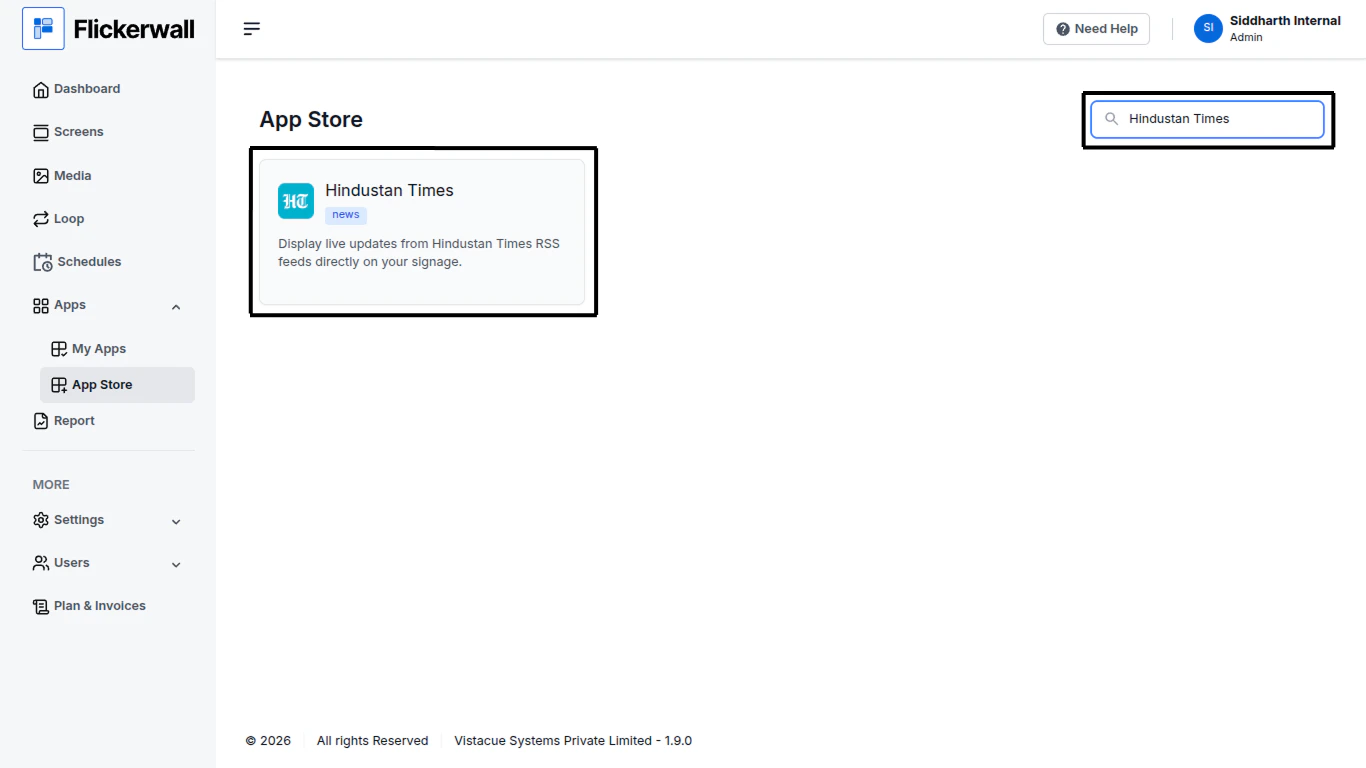
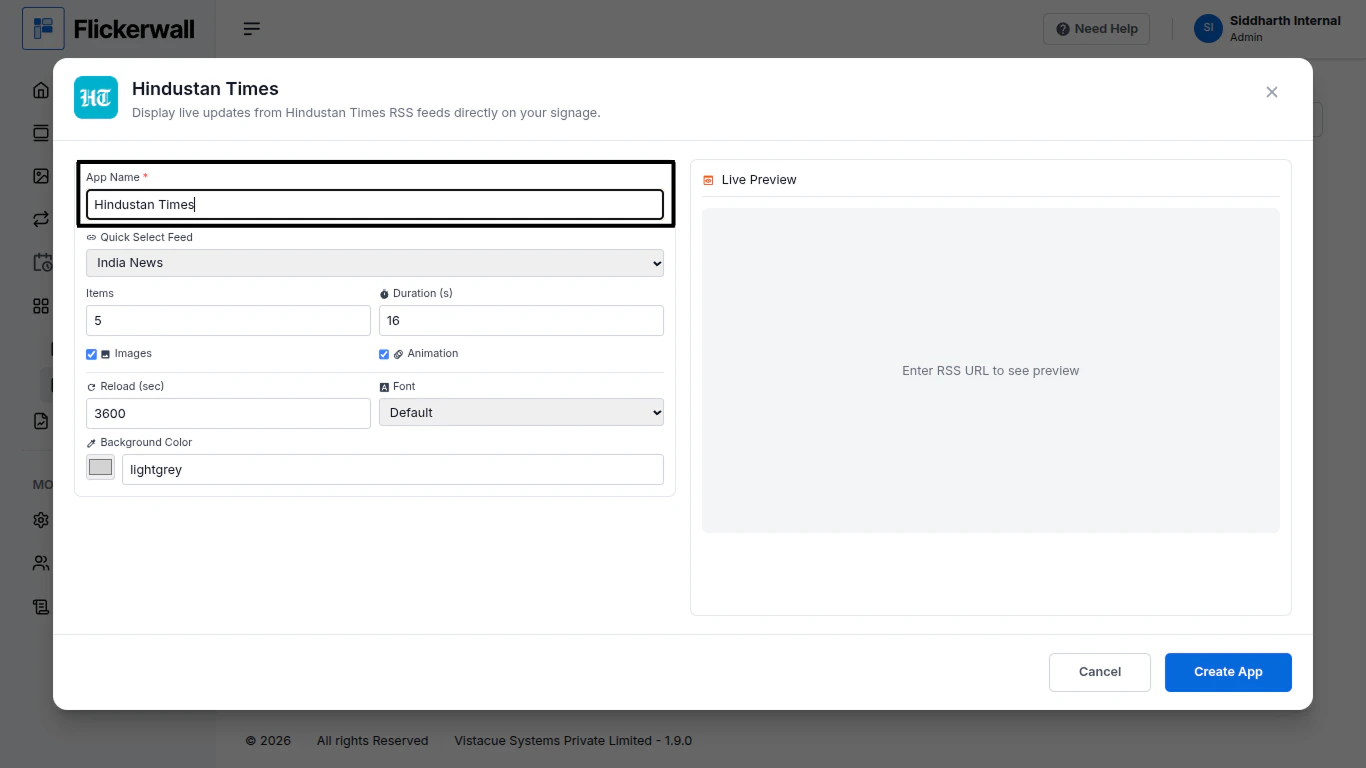
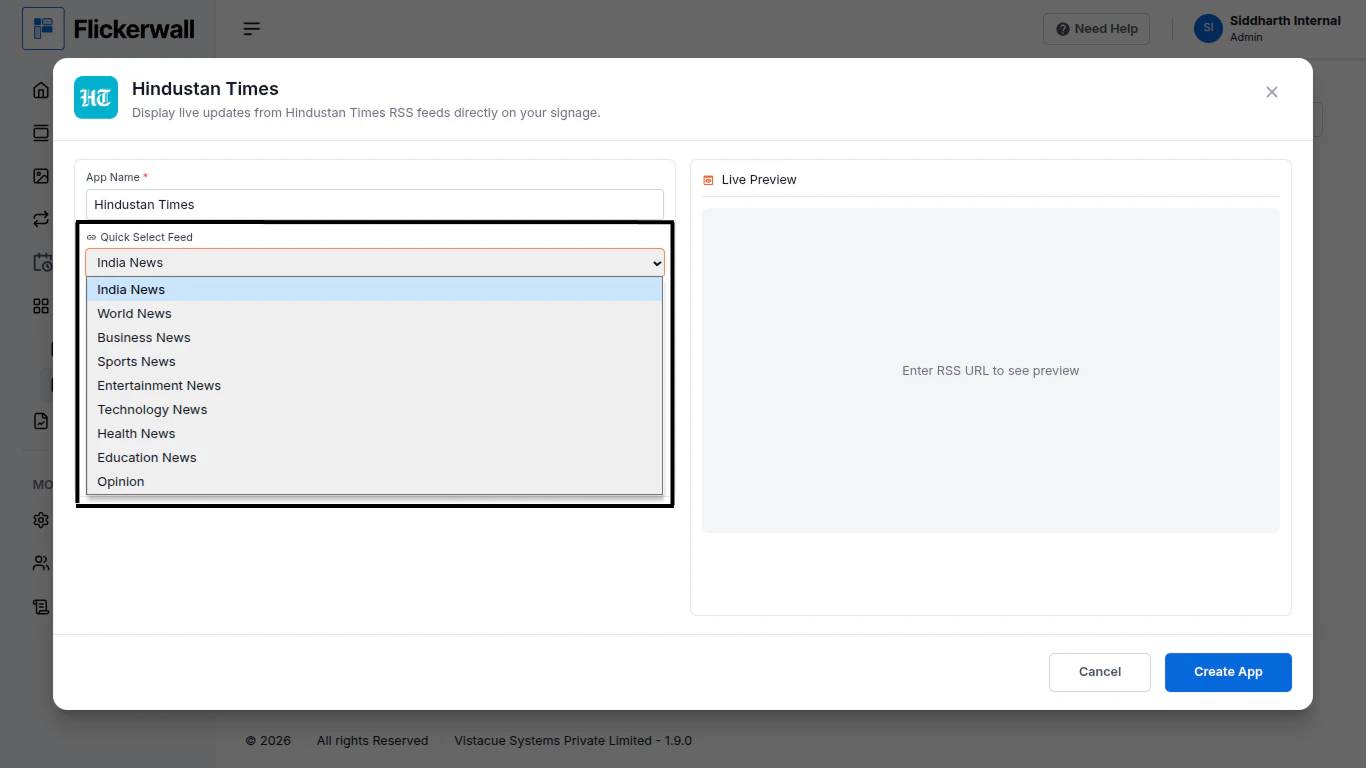
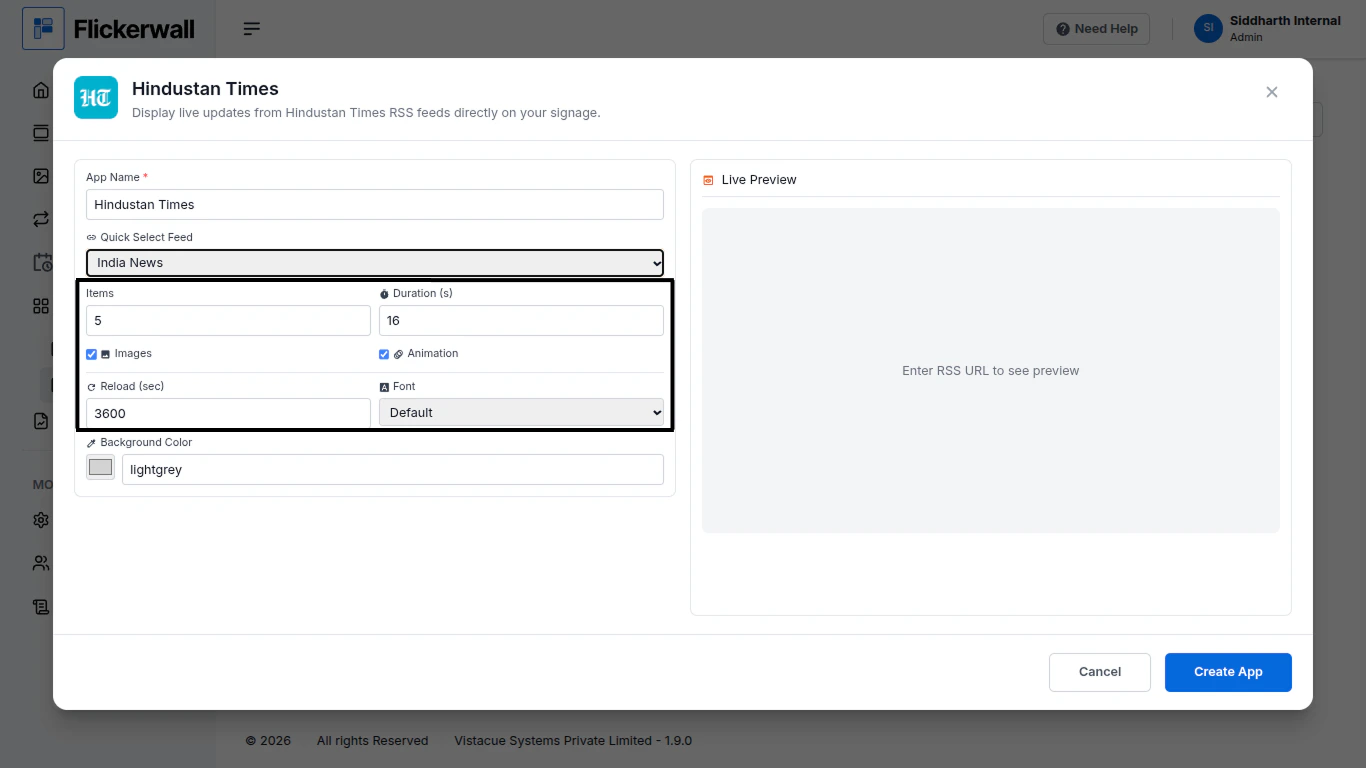
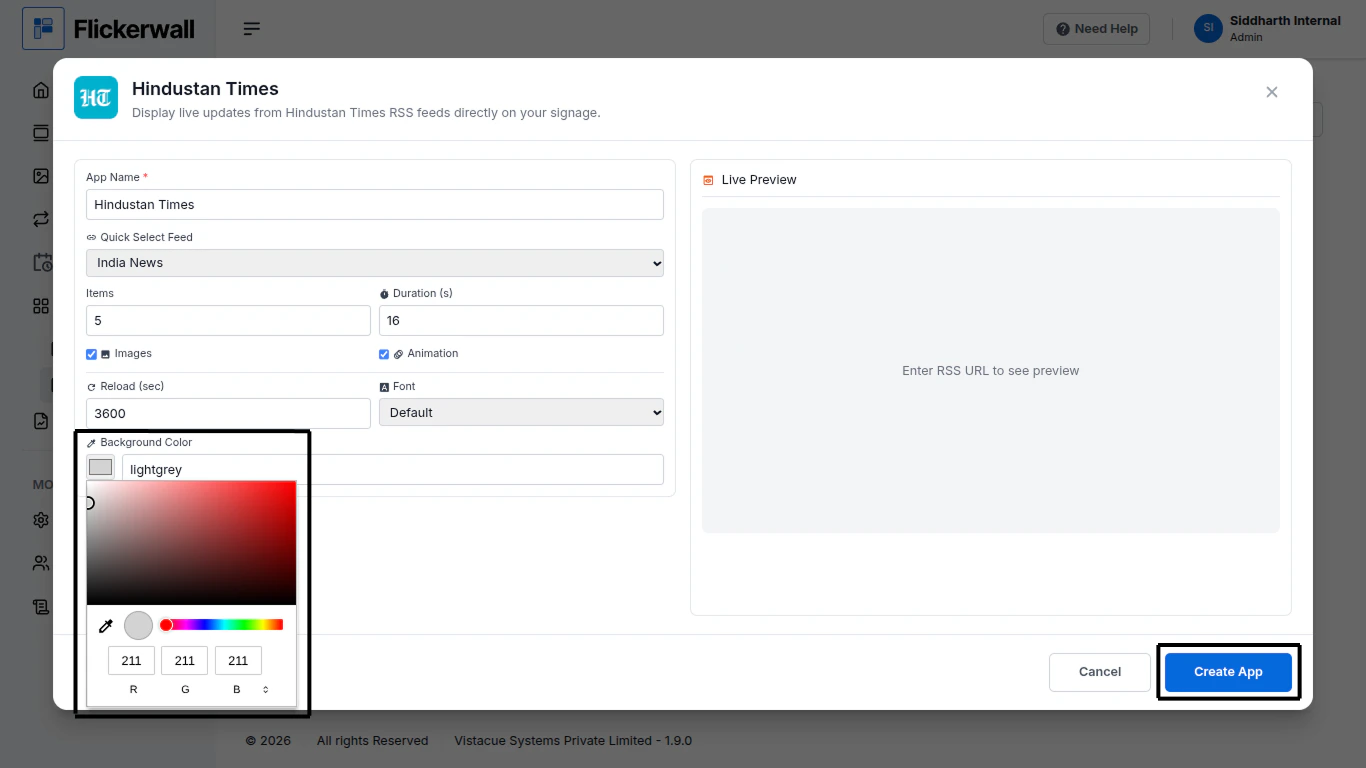
Step 1Go to Apps and then App store!click on the apps and then Nevigate to App store in the appeared drawerStep 2Go to Search Baryou can search the app you wantStep 3Search for Hindustan Times Select and click on the desired appStep 4Enter a Name for the AppEnter a name for app so you can find it easy laterStep 5Select a desired feed Topic for the AppSelect any topic that feels more valuable for you signageStep 6Select How many items you wanna display and DurationChoose if you want images and AnimationsLastly select reload time and desired FontStep 7Select the desired Background andClick Create AppCongratulations: You’ve learnt how to create an app for Flickerwall
⌘I
{"docsConfig":{"theme":"maple","$schema":"https://mintlify.com/docs.json","name":"Flickerwall Documentation","colors":{"primary":"#0369db","light":"#0369db","dark":"#15803D"},"logo":"https://mintcdn.com/flickerwall-796545b9/QyHLB_DuGuIs1P_v/images/Group2.svg?fit=max\u0026auto=format\u0026n=QyHLB_DuGuIs1P_v\u0026q=85\u0026s=468b8727704eed298bf74ff861c89070","favicon":"https://mintcdn.com/flickerwall-796545b9/WP4l1lhQM-CokS98/images/favicon.png?fit=max\u0026auto=format\u0026n=WP4l1lhQM-CokS98\u0026q=85\u0026s=04e3269553742f38b07278c8d5bc1d9d","appearance":{"default":"system","strict":false},"navbar":{"links":[{"href":"mailto:sales@flickerwall.com","label":"Support"}],"primary":{"type":"button","label":"Dashboard","href":"https://app.flickerwall.com"}},"footer":{"socials":{"x":"https://x.com/flickerwallApp","facebook":"https://facebook.com/flickerwall"}},"seo":{"indexing":"navigable"},"contextual":{"options":["copy","view","chatgpt","claude","perplexity","mcp","cursor","vscode"],"display":"header"},"styling":{"latex":false},"navigation":{"pages":[]}},"deployment":{"deploymentMetadataValue":{"subdomain":"flickerwall-796545b9","hasAudioNarration":false,"actualSubdomain":"flickerwall-796545b9","customDomains":["docs.flickerwall.com"],"gitSource":{"type":"github","owner":"flickerwall","repo":"fw-docs","deployBranch":"main","contentDirectory":"","isPrivate":true,"mountPath":"","label":""},"chroma":{"liveDeploymentHistoryId":"6a21f72c55ebb2c863916865","collectionId":"90765878-ecbb-480b-9c42-bfbb05aa2a30","schemaVersion":"v2"},"entitlements":{},"buildId":"6a21f72c55ebb2c863916865:success","clientVersion":"0.0.3990","searchFilterCounts":[{"language":"default","tag":"Cloud","count":112},{"language":"default","tag":"Apps","count":33},{"language":"default","tag":"News","count":32},{"language":"default","tag":"Settings","count":16},{"language":"default","tag":"Screens","count":10},{"language":"default","tag":"Loops","count":9},{"language":"default","tag":"Media","count":9},{"language":"default","tag":"Add or Manage","count":9},{"language":"default","tag":"User","count":9},{"language":"default","tag":"Create New or Manage","count":8}]},"assistantConfig":{"enableAskAiButton":false,"enableStarterQuestions":false,"enableAskAiSearchBar":true},"basePath":"","hasChatPermissions":false,"hasWebMcpPermissions":false,"toggles":[{"name":"kill-isr","enabled":true,"variant":{"name":"disabled","enabled":false,"feature_enabled":true},"impressionData":false},{"name":"agent-mintlify-slack","enabled":true,"variant":{"name":"disabled","enabled":false,"feature_enabled":true},"impressionData":false},{"name":"editor-v7-file-tree","enabled":true,"variant":{"name":"disabled","enabled":false,"feature_enabled":true},"impressionData":false},{"name":"agent-integrations-settings","enabled":true,"variant":{"name":"disabled","enabled":false,"feature_enabled":true},"impressionData":false},{"name":"automations-pr-grouping","enabled":true,"variant":{"name":"disabled","enabled":false,"feature_enabled":true},"impressionData":false},{"name":"custom-prefix","enabled":true,"variant":{"name":"disabled","enabled":false,"feature_enabled":true},"impressionData":false},{"name":"analytics-v7","enabled":true,"variant":{"name":"disabled","enabled":false,"feature_enabled":true},"impressionData":false},{"name":"user-flows-analytics","enabled":true,"variant":{"name":"disabled","enabled":false,"feature_enabled":true},"impressionData":false},{"name":"no-publish-flow","enabled":true,"variant":{"name":"disabled","enabled":false,"feature_enabled":true},"impressionData":false},{"name":"workos-onboarding","enabled":true,"variant":{"name":"disabled","enabled":false,"feature_enabled":true},"impressionData":false},{"name":"llms-txt-v2","enabled":true,"variant":{"name":"disabled","enabled":false,"feature_enabled":true},"impressionData":false},{"name":"pause-universal-search-reconcile","enabled":true,"variant":{"name":"disabled","enabled":false,"feature_enabled":true},"impressionData":false},{"name":"snapshot-serving-live","enabled":true,"variant":{"name":"disabled","enabled":false,"feature_enabled":true},"impressionData":false},{"name":"stripTemperatureMiddleware","enabled":true,"variant":{"name":"disabled","enabled":false,"feature_enabled":true},"impressionData":false},{"name":"per-site-search-delta","enabled":true,"variant":{"name":"disabled","enabled":false,"feature_enabled":true},"impressionData":false},{"name":"support-platform-pylon-zendesk","enabled":true,"variant":{"name":"disabled","enabled":false,"feature_enabled":true},"impressionData":false},{"name":"snapshot-serving","enabled":true,"variant":{"name":"disabled","enabled":false,"feature_enabled":true},"impressionData":false},{"name":"instant-rollback","enabled":true,"variant":{"name":"disabled","enabled":false,"feature_enabled":true},"impressionData":false},{"name":"granular-notifications-server","enabled":true,"variant":{"name":"disabled","enabled":false,"feature_enabled":true},"impressionData":false},{"name":"granular-notifications","enabled":true,"variant":{"name":"disabled","enabled":false,"feature_enabled":true},"impressionData":false},{"name":"editor-private-page-search","enabled":true,"variant":{"name":"disabled","enabled":false,"feature_enabled":true},"impressionData":false},{"name":"automations-fable","enabled":true,"variant":{"name":"disabled","enabled":false,"feature_enabled":true},"impressionData":false},{"name":"fixed-ai-action-pricing","enabled":true,"variant":{"name":"disabled","enabled":false,"feature_enabled":true},"impressionData":false},{"name":"automation-resolve-merge-conflict","enabled":true,"variant":{"name":"disabled","enabled":false,"feature_enabled":true},"impressionData":false},{"name":"scoped-publishing","enabled":true,"variant":{"name":"disabled","enabled":false,"feature_enabled":true},"impressionData":false},{"name":"mintql","enabled":true,"variant":{"name":"disabled","enabled":false,"feature_enabled":true},"impressionData":false},{"name":"page-level-analytics","enabled":true,"variant":{"name":"disabled","enabled":false,"feature_enabled":true},"impressionData":false},{"name":"editor-version-history-v2","enabled":true,"variant":{"name":"disabled","enabled":false,"feature_enabled":true},"impressionData":false},{"name":"editor-nav-generations","enabled":true,"variant":{"name":"disabled","enabled":false,"feature_enabled":true},"impressionData":false},{"name":"billing-page-v2","enabled":true,"variant":{"name":"disabled","enabled":false,"feature_enabled":true},"impressionData":false},{"name":"workspace-projects","enabled":true,"variant":{"name":"disabled","enabled":false,"feature_enabled":true},"impressionData":false},{"name":"assistant-v5","enabled":true,"variant":{"name":"disabled","enabled":false,"feature_enabled":true},"impressionData":false},{"name":"byok-sep-25","enabled":true,"variant":{"name":"disabled","enabled":false,"feature_enabled":true},"impressionData":false},{"name":"fork-pr-previews","enabled":true,"variant":{"name":"disabled","enabled":false,"feature_enabled":true},"impressionData":false},{"name":"revalidation-jwt","enabled":true,"variant":{"name":"disabled","enabled":false,"feature_enabled":true},"impressionData":false},{"name":"vite-origin","enabled":true,"variant":{"name":"disabled","enabled":false,"feature_enabled":true},"impressionData":false},{"name":"editor-agent-model-picker","enabled":true,"variant":{"name":"disabled","enabled":false,"feature_enabled":true},"impressionData":false},{"name":"billing-updated-9-15","enabled":true,"variant":{"name":"disabled","enabled":false,"feature_enabled":true},"impressionData":false},{"name":"workos-sso-scim","enabled":true,"variant":{"name":"disabled","enabled":false,"feature_enabled":true},"impressionData":false},{"name":"hobby-abuse-scan","enabled":true,"variant":{"name":"disabled","enabled":false,"feature_enabled":true},"impressionData":false},{"name":"dashboard-inbox","enabled":true,"variant":{"name":"disabled","enabled":false,"feature_enabled":true},"impressionData":false},{"name":"workos-signup","enabled":true,"variant":{"name":"disabled","enabled":false,"feature_enabled":true},"impressionData":false},{"name":"workos-enabled","enabled":true,"variant":{"name":"disabled","enabled":false,"feature_enabled":true},"impressionData":false}],"isAtlas":false,"googleFontsInlined":false},"customCss":[],"page":{"pagePath":"cloud/apps/how-to-add-and-use-hindustan-times-app-from-flickerwall-store","slug":"/cloud/apps/how-to-add-and-use-hindustan-times-app-from-flickerwall-store","pageMetadata":{"title":"How to add and use Hindustan Times app from Flickerwall store?","description":"Step by step guide to learn how to add the Hindustan Times app from the Flickerwall store","href":"/cloud/apps/how-to-add-and-use-hindustan-times-app-from-flickerwall-store"},"description":{"compiledSource":"\"use strict\";\nconst {jsx: _jsx} = arguments[0];\nconst {useMDXComponents: _provideComponents} = arguments[0];\nfunction _createMdxContent(props) {\n const _components = {\n p: \"p\",\n ..._provideComponents(),\n ...props.components\n };\n return _jsx(_components.p, {\n children: \"Step by step guide to learn how to add the Hindustan Times app from the Flickerwall store\"\n });\n}\nfunction MDXContent(props = {}) {\n const {wrapper: MDXLayout} = {\n ..._provideComponents(),\n ...props.components\n };\n return MDXLayout ? _jsx(MDXLayout, {\n ...props,\n children: _jsx(_createMdxContent, {\n ...props\n })\n }) : _createMdxContent(props);\n}\nreturn {\n default: MDXContent\n};\n","frontmatter":{},"scope":{}},"pageType":"default","mdx":{"mdxSource":{"compiledSource":"\"use strict\";const{Fragment:_Fragment,jsx:_jsx,jsxs:_jsxs}=arguments[0];const{useMDXComponents:_provideComponents}=arguments[0];function _createMdxContent(props){const _components={hr:`hr`,p:`p`,strong:`strong`,..._provideComponents(),...props.components},{OptimizedImage}=_components;if(!OptimizedImage)_missingMdxReference(`OptimizedImage`,true);return _jsxs(_Fragment,{children:[_jsx(_components.hr,{}),`\n`,_jsx(_components.p,{children:`Step 1`}),`\n`,_jsx(_components.p,{children:`Go to Apps and then App store!`}),`\n`,_jsx(_components.p,{children:`click on the apps and then Nevigate to App store in the appeared drawer`}),`\n`,_jsx(OptimizedImage,{src:`https://mintcdn.com/flickerwall-796545b9/OnEcb51Xm6XuZxse/images/apps-how-to-add-and-use-hindustan-times-app-from-flickerwall-store-image-1.png?fit=max\u0026auto=format\u0026n=OnEcb51Xm6XuZxse\u0026q=85\u0026s=1842e24e0ca5c4db9316c03b3e336019`,alt:``,\"data-og-width\":`1900`,width:`1900`,\"data-og-height\":`1068`,height:`1068`,\"data-path\":`images/apps-how-to-add-and-use-hindustan-times-app-from-flickerwall-store-image-1.png`,\"data-optimize\":`true`,\"data-opv\":`3`,srcset:`https://mintcdn.com/flickerwall-796545b9/OnEcb51Xm6XuZxse/images/apps-how-to-add-and-use-hindustan-times-app-from-flickerwall-store-image-1.png?w=280\u0026fit=max\u0026auto=format\u0026n=OnEcb51Xm6XuZxse\u0026q=85\u0026s=16d547034eaa222098e8b870213c5b3a 280w, https://mintcdn.com/flickerwall-796545b9/OnEcb51Xm6XuZxse/images/apps-how-to-add-and-use-hindustan-times-app-from-flickerwall-store-image-1.png?w=560\u0026fit=max\u0026auto=format\u0026n=OnEcb51Xm6XuZxse\u0026q=85\u0026s=fbf62e157b6422f236a60a23f85ed692 560w, https://mintcdn.com/flickerwall-796545b9/OnEcb51Xm6XuZxse/images/apps-how-to-add-and-use-hindustan-times-app-from-flickerwall-store-image-1.png?w=840\u0026fit=max\u0026auto=format\u0026n=OnEcb51Xm6XuZxse\u0026q=85\u0026s=9632f44cd80185d8ff0d1c601214f4e2 840w, https://mintcdn.com/flickerwall-796545b9/OnEcb51Xm6XuZxse/images/apps-how-to-add-and-use-hindustan-times-app-from-flickerwall-store-image-1.png?w=1100\u0026fit=max\u0026auto=format\u0026n=OnEcb51Xm6XuZxse\u0026q=85\u0026s=6cfe5c761d3d5b0b4004f2231869ebe8 1100w, https://mintcdn.com/flickerwall-796545b9/OnEcb51Xm6XuZxse/images/apps-how-to-add-and-use-hindustan-times-app-from-flickerwall-store-image-1.png?w=1650\u0026fit=max\u0026auto=format\u0026n=OnEcb51Xm6XuZxse\u0026q=85\u0026s=5714f4d0ed698c29886feb68577a9ab3 1650w, https://mintcdn.com/flickerwall-796545b9/OnEcb51Xm6XuZxse/images/apps-how-to-add-and-use-hindustan-times-app-from-flickerwall-store-image-1.png?w=2500\u0026fit=max\u0026auto=format\u0026n=OnEcb51Xm6XuZxse\u0026q=85\u0026s=bb6e10d73fb8a08d2b99d8abe923f23c 2500w`}),`\n`,_jsx(_components.p,{children:`Step 2`}),`\n`,_jsx(_components.p,{children:`Go to Search Bar`}),`\n`,_jsx(_components.p,{children:`you can search the app you want`}),`\n`,_jsx(OptimizedImage,{src:`https://mintcdn.com/flickerwall-796545b9/OnEcb51Xm6XuZxse/images/apps-how-to-add-and-use-hindustan-times-app-from-flickerwall-store-image-2.png?fit=max\u0026auto=format\u0026n=OnEcb51Xm6XuZxse\u0026q=85\u0026s=e6b8a9381279c39f494d3f4e7ca51879`,alt:``,\"data-og-width\":`1900`,width:`1900`,\"data-og-height\":`1068`,height:`1068`,\"data-path\":`images/apps-how-to-add-and-use-hindustan-times-app-from-flickerwall-store-image-2.png`,\"data-optimize\":`true`,\"data-opv\":`3`,srcset:`https://mintcdn.com/flickerwall-796545b9/OnEcb51Xm6XuZxse/images/apps-how-to-add-and-use-hindustan-times-app-from-flickerwall-store-image-2.png?w=280\u0026fit=max\u0026auto=format\u0026n=OnEcb51Xm6XuZxse\u0026q=85\u0026s=e14ef5409b2e7321e18562710fbed74b 280w, https://mintcdn.com/flickerwall-796545b9/OnEcb51Xm6XuZxse/images/apps-how-to-add-and-use-hindustan-times-app-from-flickerwall-store-image-2.png?w=560\u0026fit=max\u0026auto=format\u0026n=OnEcb51Xm6XuZxse\u0026q=85\u0026s=cd4bc1bac23e3757c2a07d6a756267f3 560w, https://mintcdn.com/flickerwall-796545b9/OnEcb51Xm6XuZxse/images/apps-how-to-add-and-use-hindustan-times-app-from-flickerwall-store-image-2.png?w=840\u0026fit=max\u0026auto=format\u0026n=OnEcb51Xm6XuZxse\u0026q=85\u0026s=e769da388793a026633c2e57914b1b1d 840w, https://mintcdn.com/flickerwall-796545b9/OnEcb51Xm6XuZxse/images/apps-how-to-add-and-use-hindustan-times-app-from-flickerwall-store-image-2.png?w=1100\u0026fit=max\u0026auto=format\u0026n=OnEcb51Xm6XuZxse\u0026q=85\u0026s=17b72998db3adbb80a75703f49b784eb 1100w, https://mintcdn.com/flickerwall-796545b9/OnEcb51Xm6XuZxse/images/apps-how-to-add-and-use-hindustan-times-app-from-flickerwall-store-image-2.png?w=1650\u0026fit=max\u0026auto=format\u0026n=OnEcb51Xm6XuZxse\u0026q=85\u0026s=244897b7bbe88b2c136c8bca24d6a551 1650w, https://mintcdn.com/flickerwall-796545b9/OnEcb51Xm6XuZxse/images/apps-how-to-add-and-use-hindustan-times-app-from-flickerwall-store-image-2.png?w=2500\u0026fit=max\u0026auto=format\u0026n=OnEcb51Xm6XuZxse\u0026q=85\u0026s=1526404c87c0c86fb8a442dc7ed10aa5 2500w`}),`\n`,_jsx(_components.p,{children:`Step 3`}),`\n`,_jsx(_components.p,{children:`Search for Hindustan Times Select and click on the desired app`}),`\n`,_jsx(OptimizedImage,{src:`https://mintcdn.com/flickerwall-796545b9/OnEcb51Xm6XuZxse/images/apps-how-to-add-and-use-hindustan-times-app-from-flickerwall-store-image-3.png?fit=max\u0026auto=format\u0026n=OnEcb51Xm6XuZxse\u0026q=85\u0026s=1568b2b16c1e042bd20756d0d8544d44`,alt:``,\"data-og-width\":`1366`,width:`1366`,\"data-og-height\":`768`,height:`768`,\"data-path\":`images/apps-how-to-add-and-use-hindustan-times-app-from-flickerwall-store-image-3.png`,\"data-optimize\":`true`,\"data-opv\":`3`,srcset:`https://mintcdn.com/flickerwall-796545b9/OnEcb51Xm6XuZxse/images/apps-how-to-add-and-use-hindustan-times-app-from-flickerwall-store-image-3.png?w=280\u0026fit=max\u0026auto=format\u0026n=OnEcb51Xm6XuZxse\u0026q=85\u0026s=5cc5b18a5776b26c66dc3180f349f17c 280w, https://mintcdn.com/flickerwall-796545b9/OnEcb51Xm6XuZxse/images/apps-how-to-add-and-use-hindustan-times-app-from-flickerwall-store-image-3.png?w=560\u0026fit=max\u0026auto=format\u0026n=OnEcb51Xm6XuZxse\u0026q=85\u0026s=667635717f32bd0af7a849ae03222f98 560w, https://mintcdn.com/flickerwall-796545b9/OnEcb51Xm6XuZxse/images/apps-how-to-add-and-use-hindustan-times-app-from-flickerwall-store-image-3.png?w=840\u0026fit=max\u0026auto=format\u0026n=OnEcb51Xm6XuZxse\u0026q=85\u0026s=cebc28ca9d684795e7aff13618773fd7 840w, https://mintcdn.com/flickerwall-796545b9/OnEcb51Xm6XuZxse/images/apps-how-to-add-and-use-hindustan-times-app-from-flickerwall-store-image-3.png?w=1100\u0026fit=max\u0026auto=format\u0026n=OnEcb51Xm6XuZxse\u0026q=85\u0026s=171a6c295f394c3db9c6f1b48e57286d 1100w, https://mintcdn.com/flickerwall-796545b9/OnEcb51Xm6XuZxse/images/apps-how-to-add-and-use-hindustan-times-app-from-flickerwall-store-image-3.png?w=1650\u0026fit=max\u0026auto=format\u0026n=OnEcb51Xm6XuZxse\u0026q=85\u0026s=ff9107984030c14584737fd64d11b141 1650w, https://mintcdn.com/flickerwall-796545b9/OnEcb51Xm6XuZxse/images/apps-how-to-add-and-use-hindustan-times-app-from-flickerwall-store-image-3.png?w=2500\u0026fit=max\u0026auto=format\u0026n=OnEcb51Xm6XuZxse\u0026q=85\u0026s=774537586626384722d13969afeefa32 2500w`}),`\n`,_jsx(_components.p,{children:`Step 4`}),`\n`,_jsx(_components.p,{children:`Enter a Name for the App`}),`\n`,_jsx(_components.p,{children:`Enter a name for app so you can find it easy later`}),`\n`,_jsx(OptimizedImage,{src:`https://mintcdn.com/flickerwall-796545b9/OnEcb51Xm6XuZxse/images/apps-how-to-add-and-use-hindustan-times-app-from-flickerwall-store-image-4.png?fit=max\u0026auto=format\u0026n=OnEcb51Xm6XuZxse\u0026q=85\u0026s=9c3e6e14ce9789c8bb09071580dbb0f7`,alt:``,\"data-og-width\":`1366`,width:`1366`,\"data-og-height\":`768`,height:`768`,\"data-path\":`images/apps-how-to-add-and-use-hindustan-times-app-from-flickerwall-store-image-4.png`,\"data-optimize\":`true`,\"data-opv\":`3`,srcset:`https://mintcdn.com/flickerwall-796545b9/OnEcb51Xm6XuZxse/images/apps-how-to-add-and-use-hindustan-times-app-from-flickerwall-store-image-4.png?w=280\u0026fit=max\u0026auto=format\u0026n=OnEcb51Xm6XuZxse\u0026q=85\u0026s=fbe92e562f820612b8dda4744d74e82d 280w, https://mintcdn.com/flickerwall-796545b9/OnEcb51Xm6XuZxse/images/apps-how-to-add-and-use-hindustan-times-app-from-flickerwall-store-image-4.png?w=560\u0026fit=max\u0026auto=format\u0026n=OnEcb51Xm6XuZxse\u0026q=85\u0026s=694cec2f64de8a1cbdf7f9e0463c7ead 560w, https://mintcdn.com/flickerwall-796545b9/OnEcb51Xm6XuZxse/images/apps-how-to-add-and-use-hindustan-times-app-from-flickerwall-store-image-4.png?w=840\u0026fit=max\u0026auto=format\u0026n=OnEcb51Xm6XuZxse\u0026q=85\u0026s=ab96598784ade10ac2163695b0d2251b 840w, https://mintcdn.com/flickerwall-796545b9/OnEcb51Xm6XuZxse/images/apps-how-to-add-and-use-hindustan-times-app-from-flickerwall-store-image-4.png?w=1100\u0026fit=max\u0026auto=format\u0026n=OnEcb51Xm6XuZxse\u0026q=85\u0026s=d87ab4083dae00f01f3c97fd4761c607 1100w, https://mintcdn.com/flickerwall-796545b9/OnEcb51Xm6XuZxse/images/apps-how-to-add-and-use-hindustan-times-app-from-flickerwall-store-image-4.png?w=1650\u0026fit=max\u0026auto=format\u0026n=OnEcb51Xm6XuZxse\u0026q=85\u0026s=100a1ceb5080816e852dc92842743792 1650w, https://mintcdn.com/flickerwall-796545b9/OnEcb51Xm6XuZxse/images/apps-how-to-add-and-use-hindustan-times-app-from-flickerwall-store-image-4.png?w=2500\u0026fit=max\u0026auto=format\u0026n=OnEcb51Xm6XuZxse\u0026q=85\u0026s=cfcbaafb4b128b8b5e6f58595ca72b1e 2500w`}),`\n`,_jsx(_components.p,{children:`Step 5`}),`\n`,_jsx(_components.p,{children:`Select a desired feed Topic for the App`}),`\n`,_jsx(_components.p,{children:`Select any topic that feels more valuable for you signage`}),`\n`,_jsx(OptimizedImage,{src:`https://mintcdn.com/flickerwall-796545b9/OnEcb51Xm6XuZxse/images/apps-how-to-add-and-use-hindustan-times-app-from-flickerwall-store-image-5.png?fit=max\u0026auto=format\u0026n=OnEcb51Xm6XuZxse\u0026q=85\u0026s=04c306588b6bde697f2de85daf07e7cb`,alt:``,\"data-og-width\":`1366`,width:`1366`,\"data-og-height\":`768`,height:`768`,\"data-path\":`images/apps-how-to-add-and-use-hindustan-times-app-from-flickerwall-store-image-5.png`,\"data-optimize\":`true`,\"data-opv\":`3`,srcset:`https://mintcdn.com/flickerwall-796545b9/OnEcb51Xm6XuZxse/images/apps-how-to-add-and-use-hindustan-times-app-from-flickerwall-store-image-5.png?w=280\u0026fit=max\u0026auto=format\u0026n=OnEcb51Xm6XuZxse\u0026q=85\u0026s=8a0741d6f641e88b6af7c40ed3fb087b 280w, https://mintcdn.com/flickerwall-796545b9/OnEcb51Xm6XuZxse/images/apps-how-to-add-and-use-hindustan-times-app-from-flickerwall-store-image-5.png?w=560\u0026fit=max\u0026auto=format\u0026n=OnEcb51Xm6XuZxse\u0026q=85\u0026s=bd501913f54d8c6f2e6e33941d799ee6 560w, https://mintcdn.com/flickerwall-796545b9/OnEcb51Xm6XuZxse/images/apps-how-to-add-and-use-hindustan-times-app-from-flickerwall-store-image-5.png?w=840\u0026fit=max\u0026auto=format\u0026n=OnEcb51Xm6XuZxse\u0026q=85\u0026s=6ac5929327131f0ef06cb649ba13d009 840w, https://mintcdn.com/flickerwall-796545b9/OnEcb51Xm6XuZxse/images/apps-how-to-add-and-use-hindustan-times-app-from-flickerwall-store-image-5.png?w=1100\u0026fit=max\u0026auto=format\u0026n=OnEcb51Xm6XuZxse\u0026q=85\u0026s=621ed3b0e5ab451991b78a17731e1bfe 1100w, https://mintcdn.com/flickerwall-796545b9/OnEcb51Xm6XuZxse/images/apps-how-to-add-and-use-hindustan-times-app-from-flickerwall-store-image-5.png?w=1650\u0026fit=max\u0026auto=format\u0026n=OnEcb51Xm6XuZxse\u0026q=85\u0026s=042e8dfb7539c920f1d564e4f1ec5126 1650w, https://mintcdn.com/flickerwall-796545b9/OnEcb51Xm6XuZxse/images/apps-how-to-add-and-use-hindustan-times-app-from-flickerwall-store-image-5.png?w=2500\u0026fit=max\u0026auto=format\u0026n=OnEcb51Xm6XuZxse\u0026q=85\u0026s=1de807c54d52cafa28164a5c28b15947 2500w`}),`\n`,_jsx(_components.p,{children:`Step 6`}),`\n`,_jsxs(_components.p,{children:[`Select How many `,_jsx(_components.strong,{children:`items`}),` you wanna display and `,_jsx(_components.strong,{children:`Duration`})]}),`\n`,_jsxs(_components.p,{children:[`Choose if you want `,_jsx(_components.strong,{children:`images`}),` and `,_jsx(_components.strong,{children:`Animations`})]}),`\n`,_jsxs(_components.p,{children:[`Lastly select `,_jsx(_components.strong,{children:`reload time`}),` and `,_jsx(_components.strong,{children:`desired Font`})]}),`\n`,_jsx(OptimizedImage,{src:`https://mintcdn.com/flickerwall-796545b9/OnEcb51Xm6XuZxse/images/apps-how-to-add-and-use-hindustan-times-app-from-flickerwall-store-image-6.png?fit=max\u0026auto=format\u0026n=OnEcb51Xm6XuZxse\u0026q=85\u0026s=ec8fe9d47aa03a00ee715c72e3911635`,alt:``,\"data-og-width\":`1366`,width:`1366`,\"data-og-height\":`768`,height:`768`,\"data-path\":`images/apps-how-to-add-and-use-hindustan-times-app-from-flickerwall-store-image-6.png`,\"data-optimize\":`true`,\"data-opv\":`3`,srcset:`https://mintcdn.com/flickerwall-796545b9/OnEcb51Xm6XuZxse/images/apps-how-to-add-and-use-hindustan-times-app-from-flickerwall-store-image-6.png?w=280\u0026fit=max\u0026auto=format\u0026n=OnEcb51Xm6XuZxse\u0026q=85\u0026s=9d503b8307d45c53050cf7cde7c544dc 280w, https://mintcdn.com/flickerwall-796545b9/OnEcb51Xm6XuZxse/images/apps-how-to-add-and-use-hindustan-times-app-from-flickerwall-store-image-6.png?w=560\u0026fit=max\u0026auto=format\u0026n=OnEcb51Xm6XuZxse\u0026q=85\u0026s=5b2fd68d3cda79fccf8498330f56f38d 560w, https://mintcdn.com/flickerwall-796545b9/OnEcb51Xm6XuZxse/images/apps-how-to-add-and-use-hindustan-times-app-from-flickerwall-store-image-6.png?w=840\u0026fit=max\u0026auto=format\u0026n=OnEcb51Xm6XuZxse\u0026q=85\u0026s=87f061847d4cf29ed6d0e1abe622fc34 840w, https://mintcdn.com/flickerwall-796545b9/OnEcb51Xm6XuZxse/images/apps-how-to-add-and-use-hindustan-times-app-from-flickerwall-store-image-6.png?w=1100\u0026fit=max\u0026auto=format\u0026n=OnEcb51Xm6XuZxse\u0026q=85\u0026s=d3f04f59095ee17f9a6c02c08afd72c3 1100w, https://mintcdn.com/flickerwall-796545b9/OnEcb51Xm6XuZxse/images/apps-how-to-add-and-use-hindustan-times-app-from-flickerwall-store-image-6.png?w=1650\u0026fit=max\u0026auto=format\u0026n=OnEcb51Xm6XuZxse\u0026q=85\u0026s=a90e0e2a4e197ce74925ce7293812c2d 1650w, https://mintcdn.com/flickerwall-796545b9/OnEcb51Xm6XuZxse/images/apps-how-to-add-and-use-hindustan-times-app-from-flickerwall-store-image-6.png?w=2500\u0026fit=max\u0026auto=format\u0026n=OnEcb51Xm6XuZxse\u0026q=85\u0026s=1e08f4868179414faf6ee77d36286a23 2500w`}),`\n`,_jsx(_components.p,{children:`Step 7`}),`\n`,_jsx(_components.p,{children:`Select the desired Background and`}),`\n`,_jsx(_components.p,{children:`Click Create App`}),`\n`,_jsx(OptimizedImage,{src:`https://mintcdn.com/flickerwall-796545b9/OnEcb51Xm6XuZxse/images/apps-how-to-add-and-use-hindustan-times-app-from-flickerwall-store-image-7.png?fit=max\u0026auto=format\u0026n=OnEcb51Xm6XuZxse\u0026q=85\u0026s=5ac87feed1dffbce380cee3205bd42ab`,alt:``,\"data-og-width\":`1366`,width:`1366`,\"data-og-height\":`768`,height:`768`,\"data-path\":`images/apps-how-to-add-and-use-hindustan-times-app-from-flickerwall-store-image-7.png`,\"data-optimize\":`true`,\"data-opv\":`3`,srcset:`https://mintcdn.com/flickerwall-796545b9/OnEcb51Xm6XuZxse/images/apps-how-to-add-and-use-hindustan-times-app-from-flickerwall-store-image-7.png?w=280\u0026fit=max\u0026auto=format\u0026n=OnEcb51Xm6XuZxse\u0026q=85\u0026s=6500f7bc4e87f20f12b0c7aa318d9304 280w, https://mintcdn.com/flickerwall-796545b9/OnEcb51Xm6XuZxse/images/apps-how-to-add-and-use-hindustan-times-app-from-flickerwall-store-image-7.png?w=560\u0026fit=max\u0026auto=format\u0026n=OnEcb51Xm6XuZxse\u0026q=85\u0026s=2401f957345069c3872f1141bd631de0 560w, https://mintcdn.com/flickerwall-796545b9/OnEcb51Xm6XuZxse/images/apps-how-to-add-and-use-hindustan-times-app-from-flickerwall-store-image-7.png?w=840\u0026fit=max\u0026auto=format\u0026n=OnEcb51Xm6XuZxse\u0026q=85\u0026s=eb3155f14977775714916c968cfc17bb 840w, https://mintcdn.com/flickerwall-796545b9/OnEcb51Xm6XuZxse/images/apps-how-to-add-and-use-hindustan-times-app-from-flickerwall-store-image-7.png?w=1100\u0026fit=max\u0026auto=format\u0026n=OnEcb51Xm6XuZxse\u0026q=85\u0026s=adc0edc0f52451d77180db87761cad65 1100w, https://mintcdn.com/flickerwall-796545b9/OnEcb51Xm6XuZxse/images/apps-how-to-add-and-use-hindustan-times-app-from-flickerwall-store-image-7.png?w=1650\u0026fit=max\u0026auto=format\u0026n=OnEcb51Xm6XuZxse\u0026q=85\u0026s=c35f21c945401549a6b39226377ec7c2 1650w, https://mintcdn.com/flickerwall-796545b9/OnEcb51Xm6XuZxse/images/apps-how-to-add-and-use-hindustan-times-app-from-flickerwall-store-image-7.png?w=2500\u0026fit=max\u0026auto=format\u0026n=OnEcb51Xm6XuZxse\u0026q=85\u0026s=a5c5d59bd20174da3d85c0a3f0702601 2500w`}),`\n`,_jsx(_components.p,{children:`Congratulations: You’ve learnt how to create an app for Flickerwall`})]})}function MDXContent(props={}){const{wrapper:MDXLayout}={..._provideComponents(),...props.components};return MDXLayout?_jsx(MDXLayout,{...props,children:_jsx(_createMdxContent,{...props})}):_createMdxContent(props)}return{default:MDXContent};function _missingMdxReference(id,component){throw new Error(`Expected `+(component?`component`:`object`)+\" `\"+id+\"` to be defined: you likely forgot to import, pass, or provide it.\")}","frontmatter":{},"scope":{"config":{},"pageMetadata":{"title":"How to add and use Hindustan Times app from Flickerwall store?","description":"Step by step guide to learn how to add the Hindustan Times app from the Flickerwall store","href":"/cloud/apps/how-to-add-and-use-hindustan-times-app-from-flickerwall-store"}}},"mdxSourceWithNoJs":null},"mdxExtracts":{"tableOfContents":[],"codeExamples":{}},"jsLinks":[],"subdomain":"flickerwall-796545b9","siteName":"Flickerwall Documentation","title":"How to add and use Hindustan Times app from Flickerwall store? - Flickerwall Documentation","navMaps":{"firstHrefInVersion":{},"firstHrefInLanguage":{}},"lastModified":"2026-02-04T17:33:05.047Z","originalFileLocation":"cloud/apps/how-to-add-and-use-hindustan-times-app-from-flickerwall-store.md"},"headHtml":"\u003cscript data-mint-head>(function(){var d=document.documentElement,p=null;if(!p){try{p=localStorage.getItem(\"isDarkMode\")}catch(e){}if(p==='true')p='dark';else if(p==='false')p='light';if(p!=='light'\u0026\u0026p!=='dark'\u0026\u0026p!=='system')p=\"system\"}var r=p==='system'?(matchMedia(\"(prefers-color-scheme: dark)\").matches?'dark':'light'):p;d.classList.remove(r==='dark'?'light':'dark');d.classList.add(r);d.setAttribute(\"data-theme-preference\",p)})();\u003c/script>\u003cmeta data-mint-head name=\"description\" content=\"Step by step guide to learn how to add the Hindustan Times app from the Flickerwall store\">\u003cmeta data-mint-head name=\"application-name\" content=\"Flickerwall Documentation\">\u003cmeta data-mint-head name=\"generator\" content=\"Mintlify\">\u003clink data-mint-head rel=\"icon\" type=\"image/png\" sizes=\"192x192\" href=\"/mintlify-assets/_mintlify/favicons/flickerwall-796545b9/IcI644e4EXkckkSh/_generated/favicon/android-chrome-192x192.png\" media=\"(prefers-color-scheme: light)\">\u003clink data-mint-head rel=\"apple-touch-icon\" type=\"image/png\" sizes=\"180x180\" href=\"/mintlify-assets/_mintlify/favicons/flickerwall-796545b9/IcI644e4EXkckkSh/_generated/favicon/apple-touch-icon.png\">\u003clink data-mint-head rel=\"icon\" type=\"image/png\" sizes=\"16x16\" href=\"/mintlify-assets/_mintlify/favicons/flickerwall-796545b9/IcI644e4EXkckkSh/_generated/favicon/favicon-16x16.png\" media=\"(prefers-color-scheme: light)\">\u003clink data-mint-head rel=\"icon\" type=\"image/png\" sizes=\"32x32\" href=\"/mintlify-assets/_mintlify/favicons/flickerwall-796545b9/IcI644e4EXkckkSh/_generated/favicon/favicon-32x32.png\" media=\"(prefers-color-scheme: light)\">\u003clink data-mint-head rel=\"shortcut icon\" type=\"image/x-icon\" href=\"/mintlify-assets/_mintlify/favicons/flickerwall-796545b9/IcI644e4EXkckkSh/_generated/favicon/favicon.ico\" media=\"(prefers-color-scheme: light)\">\u003clink data-mint-head rel=\"icon\" type=\"image/png\" sizes=\"192x192\" href=\"/mintlify-assets/_mintlify/favicons/flickerwall-796545b9/IcI644e4EXkckkSh/_generated/favicon-dark/android-chrome-192x192.png\" media=\"(prefers-color-scheme: dark)\">\u003clink data-mint-head rel=\"icon\" type=\"image/png\" sizes=\"16x16\" href=\"/mintlify-assets/_mintlify/favicons/flickerwall-796545b9/IcI644e4EXkckkSh/_generated/favicon-dark/favicon-16x16.png\" media=\"(prefers-color-scheme: dark)\">\u003clink data-mint-head rel=\"icon\" type=\"image/png\" sizes=\"32x32\" href=\"/mintlify-assets/_mintlify/favicons/flickerwall-796545b9/IcI644e4EXkckkSh/_generated/favicon-dark/favicon-32x32.png\" media=\"(prefers-color-scheme: dark)\">\u003clink data-mint-head rel=\"shortcut icon\" type=\"image/x-icon\" href=\"/mintlify-assets/_mintlify/favicons/flickerwall-796545b9/IcI644e4EXkckkSh/_generated/favicon-dark/favicon.ico\" media=\"(prefers-color-scheme: dark)\">\u003cmeta data-mint-head property=\"og:title\" content=\"How to add and use Hindustan Times app from Flickerwall store? - Flickerwall Documentation\">\u003cmeta data-mint-head property=\"og:description\" content=\"Step by step guide to learn how to add the Hindustan Times app from the Flickerwall store\">\u003cmeta data-mint-head property=\"og:site_name\" content=\"Flickerwall Documentation\">\u003cmeta data-mint-head property=\"og:url\" content=\"https://docs.flickerwall.com/cloud/apps/how-to-add-and-use-hindustan-times-app-from-flickerwall-store\">\u003cmeta data-mint-head property=\"og:type\" content=\"website\">\u003cmeta data-mint-head property=\"og:image\" content=\"https://flickerwall-796545b9.mintlify.app/_mintlify/api/og/v2?division=News\u0026amp;title=How+to+add+and+use+Hindustan+Times+app+from+Flickerwall+store%3F\u0026amp;description=Step+by+step+guide+to+learn+how+to+add+the+Hindustan+Times+app+from+the+Flickerwall+store\u0026amp;theme=20058d3373c6eb2b6ef729ff\u0026amp;signature=91d9ab2051b23f011b3f73d421a2072f79e76174613adfc97bdbb4c2cbfaa5ca\">\u003cmeta data-mint-head property=\"og:image:width\" content=\"1200\">\u003cmeta data-mint-head property=\"og:image:height\" content=\"630\">\u003cmeta data-mint-head name=\"twitter:card\" content=\"summary_large_image\">\u003cmeta data-mint-head name=\"twitter:title\" content=\"How to add and use Hindustan Times app from Flickerwall store? - Flickerwall Documentation\">\u003cmeta data-mint-head name=\"twitter:description\" content=\"Step by step guide to learn how to add the Hindustan Times app from the Flickerwall store\">\u003cmeta data-mint-head name=\"twitter:image\" content=\"https://flickerwall-796545b9.mintlify.app/_mintlify/api/og/v2?division=News\u0026amp;title=How+to+add+and+use+Hindustan+Times+app+from+Flickerwall+store%3F\u0026amp;description=Step+by+step+guide+to+learn+how+to+add+the+Hindustan+Times+app+from+the+Flickerwall+store\u0026amp;theme=20058d3373c6eb2b6ef729ff\u0026amp;signature=91d9ab2051b23f011b3f73d421a2072f79e76174613adfc97bdbb4c2cbfaa5ca\">\u003cmeta data-mint-head name=\"twitter:image:width\" content=\"1200\">\u003cmeta data-mint-head name=\"twitter:image:height\" content=\"630\">\u003cmeta data-mint-head name=\"msapplication-config\" content=\"/mintlify-assets/_mintlify/favicons/flickerwall-796545b9/IcI644e4EXkckkSh/_generated/favicon/browserconfig.xml\">\u003cmeta data-mint-head name=\"apple-mobile-web-app-title\" content=\"Flickerwall Documentation\">\u003cmeta data-mint-head name=\"msapplication-TileColor\" content=\"#0369db\">\u003clink data-mint-head rel=\"canonical\" href=\"https://docs.flickerwall.com/cloud/apps/how-to-add-and-use-hindustan-times-app-from-flickerwall-store\">\u003clink data-mint-head rel=\"alternate\" type=\"application/xml\" href=\"/sitemap.xml\">\u003clink data-mint-head rel=\"alternate\" type=\"text/markdown\" href=\"/cloud/apps/how-to-add-and-use-hindustan-times-app-from-flickerwall-store.md\">\u003cscript data-mint-head type=\"application/ld+json\">{\"@context\":\"https://schema.org\",\"@graph\":[{\"@type\":\"Organization\",\"@id\":\"https://docs.flickerwall.com/#organization\",\"name\":\"Flickerwall Documentation\",\"url\":\"https://docs.flickerwall.com\",\"logo\":{\"@type\":\"ImageObject\",\"url\":\"https://mintcdn.com/flickerwall-796545b9/QyHLB_DuGuIs1P_v/images/Group2.svg?fit=max\u0026auto=format\u0026n=QyHLB_DuGuIs1P_v\u0026q=85\u0026s=468b8727704eed298bf74ff861c89070\"}},{\"@type\":\"WebSite\",\"@id\":\"https://docs.flickerwall.com#website\",\"name\":\"Flickerwall Documentation\",\"url\":\"https://docs.flickerwall.com\",\"publisher\":{\"@id\":\"https://docs.flickerwall.com/#organization\"}},{\"@type\":\"WebPage\",\"@id\":\"https://docs.flickerwall.com/cloud/apps/how-to-add-and-use-hindustan-times-app-from-flickerwall-store#webpage\",\"url\":\"https://docs.flickerwall.com/cloud/apps/how-to-add-and-use-hindustan-times-app-from-flickerwall-store\",\"name\":\"How to add and use Hindustan Times app from Flickerwall store?\",\"description\":\"Step by step guide to learn how to add the Hindustan Times app from the Flickerwall store\",\"dateModified\":\"2026-02-04T17:33:05.047Z\",\"isPartOf\":{\"@id\":\"https://docs.flickerwall.com#website\"},\"breadcrumb\":{\"@id\":\"https://docs.flickerwall.com/cloud/apps/how-to-add-and-use-hindustan-times-app-from-flickerwall-store#breadcrumb\"}},{\"@type\":\"BreadcrumbList\",\"@id\":\"https://docs.flickerwall.com/cloud/apps/how-to-add-and-use-hindustan-times-app-from-flickerwall-store#breadcrumb\",\"itemListElement\":[{\"@type\":\"ListItem\",\"position\":1,\"name\":\"Apps\",\"item\":\"https://docs.flickerwall.com/cloud/apps/how-to-add-the-live-streaming-app-from-flickerwall-store\"},{\"@type\":\"ListItem\",\"position\":2,\"name\":\"News\",\"item\":\"https://docs.flickerwall.com/cloud/apps/how-to-add-and-use-the-business-standard-app-from-flickerwall-store\"},{\"@type\":\"ListItem\",\"position\":3,\"name\":\"News\",\"item\":\"https://docs.flickerwall.com/cloud/apps/how-to-add-and-use-the-independent-news-app-from-flickerwall-store\"},{\"@type\":\"ListItem\",\"position\":4,\"name\":\"How to add and use Hindustan Times app from Flickerwall store?\",\"item\":\"https://docs.flickerwall.com/cloud/apps/how-to-add-and-use-hindustan-times-app-from-flickerwall-store\"}]},{\"@type\":[\"Article\",\"TechArticle\"],\"@id\":\"https://docs.flickerwall.com/cloud/apps/how-to-add-and-use-hindustan-times-app-from-flickerwall-store#article\",\"headline\":\"How to add and use Hindustan Times app from Flickerwall store?\",\"name\":\"How to add and use Hindustan Times app from Flickerwall store?\",\"description\":\"Step by step guide to learn how to add the Hindustan Times app from the Flickerwall store\",\"url\":\"https://docs.flickerwall.com/cloud/apps/how-to-add-and-use-hindustan-times-app-from-flickerwall-store\",\"mainEntityOfPage\":{\"@id\":\"https://docs.flickerwall.com/cloud/apps/how-to-add-and-use-hindustan-times-app-from-flickerwall-store#webpage\"},\"dateModified\":\"2026-02-04T17:33:05.047Z\",\"publisher\":{\"@id\":\"https://docs.flickerwall.com/#organization\"},\"isPartOf\":{\"@id\":\"https://docs.flickerwall.com#website\"}}]}\u003c/script>\u003cscript data-mint-head type=\"application/ld+json\">{\"@context\":\"https://schema.org\",\"@type\":\"WebSite\",\"name\":\"Flickerwall Documentation\",\"creator\":{\"@type\":\"Organization\",\"name\":\"Mintlify\",\"url\":\"https://mintlify.com\"}}\u003c/script>","siteName":"Flickerwall Documentation","nav":{"global":null,"tabs":[{"tab":"Cloud","pages":[{"title":"How to get started With Flickerwall","href":"/getting-started"},{"group":"Installation Guide","pages":[{"group":"Select Model","pages":[{"group":"Windows","pages":[{"title":"How to install the Flickerwall digital signage software on a Windows player?","href":"/cloud/installation-guide/how-to-install-the-flickerwall-digital-signage-software-on-a-windows-player"}]},{"group":"Andriod","pages":[{"title":"How to install the Flickerwall Digital Signage Player app on Android from Play Store?","href":"/cloud/installation-guide/how-to-install-the-flickerwall-digital-signage-player-app-on-android-from-play-store"}]},{"group":"Amazon Fire TV Stick","pages":[{"title":"Installation Guide for Amazon Fire TV Stick Devices","href":"/cloud/installation-guide/flickerwall-installation-guide-for-amazon-fire-tv-stick-devices"}]},{"group":"LG webOS ","pages":[{"title":null,"href":"/cloud/installation-guide/flickerwall-player-installation-lg-webos-via-usb-flash-drive"},{"title":"Installing Flickerwall on LG webOS via the SI Server URL Method","href":"/cloud/installation-guide/installing-flickerwall-on-lg-webos-via-the-si-server-url-method"}]}]}]},{"group":"Screens","pages":[{"title":"Screen Module Overview","href":"/cloud/screens/screen-module-overview"},{"group":"Add or Manage","pages":[{"title":"How to change /Add the Tag on your Screens?","href":"/cloud/screens/how-to-add-the-tag-on-your-screens"},{"title":"How to change the Screen Name?","href":"/cloud/screens/how-to-change-the-screen-name"},{"title":"How to check if your screen is Scheduled for any content?","href":"/cloud/screens/how-to-check-if-your-screen-is-scheduled-for-any-content"},{"title":"How to change the Screen Name , Region ,Tag and Orientation?","href":"/cloud/screens/how-to-change-the-screen-name-region-tag-and-orientation"},{"title":"How to change /Add the Regions on your Screens?","href":"/cloud/screens/how-to-add-the-regions-on-your-screens"},{"title":"How to use the Quick Play Feature?","href":"/cloud/screens/how-to-use-the-quick-play-feature"},{"title":"How to Add / Change your default Loops for your Screens?","href":"/cloud/screens/how-to-change-your-default-loops-for-your-screens"},{"title":"How to take ScreenShot of the Current Screen?","href":"/cloud/screens/how-to-take-screenshot-of-the-current-screen"},{"title":"How to Add Screens?","href":"/cloud/screens/how-to-add-screens"}]}]},{"group":"Media","pages":[{"title":"Overview of Media Module","href":"/cloud/media/overview-of-media-module"},{"group":"Upload or Manage","pages":[{"title":"How to add Media to the module?","href":"/cloud/media/how-to-add-media-to-the-module"},{"title":"How to keep a track of your Cloud Storage?","href":"/cloud/media/how-to-keep-a-track-of-your-cloud-storage"},{"title":"How to move Uploaded Media to any Folder?","href":"/cloud/media/how-to-move-uploaded-media-to-any-folder"},{"title":"How to add your Canva Design using the Upload from Canva Method?","href":"/cloud/media/how-to-add-your-canva-design-using-the-upload-from-canva-method"},{"title":"How to make a Folder to Organize the Media to use it more Optimally?","href":"/cloud/media/how-to-make-a-folder-to-organize-the-media-to-use-it-more-optimally"},{"title":"How to add Media through URL method?","href":"/cloud/media/how-to-add-media-through-url-method"},{"title":"How to Change from List view Media to Grid view Media or vice versa?","href":"/cloud/media/how-to-change-from-list-view-media-to-grid-view-media-or-vice-versa"},{"title":"How to add Media directly or within the Folder?","href":"/cloud/media/how-to-add-media-directly-or-within-the-folder"}]}]},{"group":"Apps","pages":[{"group":"RSS Feed and Live Streaming","pages":[{"title":"How to add the Live Streaming app from Flickerwall store?","href":"/cloud/apps/how-to-add-the-live-streaming-app-from-flickerwall-store"},{"title":"How to add the RSS Feed app from the Flickerwall store?","href":"/cloud/apps/how-to-add-the-rss-feed-app-from-the-flickerwall-store"}]},{"group":"Kiosk","pages":[{"title":"How to add the Content Kiosk App from Flickerwall store?","href":"/cloud/apps/how-to-add-the-content-kiosk-app-from-flickerwall-store"}]},{"group":"Canva","pages":[{"title":"How to add the Canva Embed App from Flickerwall store?","href":"/cloud/apps/how-to-add-the-canva-embed-app-from-flickerwall-store"}]},{"group":"Weather","pages":[{"title":"How to add the Weather app from the Flickerwall store?","href":"/cloud/apps/how-to-add-the-weather-app-from-the-flickerwall-store"},{"title":"How to add the Weather Radar App from Flickerwall store?","href":"/cloud/apps/how-to-add-the-weather-radar-app-from-flickerwall-store"}]},{"group":"Google","pages":[{"title":"How to add the Google Map Traffic app from the Flickerwall store?","href":"/cloud/apps/how-to-add-the-google-map-traffic-app-from-the-flickerwall-store"},{"title":"How to add the Google Slide app from Flickerwall store?","href":"/cloud/apps/how-to-add-the-google-slide-app-from-flickerwall-store"}]},{"group":"QR and URL App","pages":[{"title":"How to add and use the URL App from Flickerwall store?","href":"/cloud/apps/how-to-add-and-use-the-url-app-from-flickerwall-store"},{"title":"How to add the QR Code app from the Flickerwall Store?","href":"/cloud/apps/how-to-add-the-qr-code-app-from-the-flickerwall-store"}]},{"group":"Clock , Date and Scroller","pages":[{"title":"How to add the Scroller App from the Flickerwall store?","href":"/cloud/apps/how-to-add-the-scroller-app-from-the-flickerwall-store"},{"title":"How to add the Clock and Date Widget from Flickerwall store?","href":"/cloud/apps/how-to-add-the-clock-and-date-widget-from-flickerwall-store"},{"title":"How to add the Count down App from Flickerwall store?","href":"/cloud/apps/how-to-add-the-count-down-app-from-flickerwall-store"}]},{"group":"FaceBook","pages":[{"title":"How to add the Facebook Post app from Flickerwall store?","href":"/cloud/apps/how-to-add-the-facebook-post-app-from-flickerwall-store"},{"title":"How to add the Facebook Albums Appfrom Flickerwall store?","href":"/cloud/apps/how-to-add-the-facebook-albums-appfrom-flickerwall-store"}]},{"group":"News","pages":[{"group":"Finance News","pages":[{"title":"How to add and use the Business Standard app from Flickerwall store?","href":"/cloud/apps/how-to-add-and-use-the-business-standard-app-from-flickerwall-store"},{"title":"How to add and use the Bloomberg from Flickerwall store?","href":"/cloud/apps/how-to-add-and-use-the-bloomberg-from-flickerwall-store"}]},{"group":"News","pages":[{"title":"How to add and use the Independent News app from Flickerwall store?","href":"/cloud/apps/how-to-add-and-use-the-independent-news-app-from-flickerwall-store"},{"title":"How to add and use the NDTV News app from Flickerwall store?","href":"/cloud/apps/how-to-add-and-use-the-ndtv-news-app-from-flickerwall-store"},{"title":"How to add and use the Guardian News from Flickerwall store?","href":"/cloud/apps/how-to-add-and-use-the-guardian-news-from-flickerwall-store"},{"title":"How to add and use The Indian Express app from Flickerwall store?","href":"/cloud/apps/how-to-add-and-use-the-indian-express-app-from-flickerwall-store"},{"title":null,"href":"/cloud/apps/how-to-add-and-use-the-al-jazeera-news-app-from-flickerwall-store"},{"title":"How to add and use the Sky News app from Flickerwall store?","href":"/cloud/apps/how-to-add-and-use-the-sky-news-app-from-flickerwall-store"},{"title":"How to add and use the New York Times News from Flickerwall store?","href":"/cloud/apps/how-to-add-and-use-the-new-york-times-news-from-flickerwall-store"},{"title":"How to add and use the The Hindu app from Flickerwall store?","description":"Step by step guide to learn how to add the The Hindu app from the Flickerwall store","href":"/cloud/apps/how-to-add-and-use-the-the-hindu-app-from-flickerwall-store"},{"title":"How to add and use Hindustan Times app from Flickerwall store?","href":"/cloud/apps/how-to-add-and-use-hindustan-times-app-from-flickerwall-store"},{"title":"How to add the BBC News app from the Flickerwall app store?","description":"Learn how to add the BBC News from the Flickerwall app store","href":"/cloud/apps/how-to-add-the-bbc-news-app-from-the-flickerwall-app-store"},{"title":"How to add Times of India app from Flickerwall store?","href":"/cloud/apps/how-to-add-times-of-india-app-from-flickerwall-store"},{"title":"How to add and use the Yahoo News app from Flickerwall store?","href":"/cloud/apps/how-to-add-and-use-the-yahoo-news-app-from-flickerwall-store"},{"title":"How to add the Zee News app from flickerwall store?","href":"/cloud/apps/how-to-add-the-zee-news-app-from-flickerwall-store"},{"title":"How to add the FOX News app from Flickerwall store?","href":"/cloud/apps/how-to-add-the-fox-news-app-from-flickerwall-store"},{"title":"How to add and use the Google News app from Flickerwall store?","href":"/cloud/apps/how-to-add-and-use-the-google-news-app-from-flickerwall-store"}]}]},{"group":"YouTube","pages":[{"title":"How to add the Youtube app from Flickerwall store?","href":"/cloud/apps/how-to-add-the-youtube-app-from-flickerwall-store"}]}]},{"group":"Loops","pages":[{"group":"Create New or Manage","pages":[{"title":"How to create a custom layout for my loop?","href":"/cloud/loops/how-to-create-a-custom-layout-for-my-loop"},{"title":"How to Delete a Created Loop?","href":"/cloud/loops/how-to-delete-a-created-loop"},{"title":"How to edit a Loop?","href":"/cloud/loops/how-to-edit-a-loop"},{"title":"How to Publish loops to your Screens?","href":"/cloud/loops/how-to-publish-loops-to-your-screens"},{"title":"How to Search for a loop?","href":"/cloud/loops/how-to-search-for-a-loop"},{"title":"How to Schedule your existing Loops?","href":"/cloud/loops/how-to-schedule-your-existing-loops"},{"title":"What is a Layout \u0026 How to Create a Layout?","href":"/cloud/loops/what-is-a-layout-how-to-create-a-layout"},{"title":"What is Zone in Flickerwall?","href":"/cloud/loops/what-is-zone-in-flickerwall"}]},{"title":"What is Loop? How to Create a Loop?","href":"/cloud/loops/what-is-loop-how-to-create-a-loop"}]},{"group":"Schedules","pages":[{"group":"Create New Schedule or Manage ","pages":[{"title":"How to Schedule your content?","href":"/cloud/schedules/how-to-schedule-your-content"},{"title":"How to Delete a Schedule","href":"/cloud/schedules/how-to-delete-a-schedule"}]}]},{"group":"Reports","pages":[{"group":"Manage and Download Report","pages":[{"title":"How to Check Audit Report of the Custom/Specific dates?","href":"/cloud/reports/how-to-check-audit-report-of-the-custom-or-specific-dates"},{"title":"How to Check the Audit Report from Flickerwall Dashboard? How to Check Audit Report of the Custom/Specific dates?","href":"/cloud/reports/how-to-check-the-audit-report-from-flickerwall-dashboard-how-to-check-audit-report-of-the-custom-or-specific-dates"},{"title":"How to Download Device Uptime Report from Flickerwall Dashboard? How to Download the Device Uptime Report with Custom/Specific Dates?","href":"/cloud/reports/how-to-download-device-uptime-report-from-flickerwall-dashboard-how-to-download-the-device-uptime-report-with-customor-specific-dates"},{"title":"How to Download the Device Uptime Report with Custom/Specific Dates?","href":"/cloud/reports/how-to-download-the-device-uptime-report-with-custom-or-specific-dates"},{"title":"How to Download the Playback Report with Custom/Specific Dates?","href":"/cloud/reports/how-to-download-the-playback-report-with-custom-or-specific-dates"},{"title":"How to Download your Playback Report? How to Download the Playback Report with Custom/Specific Dates?","href":"/cloud/reports/how-to-download-your-playback-report-how-to-download-the-playback-report-with-customspecific-dates"}]}]},{"group":"Settings","pages":[{"group":"Tags","pages":[{"group":"Create New or Delete ","pages":[{"title":"How to edit Tags?","href":"/cloud/settings/tags/how-to-edit-tags"},{"title":"How to make new Tags?","href":"/cloud/settings/tags/how-to-make-new-tags"},{"title":"How to Search for a Tag?","href":"/cloud/settings/tags/how-to-search-for-a-tag"},{"title":"What is the Tags Feature? How is it Useful?","href":"/cloud/settings/tags/what-is-the-tags-feature-how-is-it-useful"},{"title":"How to Delete a Tag?","href":"/cloud/settings/tags/how-to-delete-a-tag"}]}]},{"group":"Org Profile","pages":[{"title":"How to add a Default look for all newly add Screens?","href":"/cloud/settings/org-profile/how-to-add-a-default-look-for-all-newly-add-screens"},{"title":"How to Add / Change Billing Details?","href":"/cloud/settings/org-profile/how-to-add-or-change-billing-details"},{"title":"How to Add or Change details in the Org Profile?","href":"/cloud/settings/org-profile/how-to-add-or-change-details-in-the-org-profile"},{"title":"How to toggle the Settings of Org Profile?","href":"/cloud/settings/org-profile/how-to-toggle-the-settings-of-org-profile"},{"title":"What is an Org Profile in Flickerwall?","href":"/cloud/settings/org-profile/what-is-an-org-profile-in-flickerwall"},{"title":"What is 'Require Loop Appoval'?","href":"/cloud/settings/org-profile/what-is-require-loop-appoval"}]},{"group":"Regions","pages":[{"title":"How to Add a Region?","href":"/cloud/settings/regions/how-to-add-a-region"},{"title":"How to Edit a Region?","href":"/cloud/settings/regions/how-to-edit-a-region"},{"title":"How to Inspect and Edit Screens Region wise?","href":"/cloud/settings/regions/how-to-inspect-and-edit-screens-region-wise"},{"title":"How to Search a Region?","href":"/cloud/settings/regions/how-to-search-a-region"},{"title":"What are Regions? How are they helpful?","href":"/cloud/settings/regions/what-are-regions-how-are-they-helpful"}]}]},{"group":"User","pages":[{"title":"What is User and their Roles and Permissions?","href":"/cloud/user/what-is-user-and-their-roles-and-permissions"},{"group":"Users","pages":[{"title":"How to Add a User?","href":"/cloud/user/all-users/how-to-add-a-user"},{"title":"How to Delete a User?","href":"/cloud/user/all-users/how-to-delete-a-user"},{"title":"How to Search for a User?","href":"/cloud/user/all-users/how-to-search-for-a-user"}]},{"group":"Roles and Permissions","pages":[{"title":"How to add Roles?","href":"/cloud/user/roles-and-permissions/how-to-add-roles"},{"title":"How to delete a Role?","href":"/cloud/user/roles-and-permissions/how-to-delete-a-role"},{"title":"How to Edit permissions of a Role?","href":"/cloud/user/roles-and-permissions/how-to-edit-permissions-of-a-role"},{"title":"How to edit Role's Name and Description","href":"/cloud/user/roles-and-permissions/how-to-edit-roles-name-and-description"},{"title":"How to Search for a Role?","href":"/cloud/user/roles-and-permissions/how-to-search-for-a-role"}]}]},{"group":"Plan and Invoices","pages":[{"group":"Manage Plan and Invoices","pages":[{"title":"How to Download Invoices?","href":"/cloud/plan-and-invoices/how-to-download-invoices"},{"title":"How to Update any Schedule in Flickerwall?","href":"/cloud/plan-and-invoices/how-to-update-any-schedule-in-flickerwall"},{"title":"What is Plan and Invoices?","href":"/cloud/plan-and-invoices/what-is-plan-and-invoices"},{"title":"How to Upgrade your Plan?","href":"/cloud/plan-and-invoices/how-to-upgrade-your-plan"},{"title":"How to Edit your Billing Information?","href":"/cloud/plan-and-invoices/how-to-edit-your-billing-information"}]}]},{"group":"User Profile","pages":[{"title":"Overview of User Profile","href":"/overview-of-user-profile"},{"group":"User Profile Manual","pages":[{"title":"How to Check my Profile Activity ?","href":"/how-to-check-my-profile-activity"},{"title":"How to Sign-Out a particular device or all devices from Sessions ?","href":"/how-to"},{"title":"How to Update my profile Password ?","href":"/untitled-page"},{"title":"How to Change my Preferred Language ?","href":"/how-to-change-my-preferred-language"},{"title":"How to Update my User Profile ?","href":"/how-to-update-my-user-profile"},{"title":"How to Update my profile Password ?","href":"/untitled-page"},{"title":"How to enable Twi-Factor-Authentication","href":"/how-to-enable-twi-factor-authentication"}]}]}]}]},"title":"How to add and use Hindustan Times app from Flickerwall store? - Flickerwall Documentation","buildId":"dpl_2oYXwqkEXirXBPk8wV1FtM5USFWi","deploymentId":"dpl_2oYXwqkEXirXBPk8wV1FtM5USFWi","dynamics":["a74be98ba7"],"chunks":["zoom-image-lightbox-D7yRe3On.js","lightbox-handle-r17bVUz3.js"]}