How to add the Facebook Post app from Flickerwall store?
step by step guide to learn how to add the Facebook Post app from the Flickerwall store
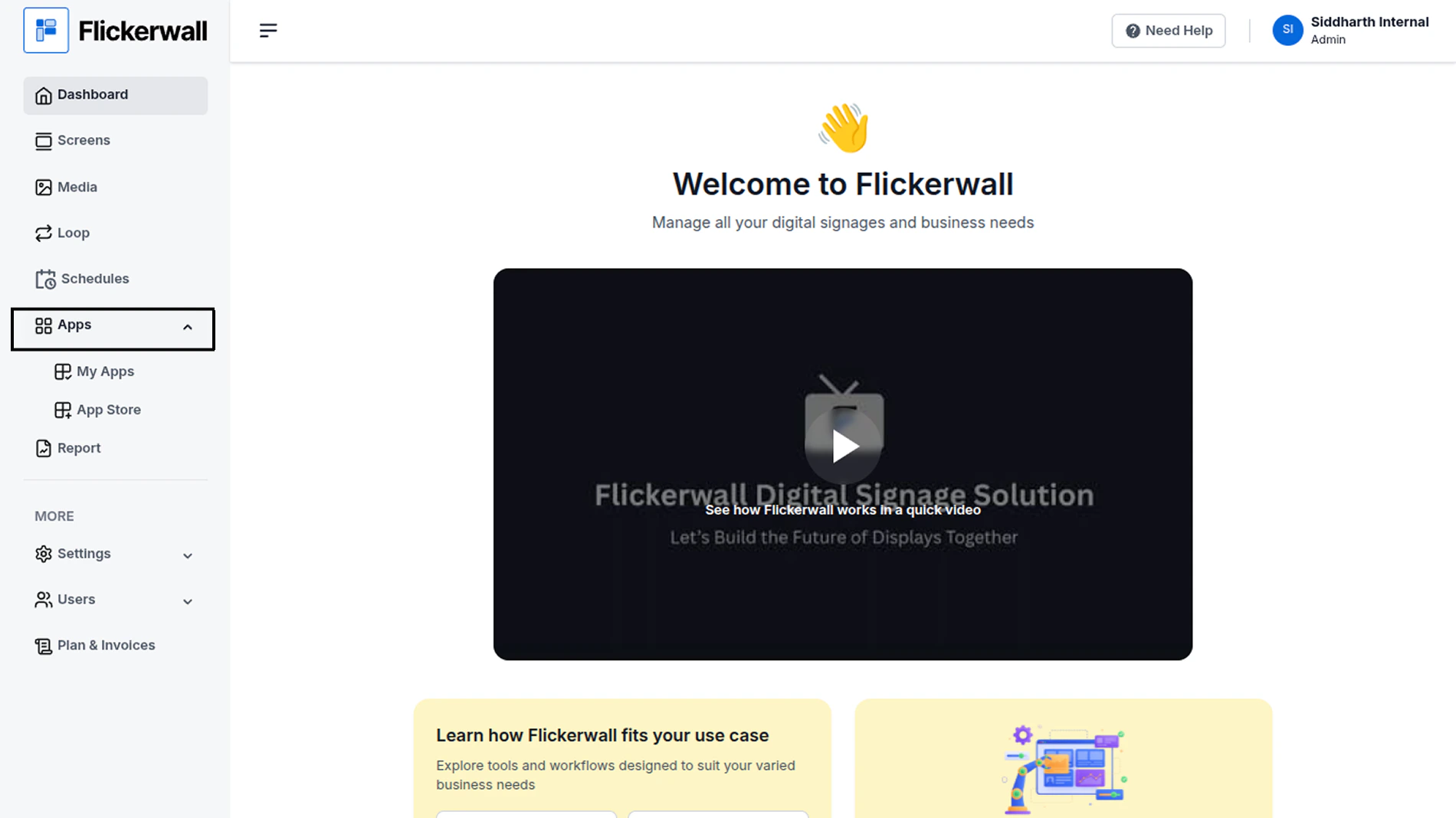
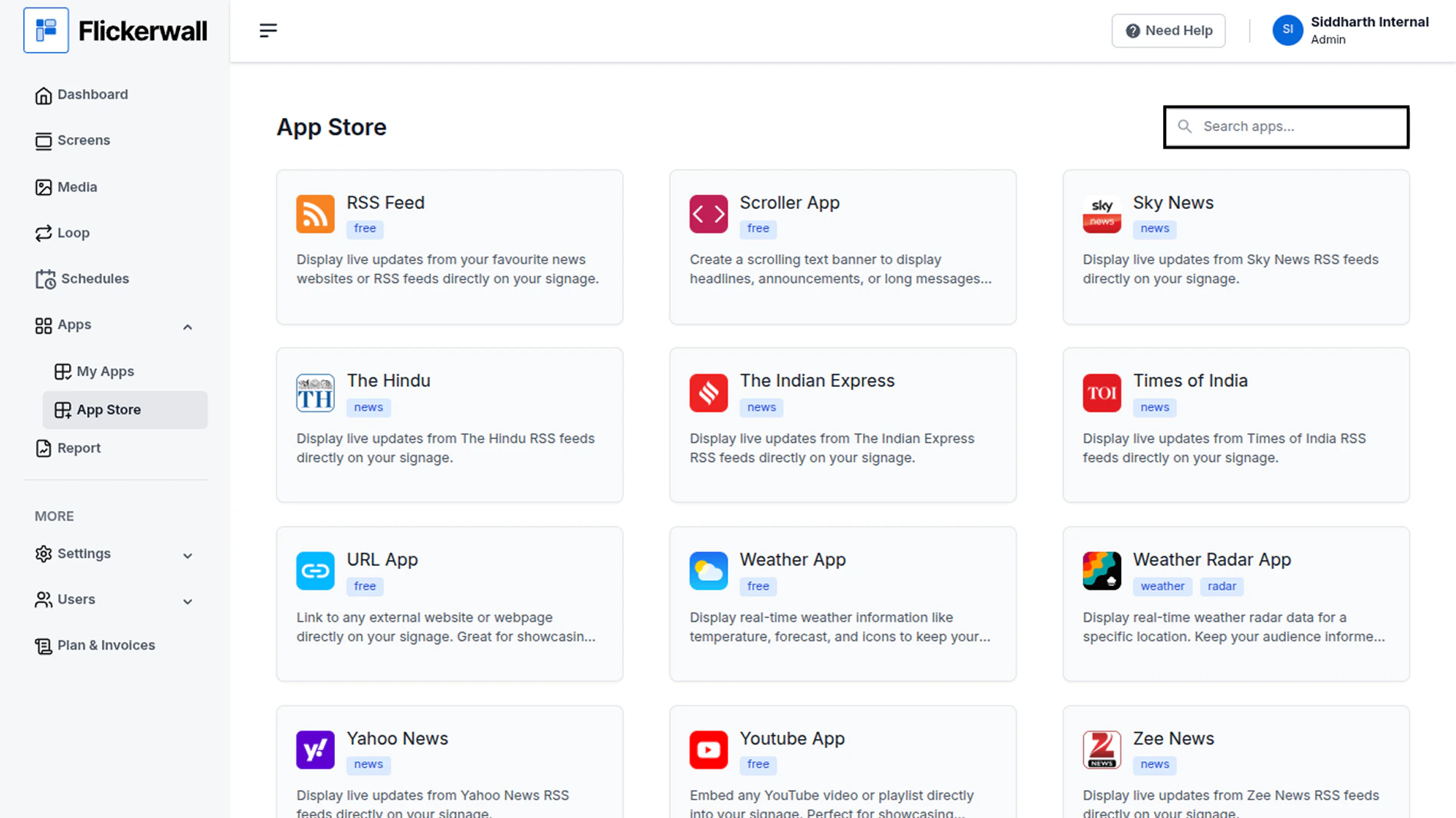
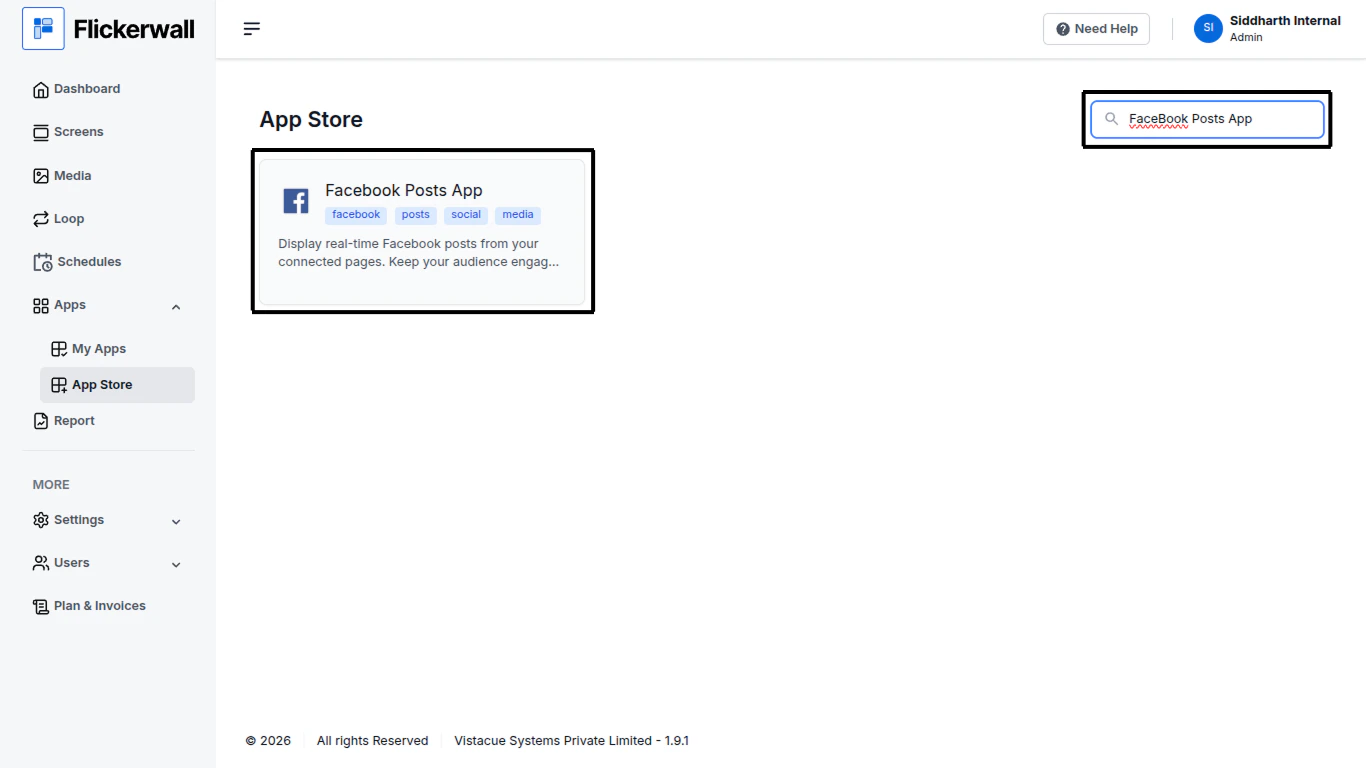
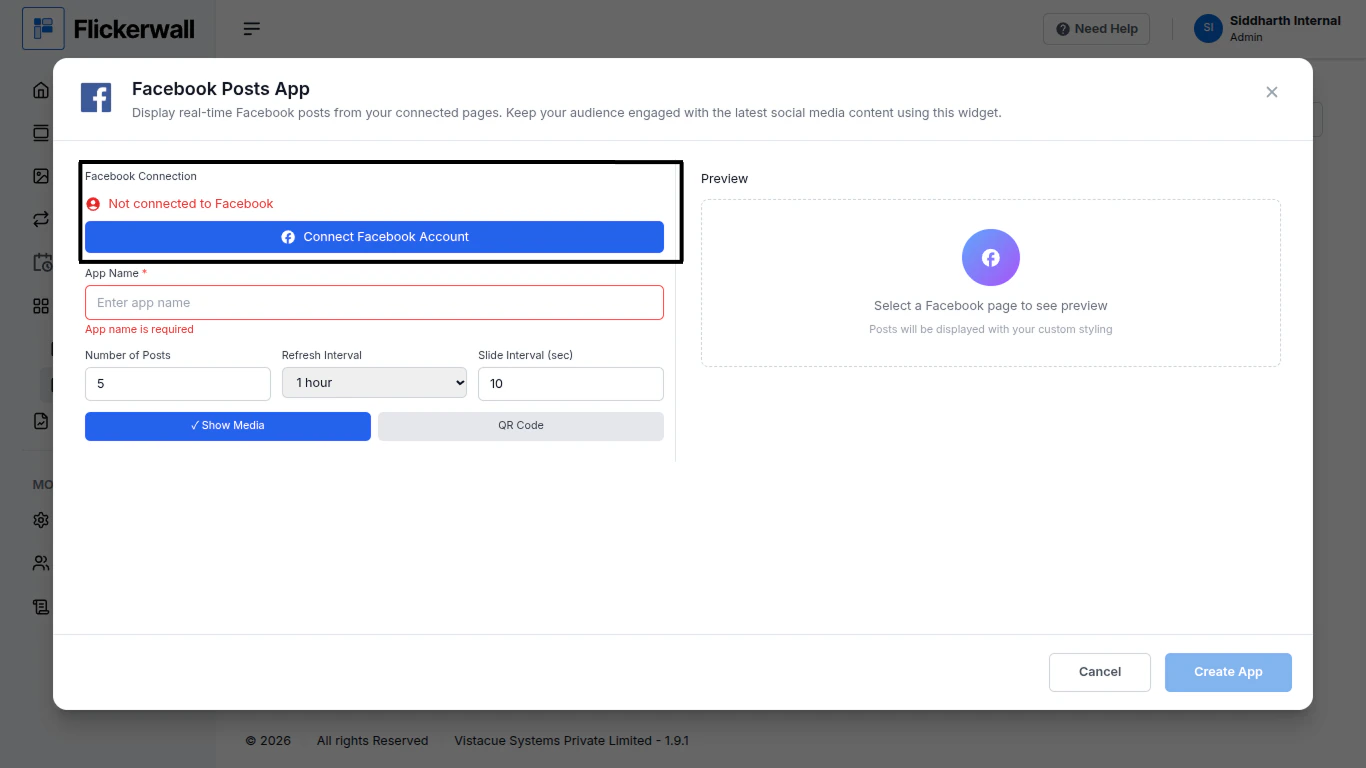
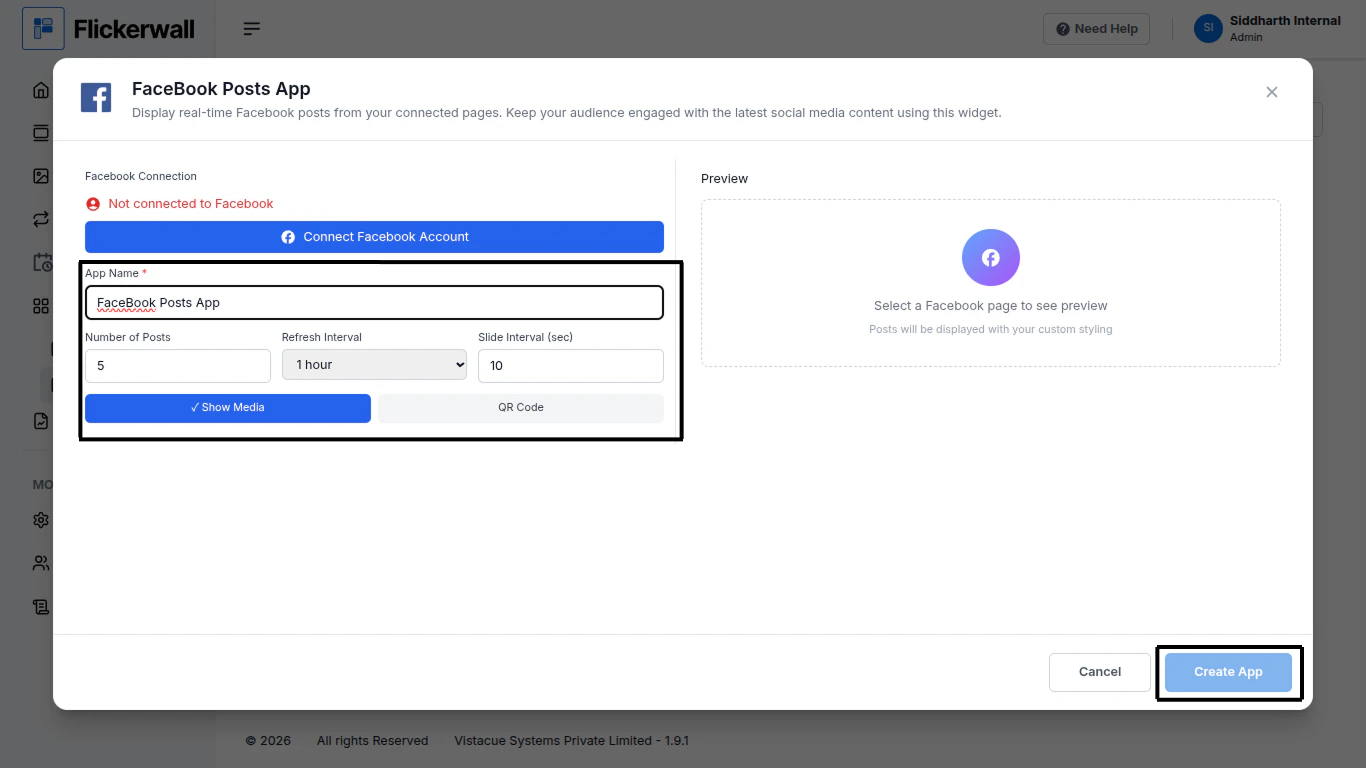
Step 1Go to Apps and then App store!click on the apps and then Nevigate to App store in the appeared drawerStep 2Go to Search Baryou can search the app you wantStep 3Search for FaceBook Posts App Select and click on the desired appStep 4First Connect a FaceBook Account and enter a Name for the AppEnter a name for app so you can find it easy laterStep 5enter how many images you want to showEnter a Refresh time ( the app will Reloads in the selected duration)Slide Interval (sec) (each image will change in the desired time)Ones done with the process click on Create App to Complete the processCongratulations : you have now Created a App for use Through Flickerwall store
⌘I
{"docsConfig":{"theme":"maple","$schema":"https://mintlify.com/docs.json","name":"Flickerwall Documentation","colors":{"primary":"#0369db","light":"#0369db","dark":"#15803D"},"logo":"https://mintcdn.com/flickerwall-796545b9/QyHLB_DuGuIs1P_v/images/Group2.svg?fit=max\u0026auto=format\u0026n=QyHLB_DuGuIs1P_v\u0026q=85\u0026s=468b8727704eed298bf74ff861c89070","favicon":"https://mintcdn.com/flickerwall-796545b9/WP4l1lhQM-CokS98/images/favicon.png?fit=max\u0026auto=format\u0026n=WP4l1lhQM-CokS98\u0026q=85\u0026s=04e3269553742f38b07278c8d5bc1d9d","appearance":{"default":"system","strict":false},"navbar":{"links":[{"href":"mailto:sales@flickerwall.com","label":"Support"}],"primary":{"type":"button","label":"Dashboard","href":"https://app.flickerwall.com"}},"footer":{"socials":{"x":"https://x.com/flickerwallApp","facebook":"https://facebook.com/flickerwall"}},"seo":{"indexing":"navigable"},"contextual":{"options":["copy","view","chatgpt","claude","perplexity","mcp","cursor","vscode"],"display":"header"},"styling":{"latex":false},"navigation":{"pages":[]}},"deployment":{"deploymentMetadataValue":{"subdomain":"flickerwall-796545b9","hasAudioNarration":false,"actualSubdomain":"flickerwall-796545b9","customDomains":["docs.flickerwall.com"],"gitSource":{"type":"github","owner":"flickerwall","repo":"fw-docs","deployBranch":"main","contentDirectory":"","isPrivate":true,"mountPath":"","label":""},"chroma":{"liveDeploymentHistoryId":"6a21f72c55ebb2c863916865","collectionId":"90765878-ecbb-480b-9c42-bfbb05aa2a30","schemaVersion":"v2"},"entitlements":{},"buildId":"6a21f72c55ebb2c863916865:success","clientVersion":"0.0.3990","searchFilterCounts":[{"language":"default","tag":"Cloud","count":112},{"language":"default","tag":"Apps","count":33},{"language":"default","tag":"News","count":32},{"language":"default","tag":"Settings","count":16},{"language":"default","tag":"Screens","count":10},{"language":"default","tag":"Loops","count":9},{"language":"default","tag":"Media","count":9},{"language":"default","tag":"Add or Manage","count":9},{"language":"default","tag":"User","count":9},{"language":"default","tag":"Create New or Manage","count":8}]},"assistantConfig":{"enableAskAiButton":false,"enableStarterQuestions":false,"enableAskAiSearchBar":true},"basePath":"","hasChatPermissions":false,"hasWebMcpPermissions":false,"toggles":[{"name":"kill-isr","enabled":true,"variant":{"name":"disabled","enabled":false,"feature_enabled":true},"impressionData":false},{"name":"agent-mintlify-slack","enabled":true,"variant":{"name":"disabled","enabled":false,"feature_enabled":true},"impressionData":false},{"name":"editor-v7-file-tree","enabled":true,"variant":{"name":"disabled","enabled":false,"feature_enabled":true},"impressionData":false},{"name":"agent-integrations-settings","enabled":true,"variant":{"name":"disabled","enabled":false,"feature_enabled":true},"impressionData":false},{"name":"automations-pr-grouping","enabled":true,"variant":{"name":"disabled","enabled":false,"feature_enabled":true},"impressionData":false},{"name":"custom-prefix","enabled":true,"variant":{"name":"disabled","enabled":false,"feature_enabled":true},"impressionData":false},{"name":"analytics-v7","enabled":true,"variant":{"name":"disabled","enabled":false,"feature_enabled":true},"impressionData":false},{"name":"user-flows-analytics","enabled":true,"variant":{"name":"disabled","enabled":false,"feature_enabled":true},"impressionData":false},{"name":"no-publish-flow","enabled":true,"variant":{"name":"disabled","enabled":false,"feature_enabled":true},"impressionData":false},{"name":"workos-onboarding","enabled":true,"variant":{"name":"disabled","enabled":false,"feature_enabled":true},"impressionData":false},{"name":"llms-txt-v2","enabled":true,"variant":{"name":"disabled","enabled":false,"feature_enabled":true},"impressionData":false},{"name":"pause-universal-search-reconcile","enabled":true,"variant":{"name":"disabled","enabled":false,"feature_enabled":true},"impressionData":false},{"name":"snapshot-serving-live","enabled":true,"variant":{"name":"disabled","enabled":false,"feature_enabled":true},"impressionData":false},{"name":"stripTemperatureMiddleware","enabled":true,"variant":{"name":"disabled","enabled":false,"feature_enabled":true},"impressionData":false},{"name":"per-site-search-delta","enabled":true,"variant":{"name":"disabled","enabled":false,"feature_enabled":true},"impressionData":false},{"name":"support-platform-pylon-zendesk","enabled":true,"variant":{"name":"disabled","enabled":false,"feature_enabled":true},"impressionData":false},{"name":"snapshot-serving","enabled":true,"variant":{"name":"disabled","enabled":false,"feature_enabled":true},"impressionData":false},{"name":"instant-rollback","enabled":true,"variant":{"name":"disabled","enabled":false,"feature_enabled":true},"impressionData":false},{"name":"granular-notifications-server","enabled":true,"variant":{"name":"disabled","enabled":false,"feature_enabled":true},"impressionData":false},{"name":"granular-notifications","enabled":true,"variant":{"name":"disabled","enabled":false,"feature_enabled":true},"impressionData":false},{"name":"editor-private-page-search","enabled":true,"variant":{"name":"disabled","enabled":false,"feature_enabled":true},"impressionData":false},{"name":"automations-fable","enabled":true,"variant":{"name":"disabled","enabled":false,"feature_enabled":true},"impressionData":false},{"name":"fixed-ai-action-pricing","enabled":true,"variant":{"name":"disabled","enabled":false,"feature_enabled":true},"impressionData":false},{"name":"automation-resolve-merge-conflict","enabled":true,"variant":{"name":"disabled","enabled":false,"feature_enabled":true},"impressionData":false},{"name":"scoped-publishing","enabled":true,"variant":{"name":"disabled","enabled":false,"feature_enabled":true},"impressionData":false},{"name":"mintql","enabled":true,"variant":{"name":"disabled","enabled":false,"feature_enabled":true},"impressionData":false},{"name":"page-level-analytics","enabled":true,"variant":{"name":"disabled","enabled":false,"feature_enabled":true},"impressionData":false},{"name":"editor-version-history-v2","enabled":true,"variant":{"name":"disabled","enabled":false,"feature_enabled":true},"impressionData":false},{"name":"editor-nav-generations","enabled":true,"variant":{"name":"disabled","enabled":false,"feature_enabled":true},"impressionData":false},{"name":"billing-page-v2","enabled":true,"variant":{"name":"disabled","enabled":false,"feature_enabled":true},"impressionData":false},{"name":"workspace-projects","enabled":true,"variant":{"name":"disabled","enabled":false,"feature_enabled":true},"impressionData":false},{"name":"assistant-v5","enabled":true,"variant":{"name":"disabled","enabled":false,"feature_enabled":true},"impressionData":false},{"name":"byok-sep-25","enabled":true,"variant":{"name":"disabled","enabled":false,"feature_enabled":true},"impressionData":false},{"name":"fork-pr-previews","enabled":true,"variant":{"name":"disabled","enabled":false,"feature_enabled":true},"impressionData":false},{"name":"revalidation-jwt","enabled":true,"variant":{"name":"disabled","enabled":false,"feature_enabled":true},"impressionData":false},{"name":"vite-origin","enabled":true,"variant":{"name":"disabled","enabled":false,"feature_enabled":true},"impressionData":false},{"name":"editor-agent-model-picker","enabled":true,"variant":{"name":"disabled","enabled":false,"feature_enabled":true},"impressionData":false},{"name":"billing-updated-9-15","enabled":true,"variant":{"name":"disabled","enabled":false,"feature_enabled":true},"impressionData":false},{"name":"workos-sso-scim","enabled":true,"variant":{"name":"disabled","enabled":false,"feature_enabled":true},"impressionData":false},{"name":"hobby-abuse-scan","enabled":true,"variant":{"name":"disabled","enabled":false,"feature_enabled":true},"impressionData":false},{"name":"dashboard-inbox","enabled":true,"variant":{"name":"disabled","enabled":false,"feature_enabled":true},"impressionData":false},{"name":"workos-signup","enabled":true,"variant":{"name":"disabled","enabled":false,"feature_enabled":true},"impressionData":false},{"name":"workos-enabled","enabled":true,"variant":{"name":"disabled","enabled":false,"feature_enabled":true},"impressionData":false}],"isAtlas":false,"googleFontsInlined":false},"customCss":[],"page":{"pagePath":"cloud/apps/how-to-add-the-facebook-post-app-from-flickerwall-store","slug":"/cloud/apps/how-to-add-the-facebook-post-app-from-flickerwall-store","pageMetadata":{"title":"How to add the Facebook Post app from Flickerwall store?","description":"step by step guide to learn how to add the Facebook Post app from the Flickerwall store","href":"/cloud/apps/how-to-add-the-facebook-post-app-from-flickerwall-store"},"description":{"compiledSource":"\"use strict\";\nconst {jsx: _jsx} = arguments[0];\nconst {useMDXComponents: _provideComponents} = arguments[0];\nfunction _createMdxContent(props) {\n const _components = {\n p: \"p\",\n ..._provideComponents(),\n ...props.components\n };\n return _jsx(_components.p, {\n children: \"step by step guide to learn how to add the Facebook Post app from the Flickerwall store\"\n });\n}\nfunction MDXContent(props = {}) {\n const {wrapper: MDXLayout} = {\n ..._provideComponents(),\n ...props.components\n };\n return MDXLayout ? _jsx(MDXLayout, {\n ...props,\n children: _jsx(_createMdxContent, {\n ...props\n })\n }) : _createMdxContent(props);\n}\nreturn {\n default: MDXContent\n};\n","frontmatter":{},"scope":{}},"pageType":"default","mdx":{"mdxSource":{"compiledSource":"\"use strict\";const{Fragment:_Fragment,jsx:_jsx,jsxs:_jsxs}=arguments[0];const{useMDXComponents:_provideComponents}=arguments[0];function _createMdxContent(props){const _components={hr:`hr`,p:`p`,..._provideComponents(),...props.components},{OptimizedImage}=_components;if(!OptimizedImage)_missingMdxReference(`OptimizedImage`,true);return _jsxs(_Fragment,{children:[_jsx(_components.hr,{}),`\n`,_jsx(_components.p,{children:`Step 1`}),`\n`,_jsx(_components.p,{children:`Go to Apps and then App store!`}),`\n`,_jsx(_components.p,{children:`click on the apps and then Nevigate to App store in the appeared drawer`}),`\n`,_jsx(OptimizedImage,{src:`https://mintcdn.com/flickerwall-796545b9/F04PkwLBM7RCLZ-O/images/apps-how-to-add-the-facebook-post-app-from-flickerwall-store-image-1.png?fit=max\u0026auto=format\u0026n=F04PkwLBM7RCLZ-O\u0026q=85\u0026s=8da6e737e1e7b3a7dc0cb076ccd1a681`,alt:``,\"data-og-width\":`1900`,width:`1900`,\"data-og-height\":`1068`,height:`1068`,\"data-path\":`images/apps-how-to-add-the-facebook-post-app-from-flickerwall-store-image-1.png`,\"data-optimize\":`true`,\"data-opv\":`3`,srcset:`https://mintcdn.com/flickerwall-796545b9/F04PkwLBM7RCLZ-O/images/apps-how-to-add-the-facebook-post-app-from-flickerwall-store-image-1.png?w=280\u0026fit=max\u0026auto=format\u0026n=F04PkwLBM7RCLZ-O\u0026q=85\u0026s=86001aa17b628354e6b0f7553f6e3049 280w, https://mintcdn.com/flickerwall-796545b9/F04PkwLBM7RCLZ-O/images/apps-how-to-add-the-facebook-post-app-from-flickerwall-store-image-1.png?w=560\u0026fit=max\u0026auto=format\u0026n=F04PkwLBM7RCLZ-O\u0026q=85\u0026s=b0930fd5b8cf5b5adb658d2a922e5641 560w, https://mintcdn.com/flickerwall-796545b9/F04PkwLBM7RCLZ-O/images/apps-how-to-add-the-facebook-post-app-from-flickerwall-store-image-1.png?w=840\u0026fit=max\u0026auto=format\u0026n=F04PkwLBM7RCLZ-O\u0026q=85\u0026s=49ee657c92e0a51663ca9639ccd5fb42 840w, https://mintcdn.com/flickerwall-796545b9/F04PkwLBM7RCLZ-O/images/apps-how-to-add-the-facebook-post-app-from-flickerwall-store-image-1.png?w=1100\u0026fit=max\u0026auto=format\u0026n=F04PkwLBM7RCLZ-O\u0026q=85\u0026s=292f259845d529757349902dcedb4573 1100w, https://mintcdn.com/flickerwall-796545b9/F04PkwLBM7RCLZ-O/images/apps-how-to-add-the-facebook-post-app-from-flickerwall-store-image-1.png?w=1650\u0026fit=max\u0026auto=format\u0026n=F04PkwLBM7RCLZ-O\u0026q=85\u0026s=fd68721ce6f727a80a964c19e9dd9a16 1650w, https://mintcdn.com/flickerwall-796545b9/F04PkwLBM7RCLZ-O/images/apps-how-to-add-the-facebook-post-app-from-flickerwall-store-image-1.png?w=2500\u0026fit=max\u0026auto=format\u0026n=F04PkwLBM7RCLZ-O\u0026q=85\u0026s=9f11859dfdc7836aa9aa7cf8c9ca3b9e 2500w`}),`\n`,_jsx(_components.p,{children:`Step 2`}),`\n`,_jsx(_components.p,{children:`Go to Search Bar`}),`\n`,_jsx(_components.p,{children:`you can search the app you want`}),`\n`,_jsx(OptimizedImage,{src:`https://mintcdn.com/flickerwall-796545b9/F04PkwLBM7RCLZ-O/images/apps-how-to-add-the-facebook-post-app-from-flickerwall-store-image-2.png?fit=max\u0026auto=format\u0026n=F04PkwLBM7RCLZ-O\u0026q=85\u0026s=2e8497851c36859f02ef7052d921b3f4`,alt:``,\"data-og-width\":`1900`,width:`1900`,\"data-og-height\":`1068`,height:`1068`,\"data-path\":`images/apps-how-to-add-the-facebook-post-app-from-flickerwall-store-image-2.png`,\"data-optimize\":`true`,\"data-opv\":`3`,srcset:`https://mintcdn.com/flickerwall-796545b9/F04PkwLBM7RCLZ-O/images/apps-how-to-add-the-facebook-post-app-from-flickerwall-store-image-2.png?w=280\u0026fit=max\u0026auto=format\u0026n=F04PkwLBM7RCLZ-O\u0026q=85\u0026s=e72c7826f6a485247d8b91ff1bc73e21 280w, https://mintcdn.com/flickerwall-796545b9/F04PkwLBM7RCLZ-O/images/apps-how-to-add-the-facebook-post-app-from-flickerwall-store-image-2.png?w=560\u0026fit=max\u0026auto=format\u0026n=F04PkwLBM7RCLZ-O\u0026q=85\u0026s=47babd102b68be2e1e957446ef11cd22 560w, https://mintcdn.com/flickerwall-796545b9/F04PkwLBM7RCLZ-O/images/apps-how-to-add-the-facebook-post-app-from-flickerwall-store-image-2.png?w=840\u0026fit=max\u0026auto=format\u0026n=F04PkwLBM7RCLZ-O\u0026q=85\u0026s=9c4e08f0bfc8a0a0a6ceb784320a419d 840w, https://mintcdn.com/flickerwall-796545b9/F04PkwLBM7RCLZ-O/images/apps-how-to-add-the-facebook-post-app-from-flickerwall-store-image-2.png?w=1100\u0026fit=max\u0026auto=format\u0026n=F04PkwLBM7RCLZ-O\u0026q=85\u0026s=db687dfc1d1411a2e17fb7dd131de582 1100w, https://mintcdn.com/flickerwall-796545b9/F04PkwLBM7RCLZ-O/images/apps-how-to-add-the-facebook-post-app-from-flickerwall-store-image-2.png?w=1650\u0026fit=max\u0026auto=format\u0026n=F04PkwLBM7RCLZ-O\u0026q=85\u0026s=175fe0542377c49f605f2e8865e2b096 1650w, https://mintcdn.com/flickerwall-796545b9/F04PkwLBM7RCLZ-O/images/apps-how-to-add-the-facebook-post-app-from-flickerwall-store-image-2.png?w=2500\u0026fit=max\u0026auto=format\u0026n=F04PkwLBM7RCLZ-O\u0026q=85\u0026s=900696fe6cfb43fba395b154adece55e 2500w`}),`\n`,_jsx(_components.p,{children:`Step 3`}),`\n`,_jsx(_components.p,{children:`Search for FaceBook Posts App Select and click on the desired app`}),`\n`,_jsx(OptimizedImage,{src:`https://mintcdn.com/flickerwall-796545b9/F04PkwLBM7RCLZ-O/images/apps-how-to-add-the-facebook-post-app-from-flickerwall-store-image-3.png?fit=max\u0026auto=format\u0026n=F04PkwLBM7RCLZ-O\u0026q=85\u0026s=f422d0bf9df351eaf807551bfa98eaaa`,alt:``,\"data-og-width\":`1366`,width:`1366`,\"data-og-height\":`768`,height:`768`,\"data-path\":`images/apps-how-to-add-the-facebook-post-app-from-flickerwall-store-image-3.png`,\"data-optimize\":`true`,\"data-opv\":`3`,srcset:`https://mintcdn.com/flickerwall-796545b9/F04PkwLBM7RCLZ-O/images/apps-how-to-add-the-facebook-post-app-from-flickerwall-store-image-3.png?w=280\u0026fit=max\u0026auto=format\u0026n=F04PkwLBM7RCLZ-O\u0026q=85\u0026s=a712a4770beaf670a75f7fbb135ef1f8 280w, https://mintcdn.com/flickerwall-796545b9/F04PkwLBM7RCLZ-O/images/apps-how-to-add-the-facebook-post-app-from-flickerwall-store-image-3.png?w=560\u0026fit=max\u0026auto=format\u0026n=F04PkwLBM7RCLZ-O\u0026q=85\u0026s=c31d22fc4a7f14ef83b6f94d8b6b1b2e 560w, https://mintcdn.com/flickerwall-796545b9/F04PkwLBM7RCLZ-O/images/apps-how-to-add-the-facebook-post-app-from-flickerwall-store-image-3.png?w=840\u0026fit=max\u0026auto=format\u0026n=F04PkwLBM7RCLZ-O\u0026q=85\u0026s=a6d6abdc4242475ffbbca1290ad3354a 840w, https://mintcdn.com/flickerwall-796545b9/F04PkwLBM7RCLZ-O/images/apps-how-to-add-the-facebook-post-app-from-flickerwall-store-image-3.png?w=1100\u0026fit=max\u0026auto=format\u0026n=F04PkwLBM7RCLZ-O\u0026q=85\u0026s=90be5ef142338012dc3857f9055aae66 1100w, https://mintcdn.com/flickerwall-796545b9/F04PkwLBM7RCLZ-O/images/apps-how-to-add-the-facebook-post-app-from-flickerwall-store-image-3.png?w=1650\u0026fit=max\u0026auto=format\u0026n=F04PkwLBM7RCLZ-O\u0026q=85\u0026s=b4e0ff81b919eb80d0c22d2f88d49e3c 1650w, https://mintcdn.com/flickerwall-796545b9/F04PkwLBM7RCLZ-O/images/apps-how-to-add-the-facebook-post-app-from-flickerwall-store-image-3.png?w=2500\u0026fit=max\u0026auto=format\u0026n=F04PkwLBM7RCLZ-O\u0026q=85\u0026s=063b0c57a60bc7b4c6e67a274fe7a8c8 2500w`}),`\n`,_jsx(_components.p,{children:`Step 4`}),`\n`,_jsx(_components.p,{children:`First Connect a FaceBook Account and enter a Name for the App`}),`\n`,_jsx(_components.p,{children:`Enter a name for app so you can find it easy later`}),`\n`,_jsx(OptimizedImage,{src:`https://mintcdn.com/flickerwall-796545b9/F04PkwLBM7RCLZ-O/images/apps-how-to-add-the-facebook-post-app-from-flickerwall-store-image-4.png?fit=max\u0026auto=format\u0026n=F04PkwLBM7RCLZ-O\u0026q=85\u0026s=847dab403f08f1ebaf948fa90c920977`,alt:``,\"data-og-width\":`1366`,width:`1366`,\"data-og-height\":`768`,height:`768`,\"data-path\":`images/apps-how-to-add-the-facebook-post-app-from-flickerwall-store-image-4.png`,\"data-optimize\":`true`,\"data-opv\":`3`,srcset:`https://mintcdn.com/flickerwall-796545b9/F04PkwLBM7RCLZ-O/images/apps-how-to-add-the-facebook-post-app-from-flickerwall-store-image-4.png?w=280\u0026fit=max\u0026auto=format\u0026n=F04PkwLBM7RCLZ-O\u0026q=85\u0026s=67c459033576289e17ea3ef5cd03b06f 280w, https://mintcdn.com/flickerwall-796545b9/F04PkwLBM7RCLZ-O/images/apps-how-to-add-the-facebook-post-app-from-flickerwall-store-image-4.png?w=560\u0026fit=max\u0026auto=format\u0026n=F04PkwLBM7RCLZ-O\u0026q=85\u0026s=1f7ea128e1500e52a7dcd74f35b934c5 560w, https://mintcdn.com/flickerwall-796545b9/F04PkwLBM7RCLZ-O/images/apps-how-to-add-the-facebook-post-app-from-flickerwall-store-image-4.png?w=840\u0026fit=max\u0026auto=format\u0026n=F04PkwLBM7RCLZ-O\u0026q=85\u0026s=0b7f63ae50ec0405f71e0a3dd7d4d9be 840w, https://mintcdn.com/flickerwall-796545b9/F04PkwLBM7RCLZ-O/images/apps-how-to-add-the-facebook-post-app-from-flickerwall-store-image-4.png?w=1100\u0026fit=max\u0026auto=format\u0026n=F04PkwLBM7RCLZ-O\u0026q=85\u0026s=31ee66a77949bd927b2f2f44aca6af95 1100w, https://mintcdn.com/flickerwall-796545b9/F04PkwLBM7RCLZ-O/images/apps-how-to-add-the-facebook-post-app-from-flickerwall-store-image-4.png?w=1650\u0026fit=max\u0026auto=format\u0026n=F04PkwLBM7RCLZ-O\u0026q=85\u0026s=14607443b7b6c238c5a4b3c23856f349 1650w, https://mintcdn.com/flickerwall-796545b9/F04PkwLBM7RCLZ-O/images/apps-how-to-add-the-facebook-post-app-from-flickerwall-store-image-4.png?w=2500\u0026fit=max\u0026auto=format\u0026n=F04PkwLBM7RCLZ-O\u0026q=85\u0026s=a59ef06dc3e356e709d02b9fc4b17f0b 2500w`}),`\n`,_jsx(_components.p,{children:`Step 5`}),`\n`,_jsx(_components.p,{children:`enter how many images you want to show`}),`\n`,_jsx(_components.p,{children:`Enter a Refresh time ( the app will Reloads in the selected duration)`}),`\n`,_jsx(_components.p,{children:`Slide Interval (sec) (each image will change in the desired time)`}),`\n`,_jsx(OptimizedImage,{src:`https://mintcdn.com/flickerwall-796545b9/F04PkwLBM7RCLZ-O/images/apps-how-to-add-the-facebook-post-app-from-flickerwall-store-image-5.png?fit=max\u0026auto=format\u0026n=F04PkwLBM7RCLZ-O\u0026q=85\u0026s=0a3a19670dad5c71847a83eec673df74`,alt:``,\"data-og-width\":`1366`,width:`1366`,\"data-og-height\":`768`,height:`768`,\"data-path\":`images/apps-how-to-add-the-facebook-post-app-from-flickerwall-store-image-5.png`,\"data-optimize\":`true`,\"data-opv\":`3`,srcset:`https://mintcdn.com/flickerwall-796545b9/F04PkwLBM7RCLZ-O/images/apps-how-to-add-the-facebook-post-app-from-flickerwall-store-image-5.png?w=280\u0026fit=max\u0026auto=format\u0026n=F04PkwLBM7RCLZ-O\u0026q=85\u0026s=009a728a5772b803634f826a83c1d151 280w, https://mintcdn.com/flickerwall-796545b9/F04PkwLBM7RCLZ-O/images/apps-how-to-add-the-facebook-post-app-from-flickerwall-store-image-5.png?w=560\u0026fit=max\u0026auto=format\u0026n=F04PkwLBM7RCLZ-O\u0026q=85\u0026s=28766311d30348c36f5f90e2791e164c 560w, https://mintcdn.com/flickerwall-796545b9/F04PkwLBM7RCLZ-O/images/apps-how-to-add-the-facebook-post-app-from-flickerwall-store-image-5.png?w=840\u0026fit=max\u0026auto=format\u0026n=F04PkwLBM7RCLZ-O\u0026q=85\u0026s=beb7462e8baed0ceab7d90bf36c948d1 840w, https://mintcdn.com/flickerwall-796545b9/F04PkwLBM7RCLZ-O/images/apps-how-to-add-the-facebook-post-app-from-flickerwall-store-image-5.png?w=1100\u0026fit=max\u0026auto=format\u0026n=F04PkwLBM7RCLZ-O\u0026q=85\u0026s=7dc10e63abcd50177f59a8ac40f55198 1100w, https://mintcdn.com/flickerwall-796545b9/F04PkwLBM7RCLZ-O/images/apps-how-to-add-the-facebook-post-app-from-flickerwall-store-image-5.png?w=1650\u0026fit=max\u0026auto=format\u0026n=F04PkwLBM7RCLZ-O\u0026q=85\u0026s=e97b859f5f1a487bda758207fc913102 1650w, https://mintcdn.com/flickerwall-796545b9/F04PkwLBM7RCLZ-O/images/apps-how-to-add-the-facebook-post-app-from-flickerwall-store-image-5.png?w=2500\u0026fit=max\u0026auto=format\u0026n=F04PkwLBM7RCLZ-O\u0026q=85\u0026s=48ea9e1ef21c14f0d5aaeb67187b6510 2500w`}),`\n`,_jsx(_components.p,{children:`Ones done with the process click on Create App to Complete the process`}),`\n`,_jsx(_components.p,{children:`Congratulations : you have now Created a App for use Through Flickerwall store`})]})}function MDXContent(props={}){const{wrapper:MDXLayout}={..._provideComponents(),...props.components};return MDXLayout?_jsx(MDXLayout,{...props,children:_jsx(_createMdxContent,{...props})}):_createMdxContent(props)}return{default:MDXContent};function _missingMdxReference(id,component){throw new Error(`Expected `+(component?`component`:`object`)+\" `\"+id+\"` to be defined: you likely forgot to import, pass, or provide it.\")}","frontmatter":{},"scope":{"config":{},"pageMetadata":{"title":"How to add the Facebook Post app from Flickerwall store?","description":"step by step guide to learn how to add the Facebook Post app from the Flickerwall store","href":"/cloud/apps/how-to-add-the-facebook-post-app-from-flickerwall-store"}}},"mdxSourceWithNoJs":null},"mdxExtracts":{"tableOfContents":[],"codeExamples":{}},"jsLinks":[],"subdomain":"flickerwall-796545b9","siteName":"Flickerwall Documentation","title":"How to add the Facebook Post app from Flickerwall store? - Flickerwall Documentation","navMaps":{"firstHrefInVersion":{},"firstHrefInLanguage":{}},"lastModified":"2026-02-04T17:33:05.759Z","originalFileLocation":"cloud/apps/how-to-add-the-facebook-post-app-from-flickerwall-store.md"},"headHtml":"\u003cscript data-mint-head>(function(){var d=document.documentElement,p=null;if(!p){try{p=localStorage.getItem(\"isDarkMode\")}catch(e){}if(p==='true')p='dark';else if(p==='false')p='light';if(p!=='light'\u0026\u0026p!=='dark'\u0026\u0026p!=='system')p=\"system\"}var r=p==='system'?(matchMedia(\"(prefers-color-scheme: dark)\").matches?'dark':'light'):p;d.classList.remove(r==='dark'?'light':'dark');d.classList.add(r);d.setAttribute(\"data-theme-preference\",p)})();\u003c/script>\u003cmeta data-mint-head name=\"description\" content=\"step by step guide to learn how to add the Facebook Post app from the Flickerwall store\">\u003cmeta data-mint-head name=\"application-name\" content=\"Flickerwall Documentation\">\u003cmeta data-mint-head name=\"generator\" content=\"Mintlify\">\u003clink data-mint-head rel=\"icon\" type=\"image/png\" sizes=\"192x192\" href=\"/mintlify-assets/_mintlify/favicons/flickerwall-796545b9/IcI644e4EXkckkSh/_generated/favicon/android-chrome-192x192.png\" media=\"(prefers-color-scheme: light)\">\u003clink data-mint-head rel=\"apple-touch-icon\" type=\"image/png\" sizes=\"180x180\" href=\"/mintlify-assets/_mintlify/favicons/flickerwall-796545b9/IcI644e4EXkckkSh/_generated/favicon/apple-touch-icon.png\">\u003clink data-mint-head rel=\"icon\" type=\"image/png\" sizes=\"16x16\" href=\"/mintlify-assets/_mintlify/favicons/flickerwall-796545b9/IcI644e4EXkckkSh/_generated/favicon/favicon-16x16.png\" media=\"(prefers-color-scheme: light)\">\u003clink data-mint-head rel=\"icon\" type=\"image/png\" sizes=\"32x32\" href=\"/mintlify-assets/_mintlify/favicons/flickerwall-796545b9/IcI644e4EXkckkSh/_generated/favicon/favicon-32x32.png\" media=\"(prefers-color-scheme: light)\">\u003clink data-mint-head rel=\"shortcut icon\" type=\"image/x-icon\" href=\"/mintlify-assets/_mintlify/favicons/flickerwall-796545b9/IcI644e4EXkckkSh/_generated/favicon/favicon.ico\" media=\"(prefers-color-scheme: light)\">\u003clink data-mint-head rel=\"icon\" type=\"image/png\" sizes=\"192x192\" href=\"/mintlify-assets/_mintlify/favicons/flickerwall-796545b9/IcI644e4EXkckkSh/_generated/favicon-dark/android-chrome-192x192.png\" media=\"(prefers-color-scheme: dark)\">\u003clink data-mint-head rel=\"icon\" type=\"image/png\" sizes=\"16x16\" href=\"/mintlify-assets/_mintlify/favicons/flickerwall-796545b9/IcI644e4EXkckkSh/_generated/favicon-dark/favicon-16x16.png\" media=\"(prefers-color-scheme: dark)\">\u003clink data-mint-head rel=\"icon\" type=\"image/png\" sizes=\"32x32\" href=\"/mintlify-assets/_mintlify/favicons/flickerwall-796545b9/IcI644e4EXkckkSh/_generated/favicon-dark/favicon-32x32.png\" media=\"(prefers-color-scheme: dark)\">\u003clink data-mint-head rel=\"shortcut icon\" type=\"image/x-icon\" href=\"/mintlify-assets/_mintlify/favicons/flickerwall-796545b9/IcI644e4EXkckkSh/_generated/favicon-dark/favicon.ico\" media=\"(prefers-color-scheme: dark)\">\u003cmeta data-mint-head property=\"og:title\" content=\"How to add the Facebook Post app from Flickerwall store? - Flickerwall Documentation\">\u003cmeta data-mint-head property=\"og:description\" content=\"step by step guide to learn how to add the Facebook Post app from the Flickerwall store\">\u003cmeta data-mint-head property=\"og:site_name\" content=\"Flickerwall Documentation\">\u003cmeta data-mint-head property=\"og:url\" content=\"https://docs.flickerwall.com/cloud/apps/how-to-add-the-facebook-post-app-from-flickerwall-store\">\u003cmeta data-mint-head property=\"og:type\" content=\"website\">\u003cmeta data-mint-head property=\"og:image\" content=\"https://flickerwall-796545b9.mintlify.app/_mintlify/api/og/v2?division=FaceBook\u0026amp;title=How+to+add+the+Facebook+Post+app+from+Flickerwall+store%3F\u0026amp;description=step+by+step+guide+to+learn+how+to+add+the+Facebook+Post+app+from+the+Flickerwall+store\u0026amp;theme=20058d3373c6eb2b6ef729ff\u0026amp;signature=47674cb13b7f1bf5d3c0b1d7f8e0e894d1f69afec9e622870b0d1540d9dc53ea\">\u003cmeta data-mint-head property=\"og:image:width\" content=\"1200\">\u003cmeta data-mint-head property=\"og:image:height\" content=\"630\">\u003cmeta data-mint-head name=\"twitter:card\" content=\"summary_large_image\">\u003cmeta data-mint-head name=\"twitter:title\" content=\"How to add the Facebook Post app from Flickerwall store? - Flickerwall Documentation\">\u003cmeta data-mint-head name=\"twitter:description\" content=\"step by step guide to learn how to add the Facebook Post app from the Flickerwall store\">\u003cmeta data-mint-head name=\"twitter:image\" content=\"https://flickerwall-796545b9.mintlify.app/_mintlify/api/og/v2?division=FaceBook\u0026amp;title=How+to+add+the+Facebook+Post+app+from+Flickerwall+store%3F\u0026amp;description=step+by+step+guide+to+learn+how+to+add+the+Facebook+Post+app+from+the+Flickerwall+store\u0026amp;theme=20058d3373c6eb2b6ef729ff\u0026amp;signature=47674cb13b7f1bf5d3c0b1d7f8e0e894d1f69afec9e622870b0d1540d9dc53ea\">\u003cmeta data-mint-head name=\"twitter:image:width\" content=\"1200\">\u003cmeta data-mint-head name=\"twitter:image:height\" content=\"630\">\u003cmeta data-mint-head name=\"msapplication-config\" content=\"/mintlify-assets/_mintlify/favicons/flickerwall-796545b9/IcI644e4EXkckkSh/_generated/favicon/browserconfig.xml\">\u003cmeta data-mint-head name=\"apple-mobile-web-app-title\" content=\"Flickerwall Documentation\">\u003cmeta data-mint-head name=\"msapplication-TileColor\" content=\"#0369db\">\u003clink data-mint-head rel=\"canonical\" href=\"https://docs.flickerwall.com/cloud/apps/how-to-add-the-facebook-post-app-from-flickerwall-store\">\u003clink data-mint-head rel=\"alternate\" type=\"application/xml\" href=\"/sitemap.xml\">\u003clink data-mint-head rel=\"alternate\" type=\"text/markdown\" href=\"/cloud/apps/how-to-add-the-facebook-post-app-from-flickerwall-store.md\">\u003cscript data-mint-head type=\"application/ld+json\">{\"@context\":\"https://schema.org\",\"@graph\":[{\"@type\":\"Organization\",\"@id\":\"https://docs.flickerwall.com/#organization\",\"name\":\"Flickerwall Documentation\",\"url\":\"https://docs.flickerwall.com\",\"logo\":{\"@type\":\"ImageObject\",\"url\":\"https://mintcdn.com/flickerwall-796545b9/QyHLB_DuGuIs1P_v/images/Group2.svg?fit=max\u0026auto=format\u0026n=QyHLB_DuGuIs1P_v\u0026q=85\u0026s=468b8727704eed298bf74ff861c89070\"}},{\"@type\":\"WebSite\",\"@id\":\"https://docs.flickerwall.com#website\",\"name\":\"Flickerwall Documentation\",\"url\":\"https://docs.flickerwall.com\",\"publisher\":{\"@id\":\"https://docs.flickerwall.com/#organization\"}},{\"@type\":\"WebPage\",\"@id\":\"https://docs.flickerwall.com/cloud/apps/how-to-add-the-facebook-post-app-from-flickerwall-store#webpage\",\"url\":\"https://docs.flickerwall.com/cloud/apps/how-to-add-the-facebook-post-app-from-flickerwall-store\",\"name\":\"How to add the Facebook Post app from Flickerwall store?\",\"description\":\"step by step guide to learn how to add the Facebook Post app from the Flickerwall store\",\"dateModified\":\"2026-02-04T17:33:05.759Z\",\"isPartOf\":{\"@id\":\"https://docs.flickerwall.com#website\"},\"breadcrumb\":{\"@id\":\"https://docs.flickerwall.com/cloud/apps/how-to-add-the-facebook-post-app-from-flickerwall-store#breadcrumb\"}},{\"@type\":\"BreadcrumbList\",\"@id\":\"https://docs.flickerwall.com/cloud/apps/how-to-add-the-facebook-post-app-from-flickerwall-store#breadcrumb\",\"itemListElement\":[{\"@type\":\"ListItem\",\"position\":1,\"name\":\"Apps\",\"item\":\"https://docs.flickerwall.com/cloud/apps/how-to-add-the-live-streaming-app-from-flickerwall-store\"},{\"@type\":\"ListItem\",\"position\":2,\"name\":\"How to add the Facebook Post app from Flickerwall store?\",\"item\":\"https://docs.flickerwall.com/cloud/apps/how-to-add-the-facebook-post-app-from-flickerwall-store\"}]},{\"@type\":[\"Article\",\"TechArticle\"],\"@id\":\"https://docs.flickerwall.com/cloud/apps/how-to-add-the-facebook-post-app-from-flickerwall-store#article\",\"headline\":\"How to add the Facebook Post app from Flickerwall store?\",\"name\":\"How to add the Facebook Post app from Flickerwall store?\",\"description\":\"step by step guide to learn how to add the Facebook Post app from the Flickerwall store\",\"url\":\"https://docs.flickerwall.com/cloud/apps/how-to-add-the-facebook-post-app-from-flickerwall-store\",\"mainEntityOfPage\":{\"@id\":\"https://docs.flickerwall.com/cloud/apps/how-to-add-the-facebook-post-app-from-flickerwall-store#webpage\"},\"dateModified\":\"2026-02-04T17:33:05.759Z\",\"publisher\":{\"@id\":\"https://docs.flickerwall.com/#organization\"},\"isPartOf\":{\"@id\":\"https://docs.flickerwall.com#website\"}}]}\u003c/script>\u003cscript data-mint-head type=\"application/ld+json\">{\"@context\":\"https://schema.org\",\"@type\":\"WebSite\",\"name\":\"Flickerwall Documentation\",\"creator\":{\"@type\":\"Organization\",\"name\":\"Mintlify\",\"url\":\"https://mintlify.com\"}}\u003c/script>","siteName":"Flickerwall Documentation","nav":{"global":null,"tabs":[{"tab":"Cloud","pages":[{"title":"How to get started With Flickerwall","href":"/getting-started"},{"group":"Installation Guide","pages":[{"group":"Select Model","pages":[{"group":"Windows","pages":[{"title":"How to install the Flickerwall digital signage software on a Windows player?","href":"/cloud/installation-guide/how-to-install-the-flickerwall-digital-signage-software-on-a-windows-player"}]},{"group":"Andriod","pages":[{"title":"How to install the Flickerwall Digital Signage Player app on Android from Play Store?","href":"/cloud/installation-guide/how-to-install-the-flickerwall-digital-signage-player-app-on-android-from-play-store"}]},{"group":"Amazon Fire TV Stick","pages":[{"title":"Installation Guide for Amazon Fire TV Stick Devices","href":"/cloud/installation-guide/flickerwall-installation-guide-for-amazon-fire-tv-stick-devices"}]},{"group":"LG webOS ","pages":[{"title":null,"href":"/cloud/installation-guide/flickerwall-player-installation-lg-webos-via-usb-flash-drive"},{"title":"Installing Flickerwall on LG webOS via the SI Server URL Method","href":"/cloud/installation-guide/installing-flickerwall-on-lg-webos-via-the-si-server-url-method"}]}]}]},{"group":"Screens","pages":[{"title":"Screen Module Overview","href":"/cloud/screens/screen-module-overview"},{"group":"Add or Manage","pages":[{"title":"How to change /Add the Tag on your Screens?","href":"/cloud/screens/how-to-add-the-tag-on-your-screens"},{"title":"How to change the Screen Name?","href":"/cloud/screens/how-to-change-the-screen-name"},{"title":"How to check if your screen is Scheduled for any content?","href":"/cloud/screens/how-to-check-if-your-screen-is-scheduled-for-any-content"},{"title":"How to change the Screen Name , Region ,Tag and Orientation?","href":"/cloud/screens/how-to-change-the-screen-name-region-tag-and-orientation"},{"title":"How to change /Add the Regions on your Screens?","href":"/cloud/screens/how-to-add-the-regions-on-your-screens"},{"title":"How to use the Quick Play Feature?","href":"/cloud/screens/how-to-use-the-quick-play-feature"},{"title":"How to Add / Change your default Loops for your Screens?","href":"/cloud/screens/how-to-change-your-default-loops-for-your-screens"},{"title":"How to take ScreenShot of the Current Screen?","href":"/cloud/screens/how-to-take-screenshot-of-the-current-screen"},{"title":"How to Add Screens?","href":"/cloud/screens/how-to-add-screens"}]}]},{"group":"Media","pages":[{"title":"Overview of Media Module","href":"/cloud/media/overview-of-media-module"},{"group":"Upload or Manage","pages":[{"title":"How to add Media to the module?","href":"/cloud/media/how-to-add-media-to-the-module"},{"title":"How to keep a track of your Cloud Storage?","href":"/cloud/media/how-to-keep-a-track-of-your-cloud-storage"},{"title":"How to move Uploaded Media to any Folder?","href":"/cloud/media/how-to-move-uploaded-media-to-any-folder"},{"title":"How to add your Canva Design using the Upload from Canva Method?","href":"/cloud/media/how-to-add-your-canva-design-using-the-upload-from-canva-method"},{"title":"How to make a Folder to Organize the Media to use it more Optimally?","href":"/cloud/media/how-to-make-a-folder-to-organize-the-media-to-use-it-more-optimally"},{"title":"How to add Media through URL method?","href":"/cloud/media/how-to-add-media-through-url-method"},{"title":"How to Change from List view Media to Grid view Media or vice versa?","href":"/cloud/media/how-to-change-from-list-view-media-to-grid-view-media-or-vice-versa"},{"title":"How to add Media directly or within the Folder?","href":"/cloud/media/how-to-add-media-directly-or-within-the-folder"}]}]},{"group":"Apps","pages":[{"group":"RSS Feed and Live Streaming","pages":[{"title":"How to add the Live Streaming app from Flickerwall store?","href":"/cloud/apps/how-to-add-the-live-streaming-app-from-flickerwall-store"},{"title":"How to add the RSS Feed app from the Flickerwall store?","href":"/cloud/apps/how-to-add-the-rss-feed-app-from-the-flickerwall-store"}]},{"group":"Kiosk","pages":[{"title":"How to add the Content Kiosk App from Flickerwall store?","href":"/cloud/apps/how-to-add-the-content-kiosk-app-from-flickerwall-store"}]},{"group":"Canva","pages":[{"title":"How to add the Canva Embed App from Flickerwall store?","href":"/cloud/apps/how-to-add-the-canva-embed-app-from-flickerwall-store"}]},{"group":"Weather","pages":[{"title":"How to add the Weather app from the Flickerwall store?","href":"/cloud/apps/how-to-add-the-weather-app-from-the-flickerwall-store"},{"title":"How to add the Weather Radar App from Flickerwall store?","href":"/cloud/apps/how-to-add-the-weather-radar-app-from-flickerwall-store"}]},{"group":"Google","pages":[{"title":"How to add the Google Map Traffic app from the Flickerwall store?","href":"/cloud/apps/how-to-add-the-google-map-traffic-app-from-the-flickerwall-store"},{"title":"How to add the Google Slide app from Flickerwall store?","href":"/cloud/apps/how-to-add-the-google-slide-app-from-flickerwall-store"}]},{"group":"QR and URL App","pages":[{"title":"How to add and use the URL App from Flickerwall store?","href":"/cloud/apps/how-to-add-and-use-the-url-app-from-flickerwall-store"},{"title":"How to add the QR Code app from the Flickerwall Store?","href":"/cloud/apps/how-to-add-the-qr-code-app-from-the-flickerwall-store"}]},{"group":"Clock , Date and Scroller","pages":[{"title":"How to add the Scroller App from the Flickerwall store?","href":"/cloud/apps/how-to-add-the-scroller-app-from-the-flickerwall-store"},{"title":"How to add the Clock and Date Widget from Flickerwall store?","href":"/cloud/apps/how-to-add-the-clock-and-date-widget-from-flickerwall-store"},{"title":"How to add the Count down App from Flickerwall store?","description":"Step by step guide to learn how to add the Count down app from the Flickerwall store","href":"/cloud/apps/how-to-add-the-count-down-app-from-flickerwall-store"}]},{"group":"FaceBook","pages":[{"title":"How to add the Facebook Post app from Flickerwall store?","href":"/cloud/apps/how-to-add-the-facebook-post-app-from-flickerwall-store"},{"title":"How to add the Facebook Albums Appfrom Flickerwall store?","description":"Step by step guide to learn how to add the Facebook Albums app from the Flickerwall store","href":"/cloud/apps/how-to-add-the-facebook-albums-appfrom-flickerwall-store"}]},{"group":"News","pages":[{"group":"Finance News","pages":[{"title":"How to add and use the Business Standard app from Flickerwall store?","href":"/cloud/apps/how-to-add-and-use-the-business-standard-app-from-flickerwall-store"},{"title":"How to add and use the Bloomberg from Flickerwall store?","href":"/cloud/apps/how-to-add-and-use-the-bloomberg-from-flickerwall-store"}]},{"group":"News","pages":[{"title":"How to add and use the Independent News app from Flickerwall store?","href":"/cloud/apps/how-to-add-and-use-the-independent-news-app-from-flickerwall-store"},{"title":"How to add and use the NDTV News app from Flickerwall store?","href":"/cloud/apps/how-to-add-and-use-the-ndtv-news-app-from-flickerwall-store"},{"title":"How to add and use the Guardian News from Flickerwall store?","href":"/cloud/apps/how-to-add-and-use-the-guardian-news-from-flickerwall-store"},{"title":"How to add and use The Indian Express app from Flickerwall store?","href":"/cloud/apps/how-to-add-and-use-the-indian-express-app-from-flickerwall-store"},{"title":null,"href":"/cloud/apps/how-to-add-and-use-the-al-jazeera-news-app-from-flickerwall-store"},{"title":"How to add and use the Sky News app from Flickerwall store?","href":"/cloud/apps/how-to-add-and-use-the-sky-news-app-from-flickerwall-store"},{"title":"How to add and use the New York Times News from Flickerwall store?","href":"/cloud/apps/how-to-add-and-use-the-new-york-times-news-from-flickerwall-store"},{"title":"How to add and use the The Hindu app from Flickerwall store?","href":"/cloud/apps/how-to-add-and-use-the-the-hindu-app-from-flickerwall-store"},{"title":"How to add and use Hindustan Times app from Flickerwall store?","href":"/cloud/apps/how-to-add-and-use-hindustan-times-app-from-flickerwall-store"},{"title":"How to add the BBC News app from the Flickerwall app store?","href":"/cloud/apps/how-to-add-the-bbc-news-app-from-the-flickerwall-app-store"},{"title":"How to add Times of India app from Flickerwall store?","href":"/cloud/apps/how-to-add-times-of-india-app-from-flickerwall-store"},{"title":"How to add and use the Yahoo News app from Flickerwall store?","href":"/cloud/apps/how-to-add-and-use-the-yahoo-news-app-from-flickerwall-store"},{"title":"How to add the Zee News app from flickerwall store?","href":"/cloud/apps/how-to-add-the-zee-news-app-from-flickerwall-store"},{"title":"How to add the FOX News app from Flickerwall store?","href":"/cloud/apps/how-to-add-the-fox-news-app-from-flickerwall-store"},{"title":"How to add and use the Google News app from Flickerwall store?","href":"/cloud/apps/how-to-add-and-use-the-google-news-app-from-flickerwall-store"}]}]},{"group":"YouTube","pages":[{"title":"How to add the Youtube app from Flickerwall store?","href":"/cloud/apps/how-to-add-the-youtube-app-from-flickerwall-store"}]}]},{"group":"Loops","pages":[{"group":"Create New or Manage","pages":[{"title":"How to create a custom layout for my loop?","href":"/cloud/loops/how-to-create-a-custom-layout-for-my-loop"},{"title":"How to Delete a Created Loop?","href":"/cloud/loops/how-to-delete-a-created-loop"},{"title":"How to edit a Loop?","href":"/cloud/loops/how-to-edit-a-loop"},{"title":"How to Publish loops to your Screens?","href":"/cloud/loops/how-to-publish-loops-to-your-screens"},{"title":"How to Search for a loop?","href":"/cloud/loops/how-to-search-for-a-loop"},{"title":"How to Schedule your existing Loops?","href":"/cloud/loops/how-to-schedule-your-existing-loops"},{"title":"What is a Layout \u0026 How to Create a Layout?","href":"/cloud/loops/what-is-a-layout-how-to-create-a-layout"},{"title":"What is Zone in Flickerwall?","href":"/cloud/loops/what-is-zone-in-flickerwall"}]},{"title":"What is Loop? How to Create a Loop?","href":"/cloud/loops/what-is-loop-how-to-create-a-loop"}]},{"group":"Schedules","pages":[{"group":"Create New Schedule or Manage ","pages":[{"title":"How to Schedule your content?","href":"/cloud/schedules/how-to-schedule-your-content"},{"title":"How to Delete a Schedule","href":"/cloud/schedules/how-to-delete-a-schedule"}]}]},{"group":"Reports","pages":[{"group":"Manage and Download Report","pages":[{"title":"How to Check Audit Report of the Custom/Specific dates?","href":"/cloud/reports/how-to-check-audit-report-of-the-custom-or-specific-dates"},{"title":"How to Check the Audit Report from Flickerwall Dashboard? How to Check Audit Report of the Custom/Specific dates?","href":"/cloud/reports/how-to-check-the-audit-report-from-flickerwall-dashboard-how-to-check-audit-report-of-the-custom-or-specific-dates"},{"title":"How to Download Device Uptime Report from Flickerwall Dashboard? How to Download the Device Uptime Report with Custom/Specific Dates?","href":"/cloud/reports/how-to-download-device-uptime-report-from-flickerwall-dashboard-how-to-download-the-device-uptime-report-with-customor-specific-dates"},{"title":"How to Download the Device Uptime Report with Custom/Specific Dates?","href":"/cloud/reports/how-to-download-the-device-uptime-report-with-custom-or-specific-dates"},{"title":"How to Download the Playback Report with Custom/Specific Dates?","href":"/cloud/reports/how-to-download-the-playback-report-with-custom-or-specific-dates"},{"title":"How to Download your Playback Report? How to Download the Playback Report with Custom/Specific Dates?","href":"/cloud/reports/how-to-download-your-playback-report-how-to-download-the-playback-report-with-customspecific-dates"}]}]},{"group":"Settings","pages":[{"group":"Tags","pages":[{"group":"Create New or Delete ","pages":[{"title":"How to edit Tags?","href":"/cloud/settings/tags/how-to-edit-tags"},{"title":"How to make new Tags?","href":"/cloud/settings/tags/how-to-make-new-tags"},{"title":"How to Search for a Tag?","href":"/cloud/settings/tags/how-to-search-for-a-tag"},{"title":"What is the Tags Feature? How is it Useful?","href":"/cloud/settings/tags/what-is-the-tags-feature-how-is-it-useful"},{"title":"How to Delete a Tag?","href":"/cloud/settings/tags/how-to-delete-a-tag"}]}]},{"group":"Org Profile","pages":[{"title":"How to add a Default look for all newly add Screens?","href":"/cloud/settings/org-profile/how-to-add-a-default-look-for-all-newly-add-screens"},{"title":"How to Add / Change Billing Details?","href":"/cloud/settings/org-profile/how-to-add-or-change-billing-details"},{"title":"How to Add or Change details in the Org Profile?","href":"/cloud/settings/org-profile/how-to-add-or-change-details-in-the-org-profile"},{"title":"How to toggle the Settings of Org Profile?","href":"/cloud/settings/org-profile/how-to-toggle-the-settings-of-org-profile"},{"title":"What is an Org Profile in Flickerwall?","href":"/cloud/settings/org-profile/what-is-an-org-profile-in-flickerwall"},{"title":"What is 'Require Loop Appoval'?","href":"/cloud/settings/org-profile/what-is-require-loop-appoval"}]},{"group":"Regions","pages":[{"title":"How to Add a Region?","href":"/cloud/settings/regions/how-to-add-a-region"},{"title":"How to Edit a Region?","href":"/cloud/settings/regions/how-to-edit-a-region"},{"title":"How to Inspect and Edit Screens Region wise?","href":"/cloud/settings/regions/how-to-inspect-and-edit-screens-region-wise"},{"title":"How to Search a Region?","href":"/cloud/settings/regions/how-to-search-a-region"},{"title":"What are Regions? How are they helpful?","href":"/cloud/settings/regions/what-are-regions-how-are-they-helpful"}]}]},{"group":"User","pages":[{"title":"What is User and their Roles and Permissions?","href":"/cloud/user/what-is-user-and-their-roles-and-permissions"},{"group":"Users","pages":[{"title":"How to Add a User?","href":"/cloud/user/all-users/how-to-add-a-user"},{"title":"How to Delete a User?","href":"/cloud/user/all-users/how-to-delete-a-user"},{"title":"How to Search for a User?","href":"/cloud/user/all-users/how-to-search-for-a-user"}]},{"group":"Roles and Permissions","pages":[{"title":"How to add Roles?","href":"/cloud/user/roles-and-permissions/how-to-add-roles"},{"title":"How to delete a Role?","href":"/cloud/user/roles-and-permissions/how-to-delete-a-role"},{"title":"How to Edit permissions of a Role?","href":"/cloud/user/roles-and-permissions/how-to-edit-permissions-of-a-role"},{"title":"How to edit Role's Name and Description","href":"/cloud/user/roles-and-permissions/how-to-edit-roles-name-and-description"},{"title":"How to Search for a Role?","href":"/cloud/user/roles-and-permissions/how-to-search-for-a-role"}]}]},{"group":"Plan and Invoices","pages":[{"group":"Manage Plan and Invoices","pages":[{"title":"How to Download Invoices?","href":"/cloud/plan-and-invoices/how-to-download-invoices"},{"title":"How to Update any Schedule in Flickerwall?","href":"/cloud/plan-and-invoices/how-to-update-any-schedule-in-flickerwall"},{"title":"What is Plan and Invoices?","href":"/cloud/plan-and-invoices/what-is-plan-and-invoices"},{"title":"How to Upgrade your Plan?","href":"/cloud/plan-and-invoices/how-to-upgrade-your-plan"},{"title":"How to Edit your Billing Information?","href":"/cloud/plan-and-invoices/how-to-edit-your-billing-information"}]}]},{"group":"User Profile","pages":[{"title":"Overview of User Profile","href":"/overview-of-user-profile"},{"group":"User Profile Manual","pages":[{"title":"How to Check my Profile Activity ?","href":"/how-to-check-my-profile-activity"},{"title":"How to Sign-Out a particular device or all devices from Sessions ?","href":"/how-to"},{"title":"How to Update my profile Password ?","href":"/untitled-page"},{"title":"How to Change my Preferred Language ?","href":"/how-to-change-my-preferred-language"},{"title":"How to Update my User Profile ?","href":"/how-to-update-my-user-profile"},{"title":"How to Update my profile Password ?","href":"/untitled-page"},{"title":"How to enable Twi-Factor-Authentication","href":"/how-to-enable-twi-factor-authentication"}]}]}]}]},"title":"How to add the Facebook Post app from Flickerwall store? - Flickerwall Documentation","buildId":"dpl_2oYXwqkEXirXBPk8wV1FtM5USFWi","deploymentId":"dpl_2oYXwqkEXirXBPk8wV1FtM5USFWi","dynamics":["a74be98ba7"],"chunks":["zoom-image-lightbox-D7yRe3On.js","lightbox-handle-r17bVUz3.js"]}