> ## Documentation Index
> Fetch the complete documentation index at: https://docs.flickerwall.com/llms.txt
> Use this file to discover all available pages before exploring further.
# Overview of User Profile
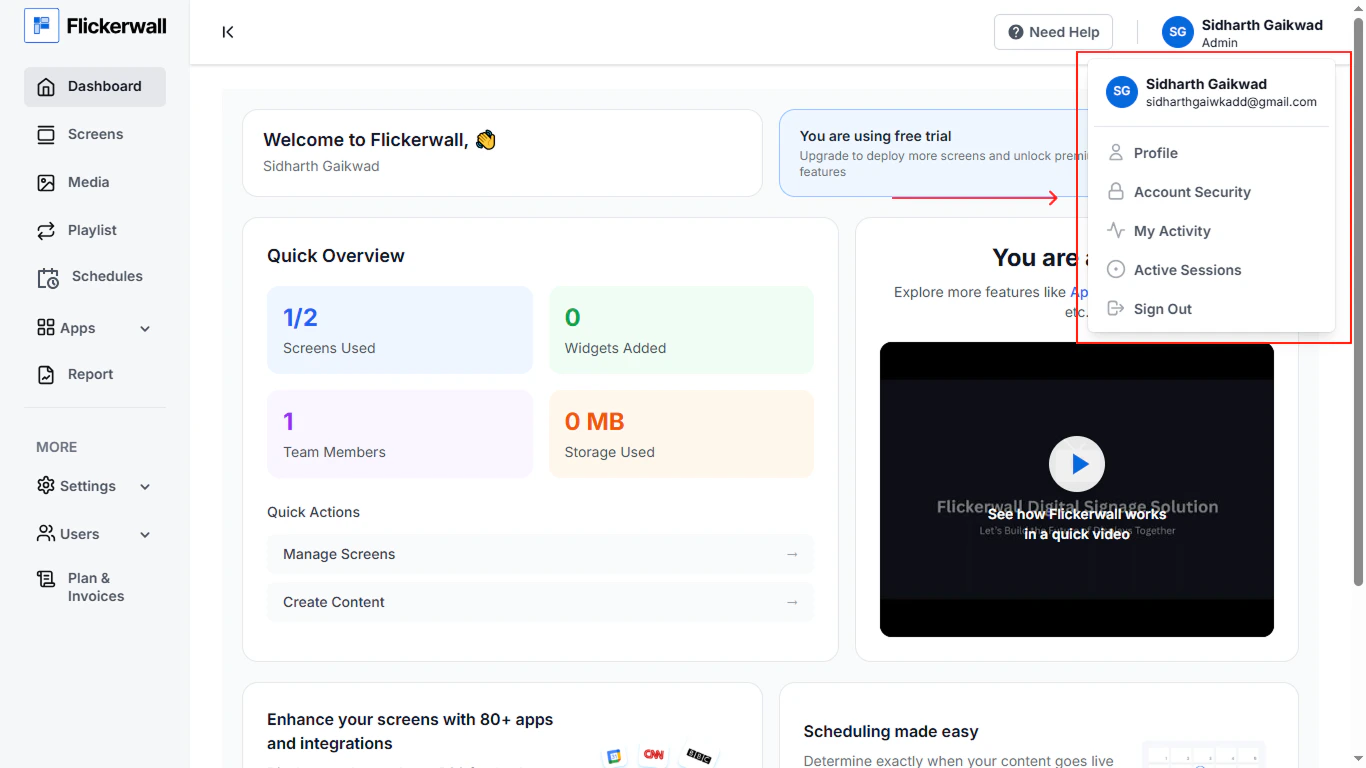
> Let's have a quick Overview of the User Profile In the User Profile you'll see four components 1) Profile 2) Account Security 3) Active Sessions 4) My Activity
 ## 1) Profile
Here you can see your basic info that appears in public such as your name and email
You can also cange your preferred language from here as well.
## 1) Profile
Here you can see your basic info that appears in public such as your name and email
You can also cange your preferred language from here as well.
.png?fit=max&auto=format&n=jCEJETbggfC-OjJz&q=85&s=d0de3f89682957e1bb7566e96ca93f48) ## 2) Account Security
Here you can se settings related to your Account Security .
Changing Password or Enabling the **Two-Factor Authentication**
## 2) Account Security
Here you can se settings related to your Account Security .
Changing Password or Enabling the **Two-Factor Authentication**
.png?fit=max&auto=format&n=QyHLB_DuGuIs1P_v&q=85&s=15fbd0c818bb7ce3e39de71108ce7d6d) ## 3) Active Sessions
Here you can see all devices you have signed-In on so you have a better control on your management
you can also Sign-out uunwanted devices from here .
## 3) Active Sessions
Here you can see all devices you have signed-In on so you have a better control on your management
you can also Sign-out uunwanted devices from here .
.png?fit=max&auto=format&n=QyHLB_DuGuIs1P_v&q=85&s=14e83053918dba5f780a62dcb11c7710) ## 4) My Activity
Here you can see all the recent activity related to the account such as
New Loop Created , New Composition Created , New Member Added
You can also filter the acivity in the bar on the right side so our system will show you info related to the filtered search
## 4) My Activity
Here you can see all the recent activity related to the account such as
New Loop Created , New Composition Created , New Member Added
You can also filter the acivity in the bar on the right side so our system will show you info related to the filtered search
.png?fit=max&auto=format&n=QyHLB_DuGuIs1P_v&q=85&s=ec36a1455d9af7e1f8bec94e19e8138d)