> ## Documentation Index
> Fetch the complete documentation index at: https://docs.flickerwall.com/llms.txt
> Use this file to discover all available pages before exploring further.

# How to get started With Flickerwall

let's get started with how you can get started with flickerwall in the easiest steps

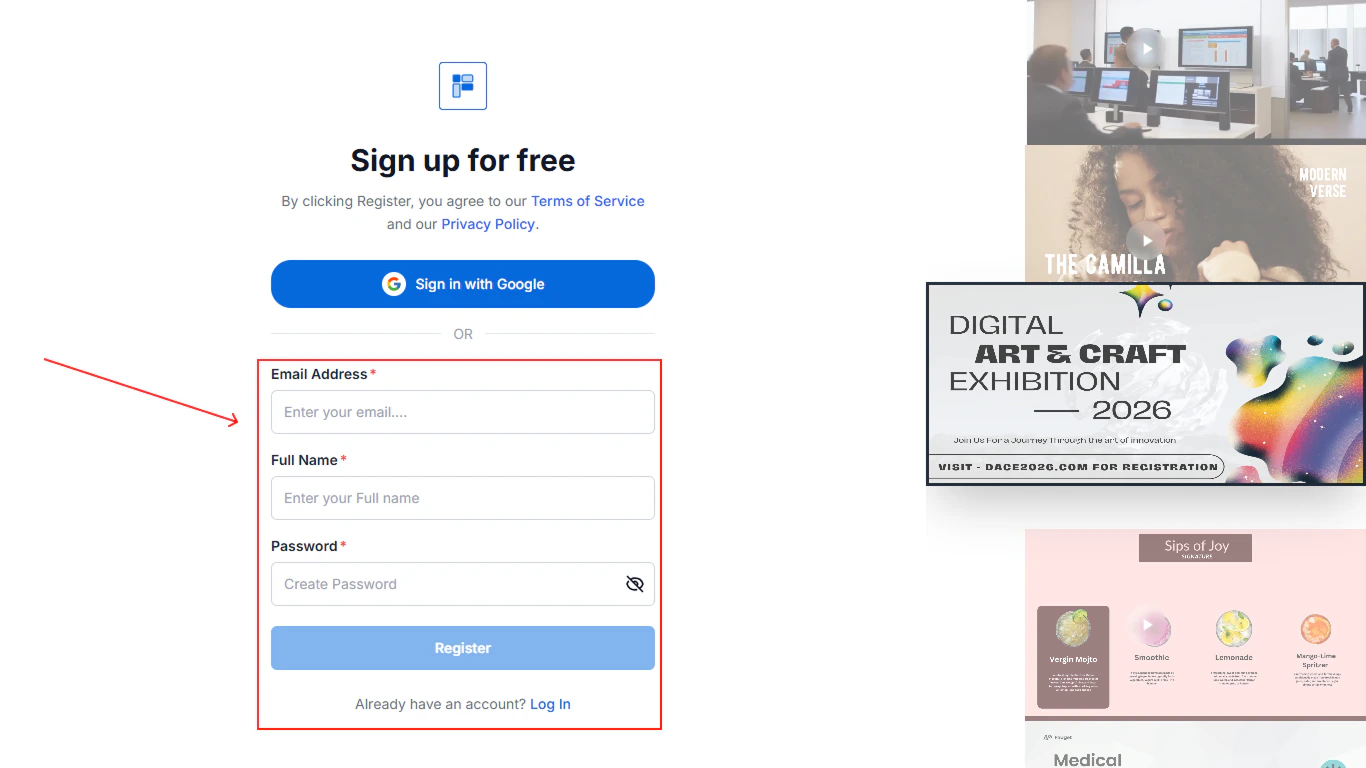
Step 1 \
Go to [https://app.flickerwall.com/sign-up](https://app.flickerwall.com/sign-up)  and click on register

<Frame>
  <img src="https://mintcdn.com/flickerwall-796545b9/QyHLB_DuGuIs1P_v/images/Group-7-(1)-1.png?fit=max&auto=format&n=QyHLB_DuGuIs1P_v&q=85&s=9507adeb1d0d59e2da43d82dca11a57a" alt="Group 7 (1) 1" width="1366" height="768" data-path="images/Group-7-(1)-1.png" />

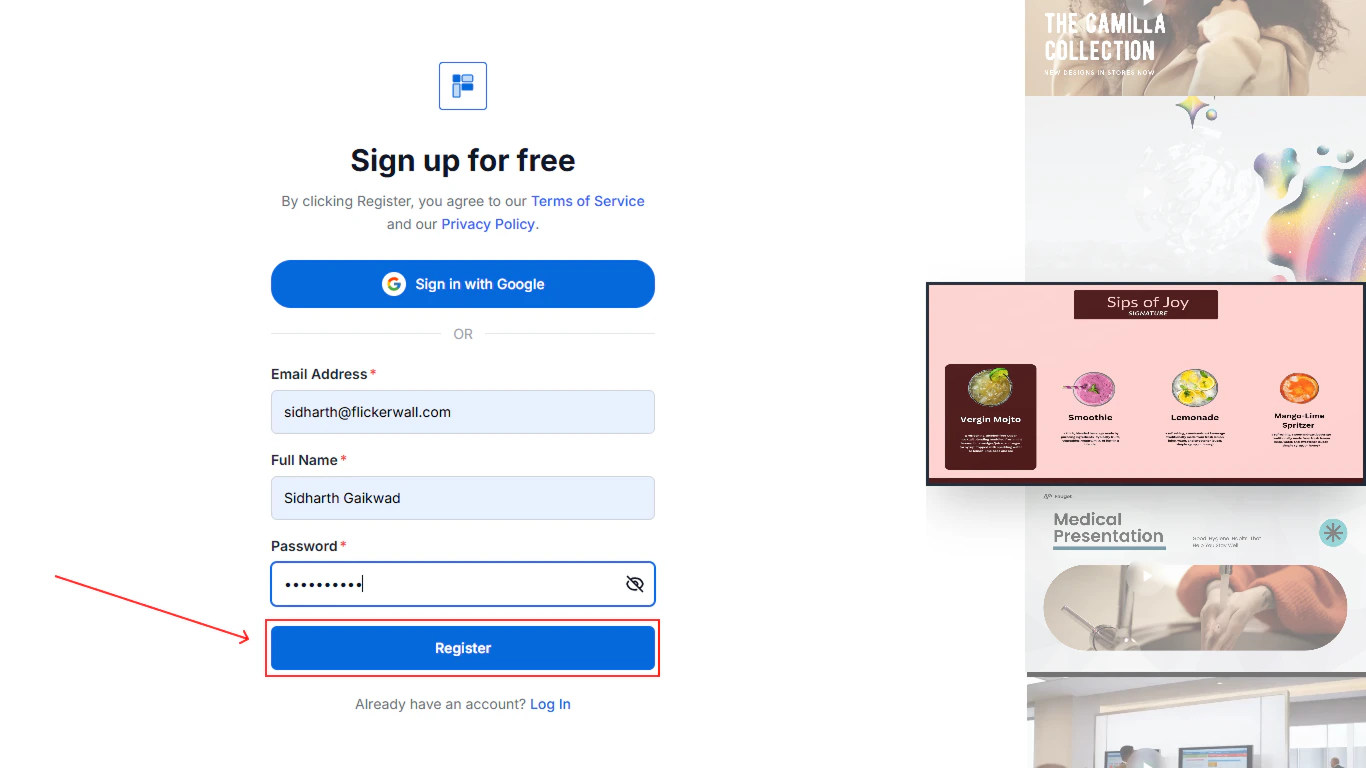
  * Step 2 \
    Enter the required details

      <img src="https://mintcdn.com/flickerwall-796545b9/QyHLB_DuGuIs1P_v/images/Group-8-1.png?fit=max&auto=format&n=QyHLB_DuGuIs1P_v&q=85&s=9b89355b284f9918956ef4298f340976" alt="Group 8 1" width="1366" height="768" data-path="images/Group-8-1.png" />
</Frame>

Step 3 \
Click on Register

<Frame>
  <img src="https://mintcdn.com/flickerwall-796545b9/QyHLB_DuGuIs1P_v/images/Group-9.png?fit=max&auto=format&n=QyHLB_DuGuIs1P_v&q=85&s=05afc48dc5de01ffd328be69f0bbf434" alt="Group 9" width="1366" height="768" data-path="images/Group-9.png" />
</Frame>

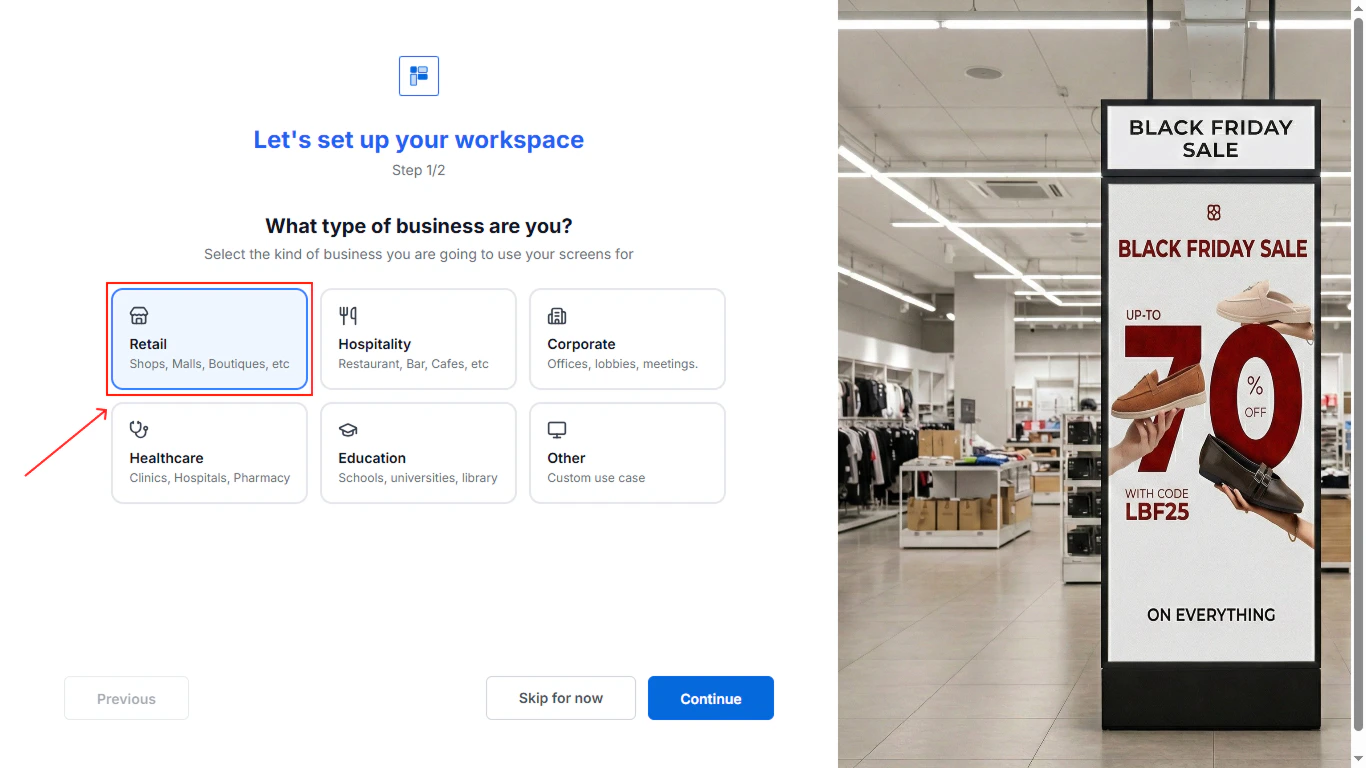
step 4 \
Select your industry for us to suggest better canvas and more personalized options for you
<Frame>
  <img src="https://mintcdn.com/flickerwall-796545b9/QyHLB_DuGuIs1P_v/images/Group-10.png?fit=max&auto=format&n=QyHLB_DuGuIs1P_v&q=85&s=5458f135da43bd39648b973fb2cccdd8" alt="Group 10" width="1366" height="768" data-path="images/Group-10.png" />
</Frame>

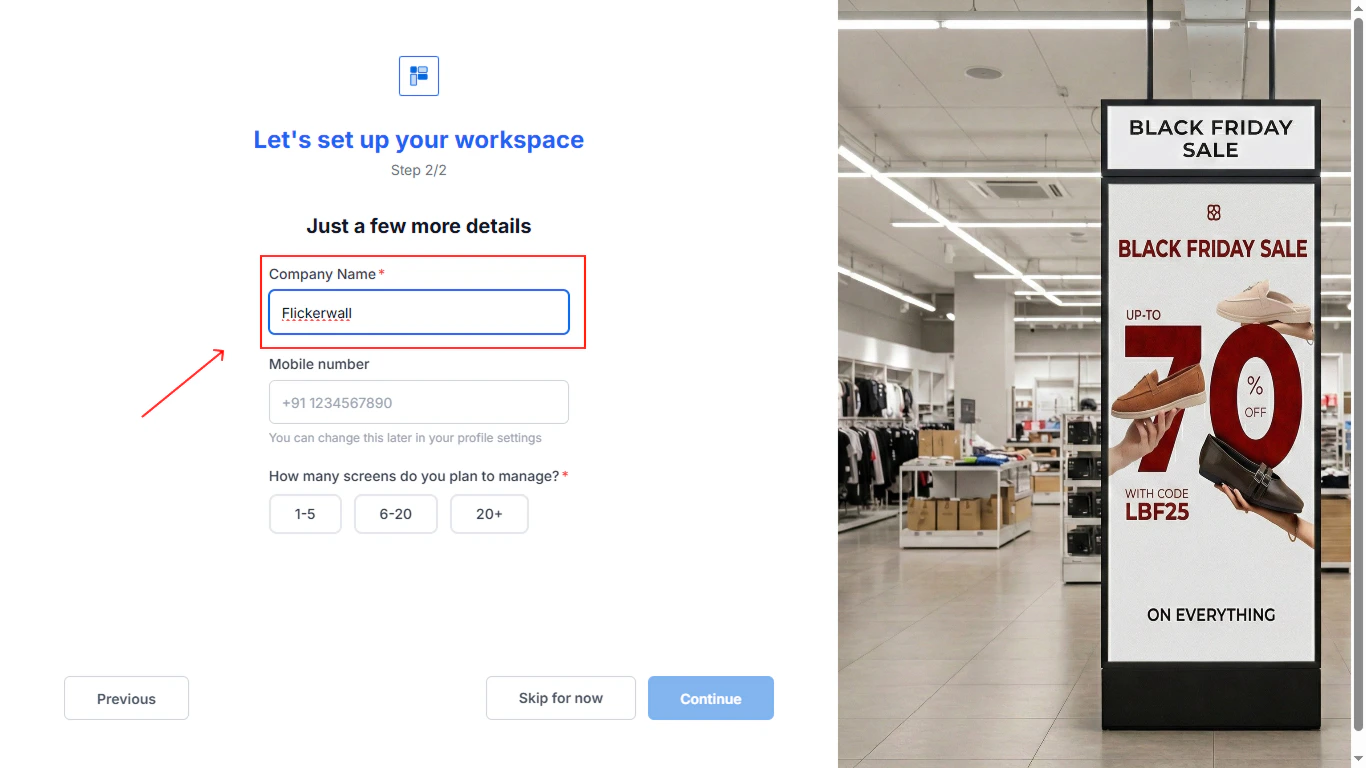
Step 5\
Fill in all the company details
<Frame>
  <img src="https://mintcdn.com/flickerwall-796545b9/QyHLB_DuGuIs1P_v/images/Group-11.png?fit=max&auto=format&n=QyHLB_DuGuIs1P_v&q=85&s=162db021712222428f34eeb309449ac6" alt="Group 11" width="1366" height="768" data-path="images/Group-11.png" />
</Frame>

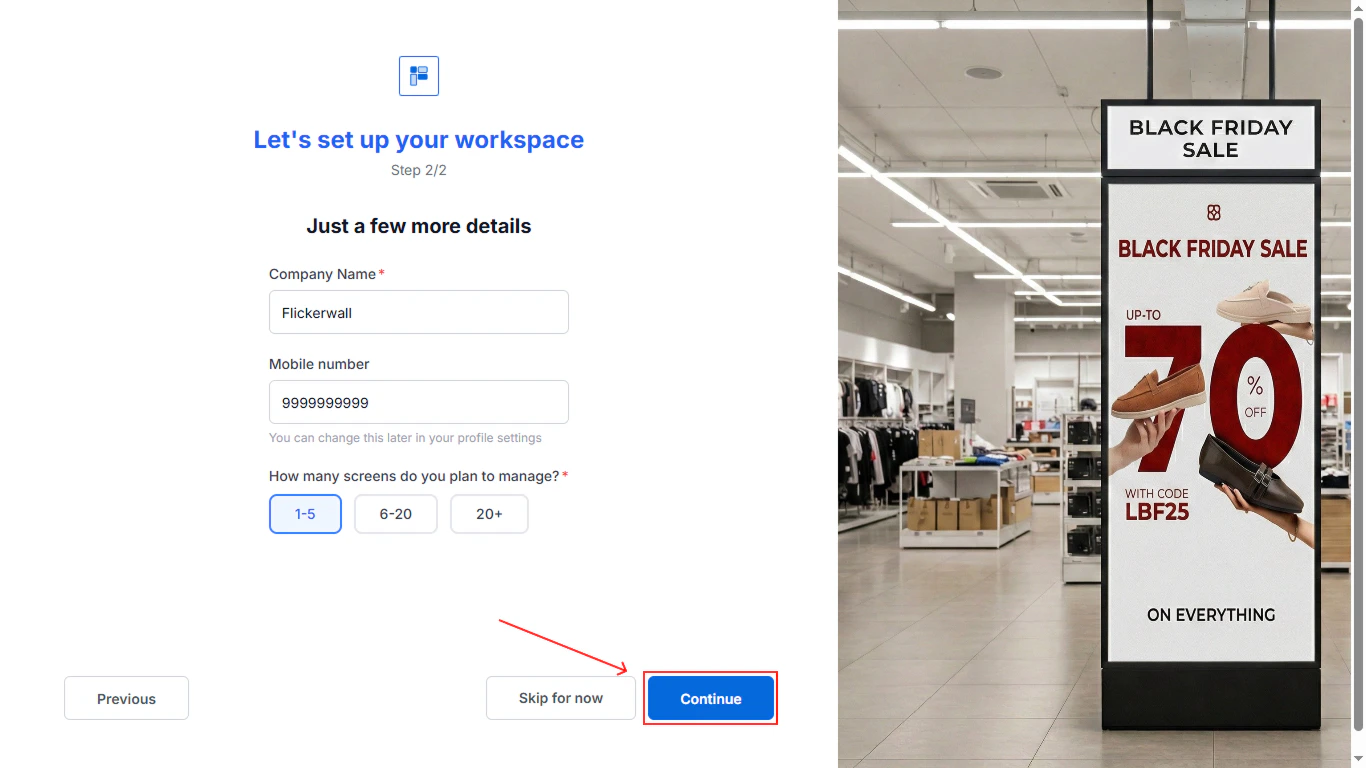
Step 6\
Click on Continue for the next step
<Frame>
  <img src="https://mintcdn.com/flickerwall-796545b9/QyHLB_DuGuIs1P_v/images/Group-14.png?fit=max&auto=format&n=QyHLB_DuGuIs1P_v&q=85&s=1f3121e17798a4fa585599d7c12081f1" alt="Group 14" width="1366" height="768" data-path="images/Group-14.png" />
</Frame>

Step 7 \
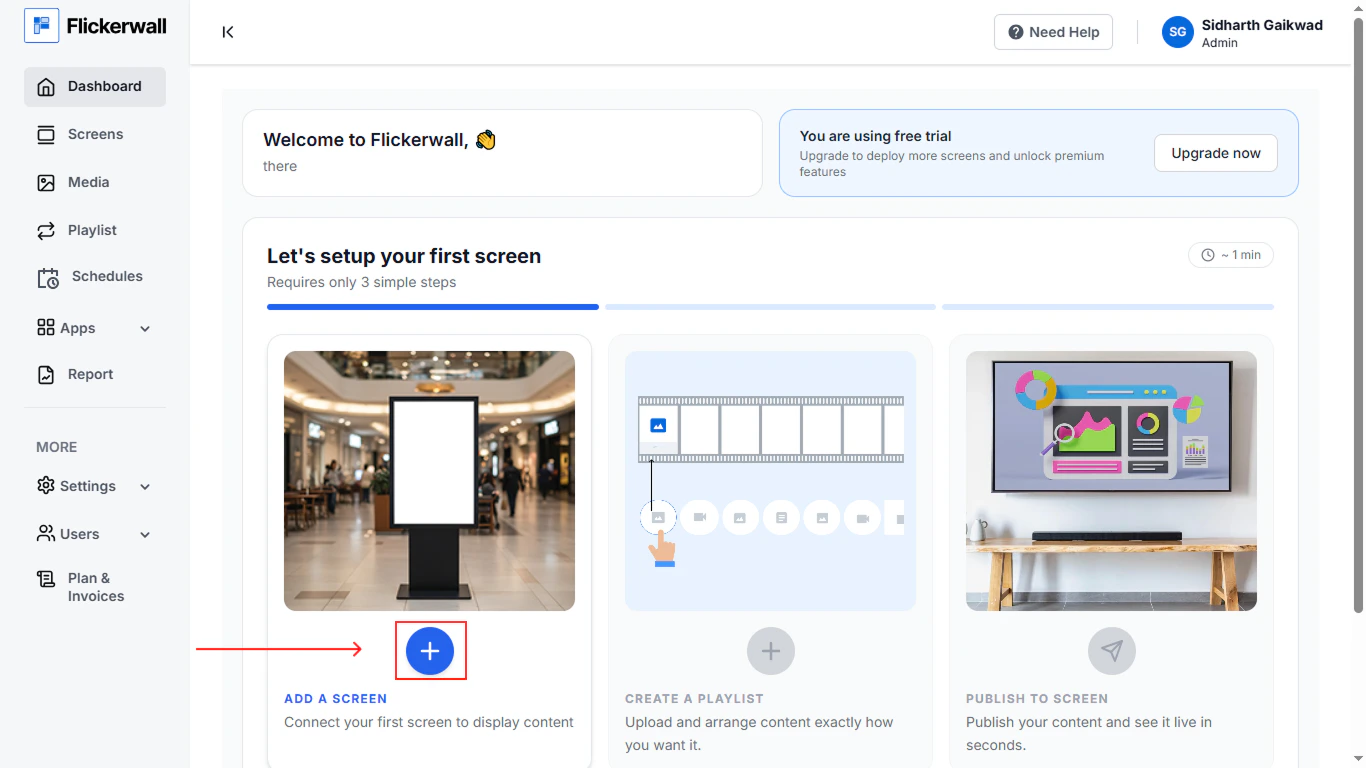
Complete the on-boarding\
\
Click on the plus icon to add screen
<Frame>
  <img src="https://mintcdn.com/flickerwall-796545b9/QyHLB_DuGuIs1P_v/images/Group-15.png?fit=max&auto=format&n=QyHLB_DuGuIs1P_v&q=85&s=b4364b18ecb2ee85afad296db07efb61" alt="Group 15" width="1366" height="768" data-path="images/Group-15.png" />
</Frame>

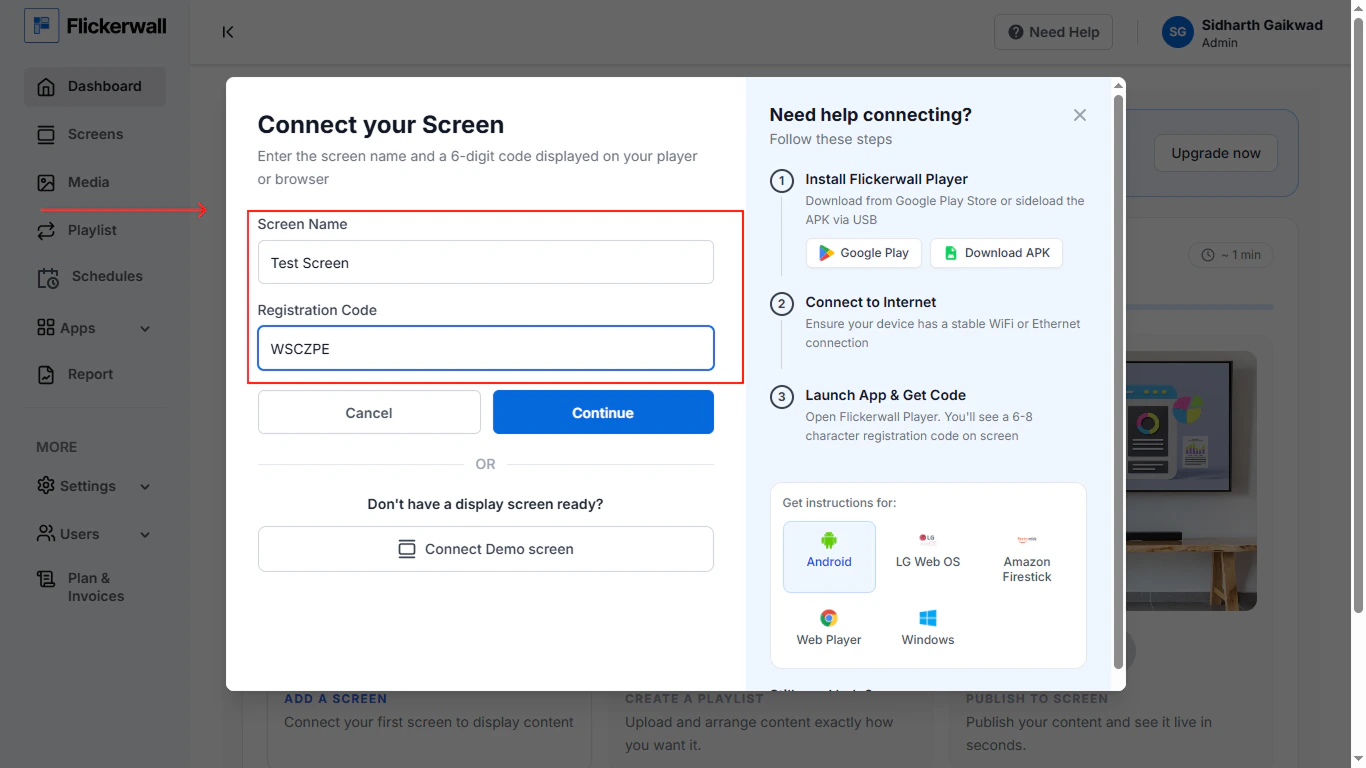
Step 8 \
Add your screen name and Registration Code
<Frame>
  <img src="https://mintcdn.com/flickerwall-796545b9/QyHLB_DuGuIs1P_v/images/Group-16.png?fit=max&auto=format&n=QyHLB_DuGuIs1P_v&q=85&s=a0e3f6074647d129e7134a8a8254d3ba" alt="Group 16" width="1366" height="768" data-path="images/Group-16.png" />
</Frame>

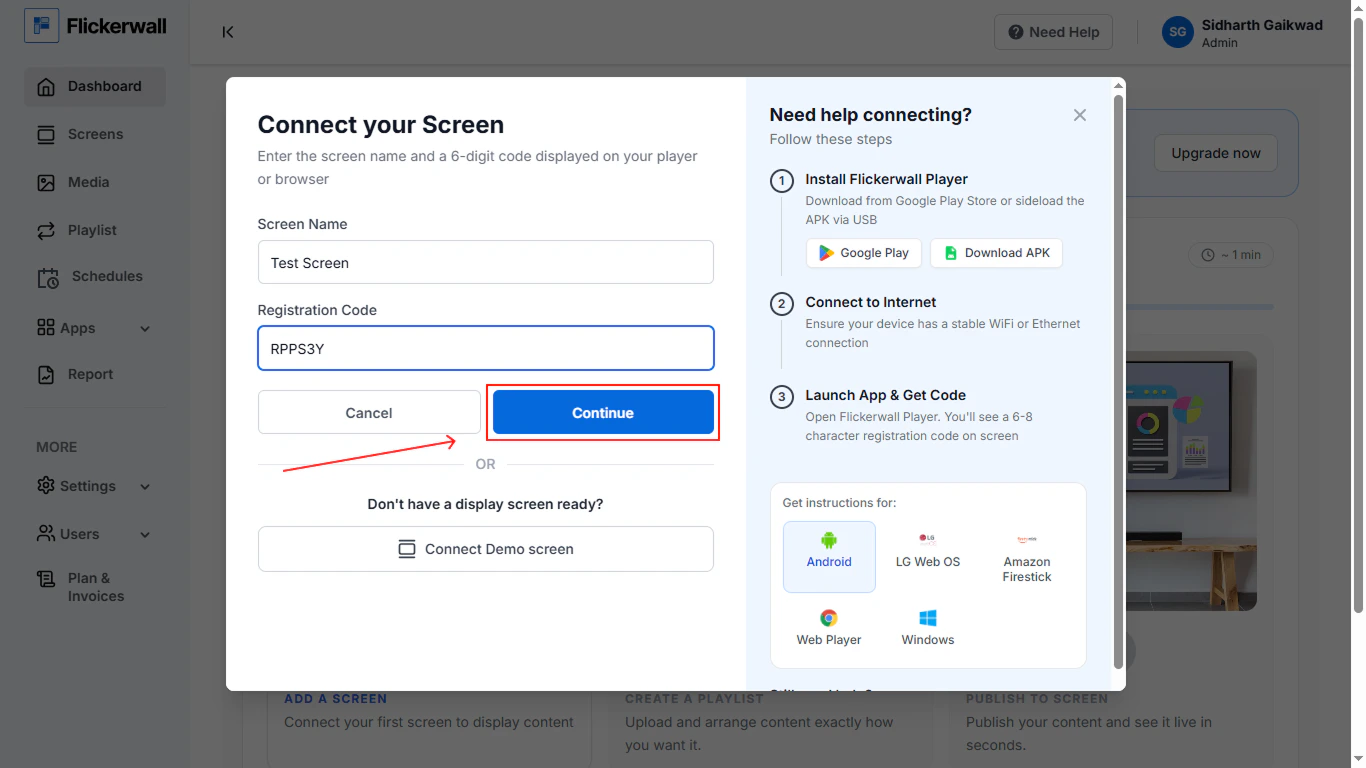
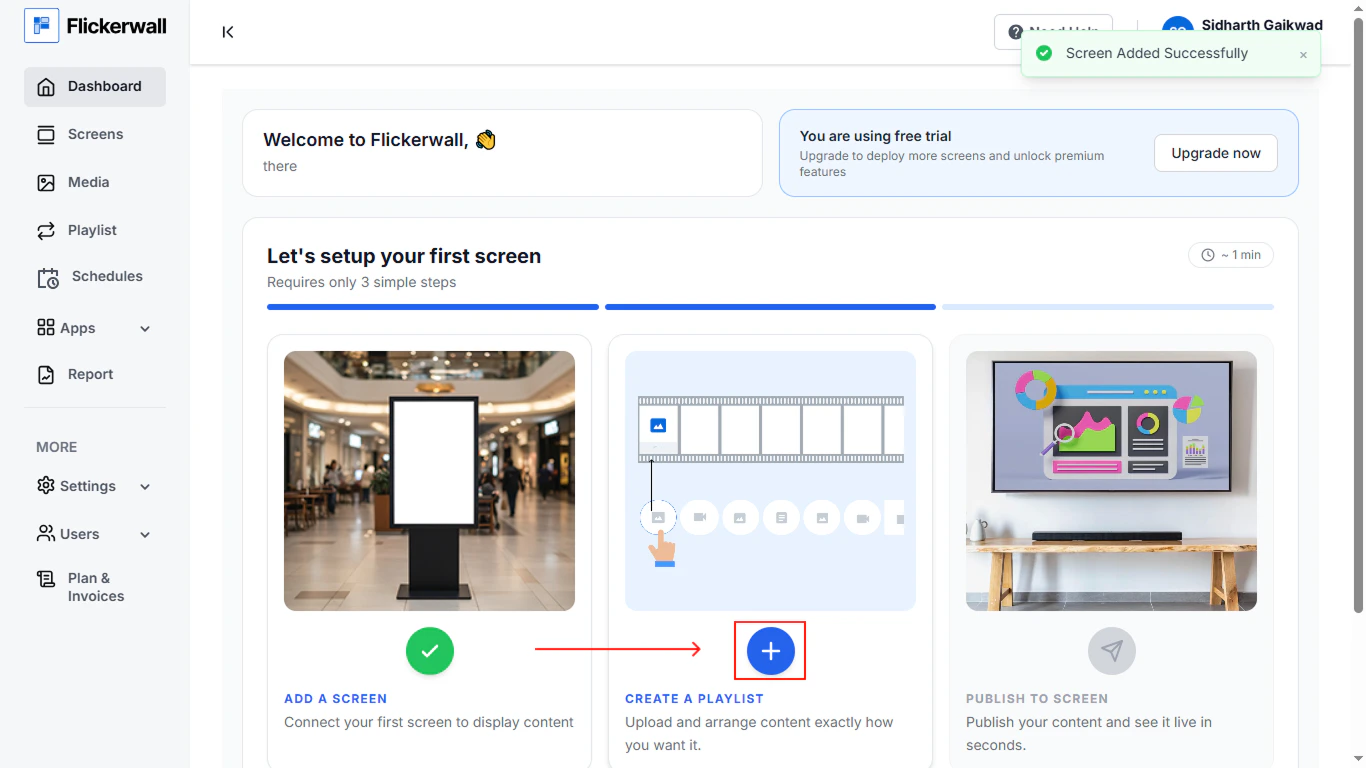
Step 9 \
Click Continue for next step

<Frame>
  <img src="https://mintcdn.com/flickerwall-796545b9/QyHLB_DuGuIs1P_v/images/Group-17.png?fit=max&auto=format&n=QyHLB_DuGuIs1P_v&q=85&s=c454a2f133f7bbd77de2041f2c3168fd" alt="Group 17" width="1366" height="768" data-path="images/Group-17.png" />
</Frame>

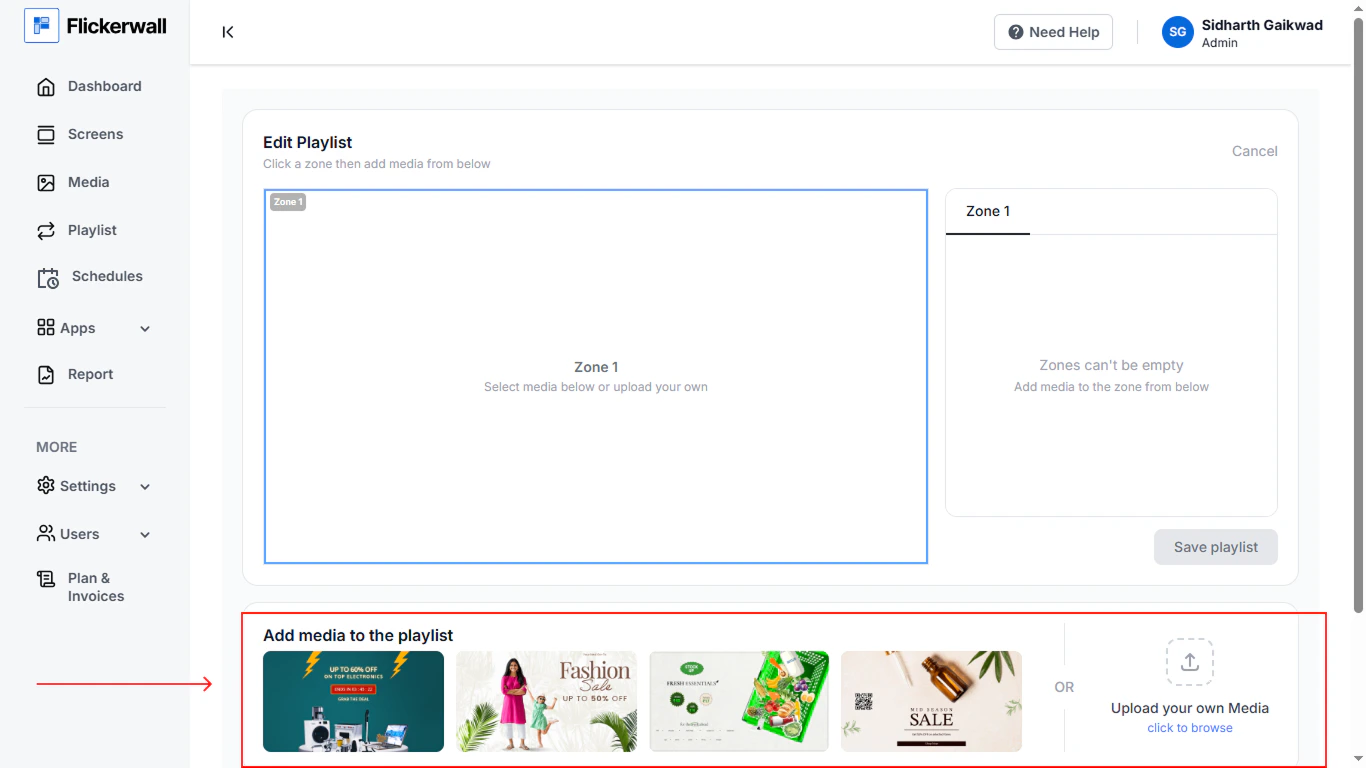
Step 10 \
Create a Playlist to continue \
add media or select a template thast already provided for you industry
<Frame>
  <img src="https://mintcdn.com/flickerwall-796545b9/QyHLB_DuGuIs1P_v/images/Group-18.png?fit=max&auto=format&n=QyHLB_DuGuIs1P_v&q=85&s=6cd86da58d807ec49be371387e9ecc63" alt="Group 18" width="1366" height="768" data-path="images/Group-18.png" />
</Frame>

<Frame>
  <img src="https://mintcdn.com/flickerwall-796545b9/QyHLB_DuGuIs1P_v/images/Group-19.png?fit=max&auto=format&n=QyHLB_DuGuIs1P_v&q=85&s=cda4966eaaba49d13842c07acc3bf70d" alt="Group 19" width="1366" height="768" data-path="images/Group-19.png" />
</Frame>

\
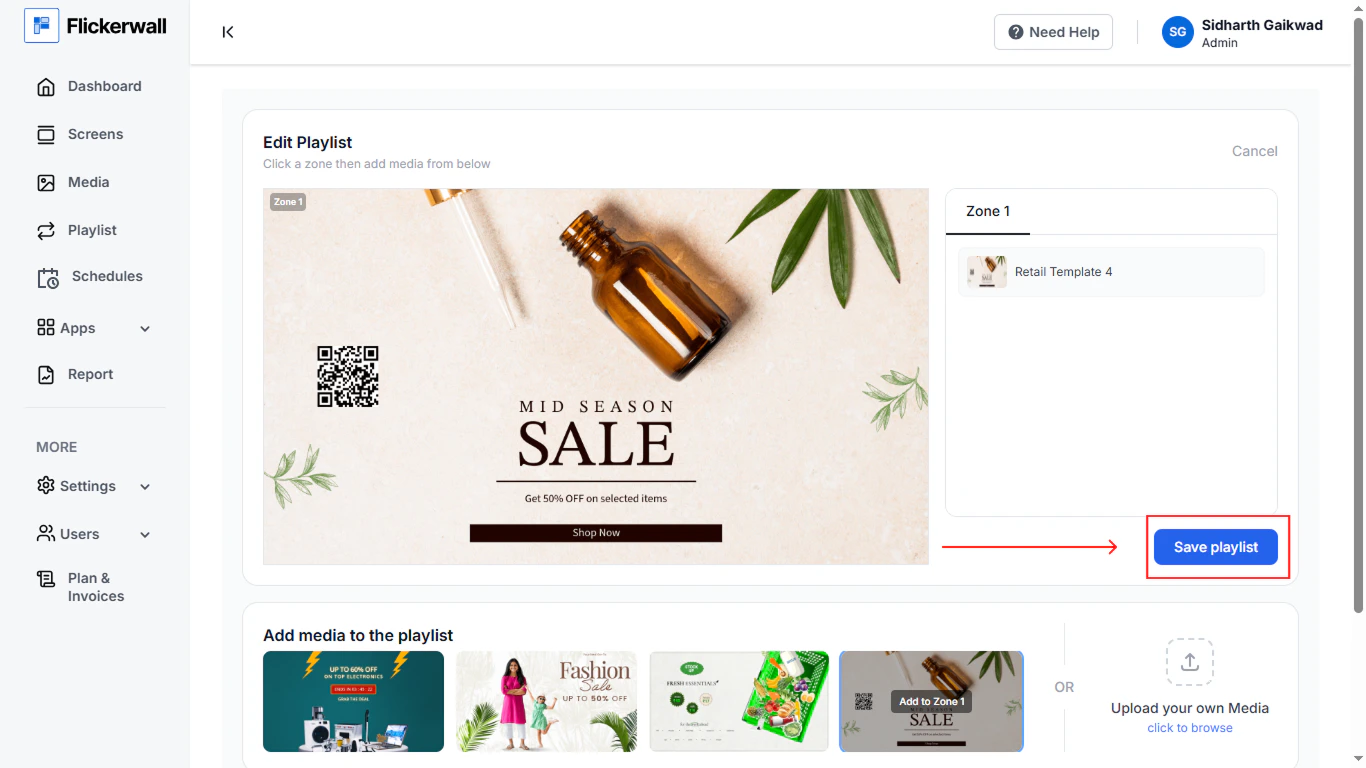
Step 11 \
Click on Save Playlist \\

<Frame>
  <img src="https://mintcdn.com/flickerwall-796545b9/QyHLB_DuGuIs1P_v/images/Group-20.png?fit=max&auto=format&n=QyHLB_DuGuIs1P_v&q=85&s=634ce1bdb9761a5760cb63da10810c76" alt="Group 20" width="1366" height="768" data-path="images/Group-20.png" />
</Frame>

\
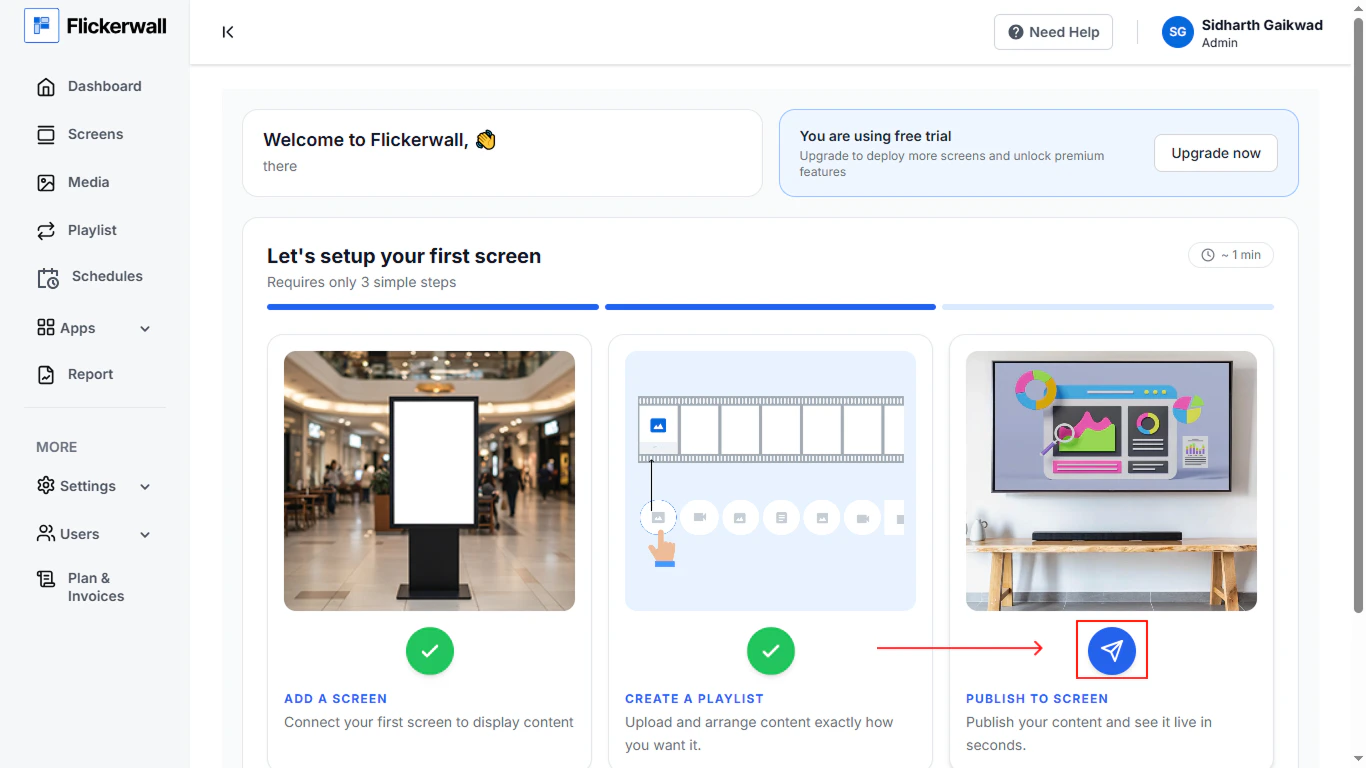
Step 12 \
Complete the last step \
Publish the content to screen
<Frame>
  <img src="https://mintcdn.com/flickerwall-796545b9/QyHLB_DuGuIs1P_v/images/Group-22.png?fit=max&auto=format&n=QyHLB_DuGuIs1P_v&q=85&s=d5aa20aefa06a3fd7103ef6eac2da537" alt="Group 22" width="1366" height="768" data-path="images/Group-22.png" />
</Frame>

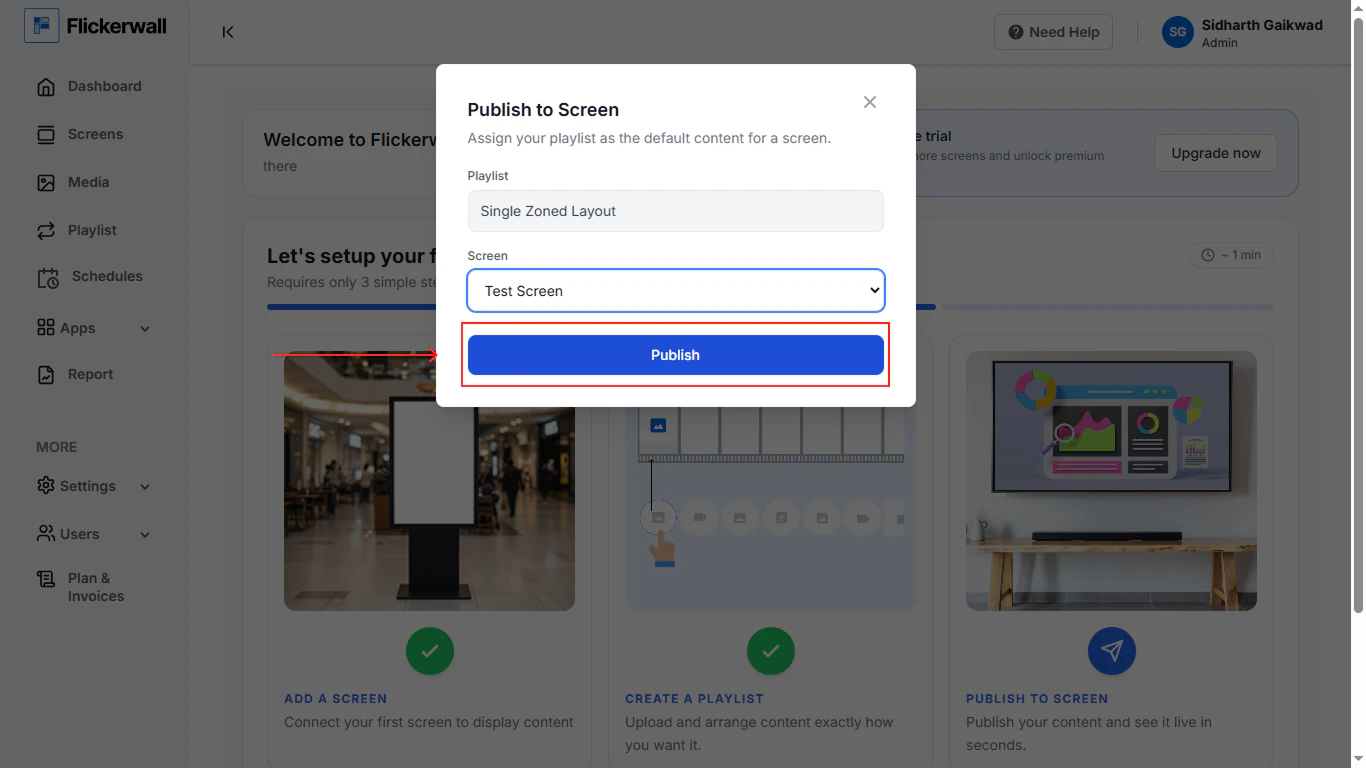
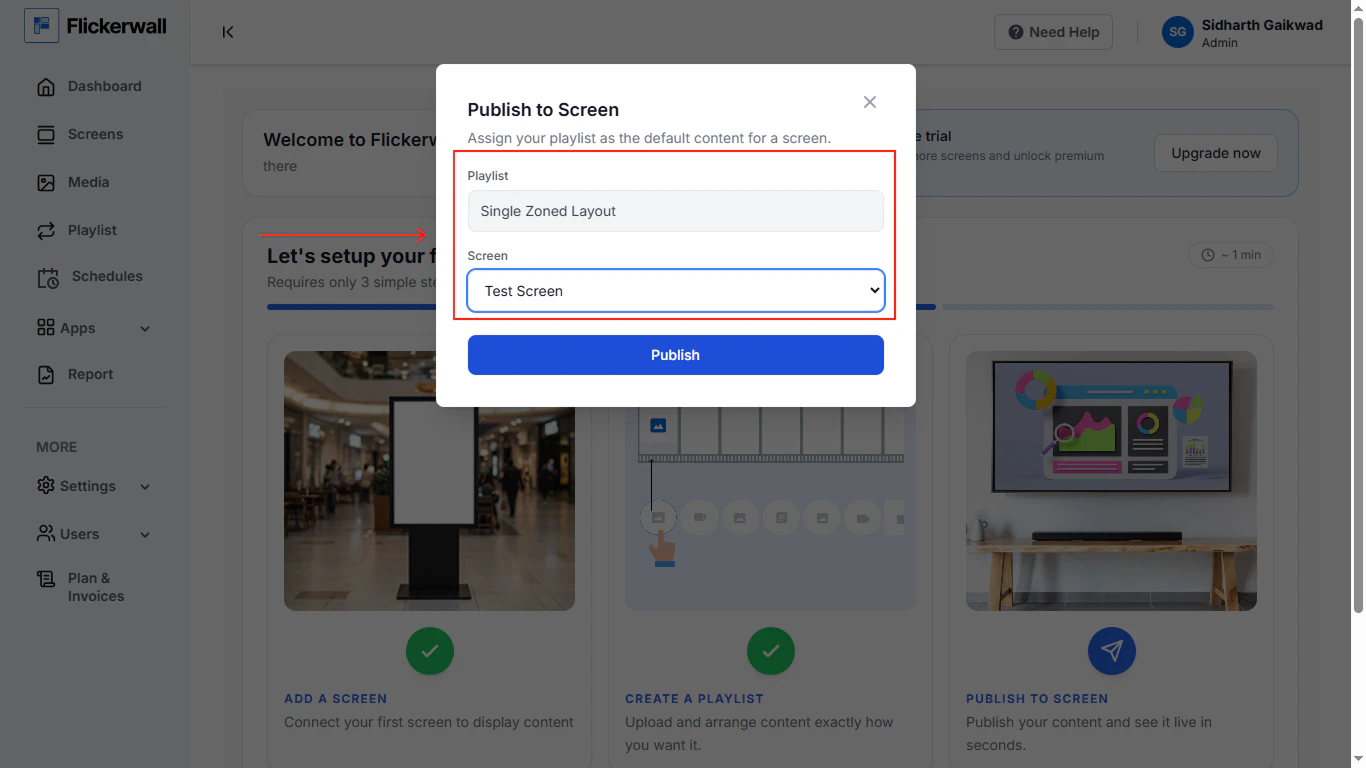
Step 13 \
Select the zoan type and screen and publish the content
<Frame>
  <img src="https://mintcdn.com/flickerwall-796545b9/QyHLB_DuGuIs1P_v/images/Group-23-1.png?fit=max&auto=format&n=QyHLB_DuGuIs1P_v&q=85&s=d916777d5c27b9b20fdaa512d1e69a4a" alt="Group 23 1" width="1366" height="768" data-path="images/Group-23-1.png" />
</Frame>

<Frame>
  <img src="https://mintcdn.com/flickerwall-796545b9/QyHLB_DuGuIs1P_v/images/Group-24.png?fit=max&auto=format&n=QyHLB_DuGuIs1P_v&q=85&s=07b8df1204ec629917dee55c567260b3" alt="Group 24" width="1366" height="768" data-path="images/Group-24.png" />
</Frame>